
- The Short Answer
- What Is GMS (Google Mobile Services)?
- When You Need SUNMI GMS on Your Android POS
- You Will Install Apps From the Google Play Store
- Your App Uses Firebase Cloud Messaging (FCM)
- Your App Uses Google Maps or Google Location Services
- Your App Uses Google Pay or Google Wallet SDK
- Your MDM Uses Android Enterprise (Work Profile or Fully Managed Device)
- You Want Security Certifications Tied to Play Integrity
- When You Do Not Need SUNMI GMS on Your Android POS
- What Happens If You Order the Wrong Version?
- SUNMI GMS and Payment Terminal Certification
- SUNMI GMS in Canada vs United States
- How Rosper Helps You Get the Right SUNMI GMS Configuration
- FAQ
- Ready to Specify GMS Correctly on Your Next SUNMI Order?
SUNMI GMS configuration on an Android POS is one of the most common questions we get from US and Canadian buyers placing their first SUNMI order through Rosper. Do I need GMS on my SUNMI Android POS? It is also one of the most misunderstood decisions in the whole procurement process. Picking the wrong SUNMI GMS configuration for your deployment either locks out apps you need, breaks software updates, or forces an expensive reflash later.
This 2026 buyer’s guide answers the SUNMI GMS question in plain language for US and Canadian operators: what SUNMI GMS actually is, when you need it on a SUNMI Android POS, when you do not, what happens if you order the wrong version, and how to make sure the SUNMI device you buy through Rosper Technology ships with the right configuration for your market and use case.
The Short Answer
If your SUNMI POS deployment is in the United States or Canada, and you plan to install any app from the Google Play Store (including most modern restaurant POS apps, payment SDKs, delivery integrations, loyalty apps, and MDM agents), yes, you need GMS on your SUNMI Android POS.
If your deployment is entirely self-contained (a single custom APK delivered by your software vendor, no Google Play, no Google services, no Maps, no Firebase Cloud Messaging), you do not need GMS, and a non-GMS SUNMI device will often run more predictably and with fewer background processes.
The default that solves the most North American buyer scenarios is SUNMI GMS version for US and Canada deployments, which ships with Google Mobile Services enabled and Google Play installed out of the box.
What Is GMS (Google Mobile Services)?
GMS, or Google Mobile Services, is Google’s proprietary layer of apps and APIs that sit on top of stock Android. Although Android itself is open source (AOSP), the full set of Google services (Google Play Store, Google Play Services, Maps, Firebase Cloud Messaging, Google Accounts, SafetyNet/Play Integrity, etc.) is licensed separately and must be explicitly bundled onto the device by the manufacturer.
There are two kinds of Android POS devices in the SUNMI lineup:
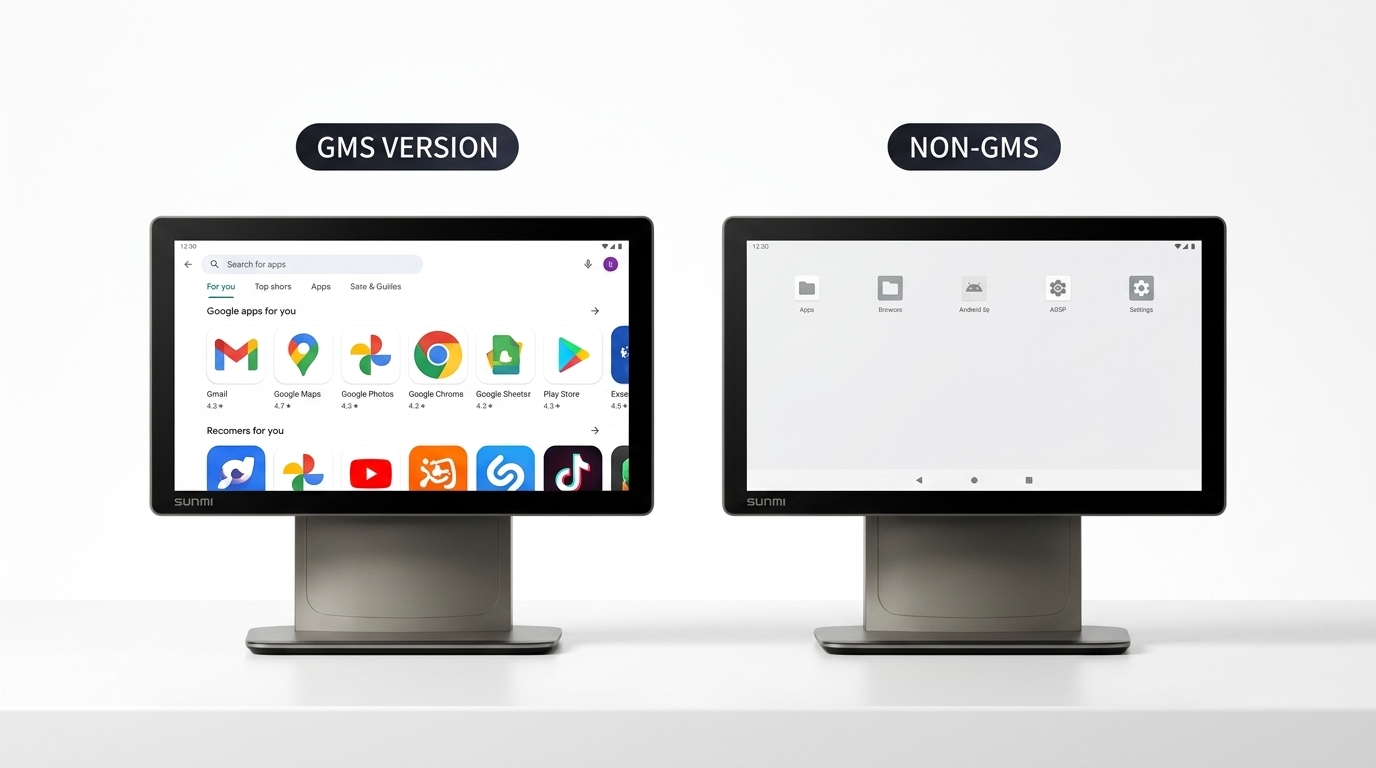
- GMS version devices ship with the full Google Mobile Services stack enabled. Google Play is available, Google accounts can be signed in, and any app that depends on Google Play Services works out of the box.
- Non-GMS (AOSP-only) devices ship without GMS. The device runs Android, but the Google Play Store is absent and apps that depend on Google Play Services either fail to install or fail at runtime when they call Google APIs.
Most of SUNMI’s current-generation devices (D3 Pro, T3 Pro, V3 series, L2s Pro, P3 series) are available in both GMS and non-GMS configurations. The distinction is made at the factory and tied to the device’s serial number and firmware.
For the official Google documentation of what GMS includes, see the Google Mobile Services overview.
When You Need SUNMI GMS on Your Android POS
For US and Canadian deployments specifically, GMS is effectively required in any of the following scenarios.
You Will Install Apps From the Google Play Store
This is the most common case. If your POS software vendor, payment processor, MDM agent, or any other app is distributed through Google Play in the US or Canada, you need GMS. Examples:
- Toast, Clover, Square, Lightspeed, and most cloud POS apps available on Google Play
- Payment SDKs and processor apps distributed through Google Play
- MDM/EMM agents like SOTI MobiControl, 42Gears SureMDM, Scalefusion, and others typically distributed through Google Play
- Delivery platform apps (DoorDash, Uber Eats, Grubhub merchant apps)
- Loyalty and customer engagement apps
Without GMS, these apps cannot be installed directly and, in most cases, cannot be sideloaded successfully either because they depend on Google Play Services at runtime.
Your App Uses Firebase Cloud Messaging (FCM)
Most modern POS, order notification, and kitchen display apps use Firebase Cloud Messaging for real-time push notifications. FCM is part of Google Play Services and does not work on non-GMS devices. A non-GMS device will silently fail to receive push notifications and your staff will not see new orders or alerts.
Your App Uses Google Maps or Google Location Services
Map-based delivery, routing, or pickup flows built on Google Maps SDK require GMS. A non-GMS device will either crash on map-rendering screens or fall back to degraded functionality.
Your App Uses Google Pay or Google Wallet SDK
For SUNMI payment terminals that accept Google Pay NFC transactions, or any app that integrates with Google Wallet SDK, GMS is required.
Your MDM Uses Android Enterprise (Work Profile or Fully Managed Device)
If you plan to enroll your SUNMI fleet through Android Enterprise (the modern standard for managed Android deployments in the US and Canada), GMS is mandatory. Android Enterprise requires Google Play and Google Play Services. Non-GMS devices cannot enroll in Android Enterprise and have to rely on SUNMI’s own Partner Portal MDM or a vendor-specific non-Google management layer.
You Want Security Certifications Tied to Play Integrity
Apps that use Play Integrity (successor to SafetyNet) to verify device integrity require GMS. Many payment-processor and financial-services apps check Play Integrity before allowing transactions.
When You Do Not Need SUNMI GMS on Your Android POS
Non-GMS (AOSP-only) SUNMI devices are the right choice in several specific scenarios.
Your Software Is a Single Custom APK From Your ISV
If your software vendor delivers a single self-contained APK that does not depend on Google Play Services (no FCM, no Maps, no Google accounts), non-GMS is a cleaner environment. The device has fewer background processes, lower memory usage, and fewer Google-initiated network connections.
You Need Device Lockdown and Kiosk Mode Without Google Interference
For locked-down kiosk or single-app deployments where you specifically do not want Google sign-in prompts, Google Play updates, or any Google background activity, non-GMS simplifies the lockdown.
You Are Deploying in a Region Where GMS Is Not Available
This is typically not a US or Canada concern. Non-GMS is the default in regions where Google services are restricted (mainland China, for example). But a US or Canadian buyer can ignore this case.
You Are Running an On-Prem or Air-Gapped Kiosk
Self-service kiosks in industrial, healthcare, or high-security environments that do not connect to the public internet at all often run better on non-GMS. See the SUNMI Kiosk Mode setup guide for the full lockdown configuration regardless of GMS status.
What Happens If You Order the Wrong Version?
The GMS decision is made at the factory and tied to the firmware the device ships with. Switching between GMS and non-GMS is possible but is a formal reflashing operation, not a settings toggle.
For SUNMI D3 Pro and T3 Pro, the two devices most often shipped to North America in both configurations, SUNMI publishes supported SOPs for switching:
- SUNMI D3 Pro GMS switch SOP (cross-border US and Canada) covers switching an existing D3 Pro between GMS and non-GMS firmware for cross-border deployments.
- SUNMI T3 Pro GMS flashing SOP (ScanSource channel) covers T3 Pro flashing for buyers who purchased through ScanSource and need to land on the correct firmware for US deployments.
A reflash is recoverable but not zero effort:
- It is typically performed through SUNMI’s partner flashing tools, not through a simple app.
- It resets the device to factory state. All apps, data, and configurations are wiped.
- For fleet deployments of 10 or more units, plan a half-day service window per batch.
- Rosper can perform pre-deployment GMS flashing at no charge for customers who order through Rosper and specify the wrong configuration at purchase time, provided the units have not yet been deployed.
The straightforward answer is to specify the correct GMS version at order placement. For US and Canadian deployments, GMS-on is the default that matches most buyer needs.
SUNMI GMS and Payment Terminal Certification
GMS status does not affect PCI PTS certification on SUNMI payment terminals. PCI PTS lives below the Android application layer and is certified against the device’s secure elements and payment kernels. A SUNMI P3 or CPad Pay with PCI PTS 6.x certification is certified regardless of whether the Android user space ships with GMS enabled.
What GMS does affect for payment terminals:
- App distribution. Payment processor apps distributed through Google Play need GMS.
- Play Integrity checks. Some processors require Play Integrity attestation before allowing transactions.
- Google Pay acceptance. Accepting Google Pay at the POS requires GMS.
For a full explanation of what PCI PTS 6.x covers on SUNMI devices and what processor-level certification you still need on top of it, see the PCI PTS 6.x on SUNMI Pay devices explainer.
SUNMI GMS in Canada vs United States
For North American deployments the answer is the same in both countries: if you plan to use Google Play, Firebase, Google Maps, or Android Enterprise, choose GMS. There are no Canada-specific GMS restrictions to plan around. Rosper ships GMS-enabled SUNMI devices directly into all Canadian provinces from US warehouses, with duties and brokerage handled up front.
One Canadian-specific consideration: if your SUNMI POS fleet is split across the US and Canada and you use a single MDM enrollment, Android Enterprise with Google Play Managed gives you identical device behavior in both markets. This is only possible with GMS. Non-GMS mixed fleets are more complex to operate in a cross-border setup.
How Rosper Helps You Get the Right SUNMI GMS Configuration
Rosper is an authorized SUNMI distributor for the US and Canada. On every order, Rosper:
- Confirms the intended GMS configuration at quote stage so the factory ships the correct firmware.
- Maintains US-warehouse stock of the most common GMS-enabled SKUs for faster delivery.
- Provides pre-deployment GMS flashing at no charge for orders that need the opposite configuration, before the units are deployed.
- Handles SUNMI Care Standard 3-year warranty, RMA, and post-deployment support regardless of GMS status.
If you are unsure which GMS version your deployment needs, Rosper’s deployment team will walk through your POS software stack, MDM plan, and regional split and recommend the right configuration on the first quote.
FAQ
Do I need GMS on my SUNMI Android POS in the US and Canada?
For most US and Canadian SUNMI POS deployments the answer is yes, order GMS firmware on the SUNMI D3 Pro, T3 Pro, V3 PLUS, V3 MIX, L2s Pro, or P3 series. GMS is required if you plan to install apps from the Google Play Store, use Firebase Cloud Messaging for live order push, integrate Google Maps for delivery, run Google Pay, enroll devices through Android Enterprise MDM, or use any third-party app that links Google Play Services. Non-GMS (AOSP-only) SUNMI devices fit a narrow case: a single self-contained APK with no Google dependencies and no plan to add ISV apps later. Email [email protected] to confirm GMS firmware on your quote.
What is GMS on a SUNMI Android POS?
GMS stands for Google Mobile Services, Google’s proprietary stack of apps and APIs that sits on top of stock Android: Google Play Store, Google Play Services, Google Maps, Firebase Cloud Messaging, Google Accounts, and Play Integrity. SUNMI builds its POS firmware on AOSP, then optionally adds the GMS layer at the factory before flashing each device. Most current SUNMI POS hardware (D3 Pro, T3 Pro, V3, V3 MIX, V3 PLUS, L2s Pro, and the P3, P3 AIR, P3 Lite payment terminals) is available in both configurations. The choice is set by the firmware that ships with the device, not by a setting you can switch later, which is why Rosper specifies GMS at the time of order.
What happens if I buy a SUNMI POS without GMS and need it later?
Switching a deployed non-GMS SUNMI POS to GMS is possible but requires a formal firmware reflash, not a settings change. SUNMI publishes supported flashing SOPs for the D3 Pro and T3 Pro, and the operation wipes the device to factory state, including any side-loaded apps, MDM enrollment, and local data. For a fleet deployment that means scheduling a service window and re-staging every unit. The cleaner path is to specify GMS at purchase. Rosper pre-flashes GMS firmware at no charge for orders that have not yet shipped, and stages MDM enrollment before the boxes leave the warehouse. Email [email protected] if you have already-deployed non-GMS units that need to switch.
Does GMS affect PCI PTS certification on SUNMI payment terminals?
No. The PCI PTS certification on a SUNMI P3, P3 AIR, P3 Lite, or CPad Pay is issued against the device’s secure element, payment kernel, and tamper-detection hardware, not the Android user space. A PCI PTS 6.x certified SUNMI payment terminal stays certified whether you order it in GMS or non-GMS firmware. GMS does, however, affect app distribution and security attestation. Apps installed through the Google Play Store, Play Integrity attestation calls used by some payment app providers, and Google Pay acceptance all require the GMS layer. If your processor or payment app needs Play Integrity, order the GMS configuration even though PCI PTS itself is GMS-agnostic.
Can I use Android Enterprise on a non-GMS SUNMI POS?
No. Android Enterprise enrollment requires Google Play Services and Google Play Managed, both of which are part of the GMS layer. A non-GMS SUNMI POS cannot enroll in Android Enterprise Work Profile, Fully Managed Device, or zero-touch provisioning. Fleets running non-GMS SUNMI hardware have to manage devices through SUNMI’s own Partner Portal MDM or a vendor-specific non-Google management layer, which works for tightly locked single-APK kiosk deployments but limits the scope of policies and app distribution. If your operations team has standardized on Android Enterprise (Workspace ONE, Microsoft Intune, Esper, SOTI), the SUNMI D3 Pro, T3 Pro, V3 PLUS, or L2s Pro must ship in GMS firmware.
Which SUNMI POS models are available in both GMS and non-GMS versions?
Most current-generation SUNMI POS devices ship in both GMS and non-GMS configurations. That includes the D3 Pro and T3 Pro counter terminals, the V3, V3 MIX, and V3 PLUS desktop and handheld POS line, the L2s Pro rugged handheld, and the P3, P3 AIR, and P3 Lite payment terminals. For US and Canadian deployments through Rosper, GMS is the default firmware on every model because it matches the majority of North American buyer use cases (Google Play, Firebase, Android Enterprise, Lightspeed, Toast, Square). Non-GMS is available on the same SKUs at the same price for kiosk-only or air-gapped deployments. Specify GMS or non-GMS on your Rosper quote to lock in the right firmware.
Is there a price difference between GMS and non-GMS SUNMI POS devices?
Pricing is typically identical between GMS and non-GMS firmware on the same SUNMI POS SKU. GMS is not a feature upgrade with a license fee, it is a configuration match to your software stack and deployment region. The same SUNMI V3 PLUS, D3 Pro, T3 Pro, or P3 ships at the same Rosper price in either configuration, with the firmware flashed at the factory before shipment. Where deployment cost differs is on the back end: GMS unlocks Android Enterprise and zero-touch enrollment, which usually saves staging hours per unit at scale. Email [email protected] for a unit price and a deployment-services quote for either configuration.
My ISV app requires Google Play Services, which SUNMI terminals are GMS-certified?
All current-generation SUNMI POS models are available in GMS-certified firmware: SUNMI D3 Pro, T3 Pro, V3, V3 MIX, V3 PLUS desktop terminals, L2s Pro handheld, and the P3, P3 AIR, P3 Lite payment terminals. The GMS variant ships with Google Play Services, Google Play Store, Firebase Cloud Messaging, Play Integrity, and Google Maps on top of the SUNMI Android OS, which is what most US and Canadian ISV apps assume. Critically, GMS is a factory firmware choice, not a setting you can flip post-deployment, so you need to specify GMS at purchase. Email [email protected] or add “GMS firmware required” to your Rosper quote so the units ship pre-flashed for your ISV.
I’m deploying 50 terminals for a retail chain, should I choose GMS or non-GMS SUNMI devices?
Choose GMS for a 50-terminal retail chain in the US or Canada. At fleet scale you want Android Enterprise zero-touch enrollment, Play Integrity attestation for any payment-related app, Firebase Cloud Messaging for inventory or kitchen-display sync, and the option to add Google-dependent apps later (loyalty, returns, BI dashboards) without a full reflash. The only retail scenario where non-GMS makes sense is a tightly locked single-APK kiosk deployment with no planned expansion. For a 50-unit Brampton-Ontario or US-warehouse-shipped order, Rosper pre-flashes GMS firmware at no charge, stages MDM enrollment, and ships in waves to match your store rollout. Email [email protected] for a 50-unit deployment plan and refresh-budget quote.
Can I run Lightspeed, Toast, or Square on a non-GMS SUNMI terminal?
Mostly no, you should plan on GMS for Lightspeed Retail or Restaurant, Toast, and Square on a SUNMI Android POS. These platforms commonly require Firebase Cloud Messaging for live order push, Google Play distribution, Play Integrity attestation for payment fraud checks, and Google Maps SDK for delivery routing. A non-GMS (AOSP-only) SUNMI device will fail to install or fail to register most of those features. The narrow exceptions are dedicated kiosk APKs distributed by the ISV outside Google Play. To be safe, confirm the GMS requirement with your ISV (Lightspeed, Toast, Square, TouchBistro, Loyverse) and order a SUNMI D3 Pro, T3 Pro, or V3 PLUS in the GMS configuration. Email [email protected] for a quote with the right firmware.
What’s the best SUNMI terminal for a payment-only deployment that doesn’t need Google Play?
The best SUNMI terminal for a payment-only deployment that does not need Google Play is the SUNMI P3 (or P3 AIR and P3 Lite for smaller form factors). Order it in the non-GMS firmware configuration. You get a PCI PTS 6.x certified payment kernel, an integrated thermal printer, NFC, a contactless and chip card slot, and an attack surface free of Play Store, Google Accounts, and Firebase. Non-GMS payment-only SUNMI fleets are simpler to lock down with SUNMI’s Partner Portal MDM, easier to security-audit for PCI compliance, and avoid Google Play update cycles disrupting live transactions. Email [email protected] to spec a non-GMS SUNMI P3 deployment for your US or Canadian payment-only use case.
Ready to Specify GMS Correctly on Your Next SUNMI Order?
The GMS decision shapes every subsequent step in a SUNMI POS deployment: which apps will install, whether Android Enterprise MDM will work, whether your processor will accept the device, and whether future software updates will reach the fleet. For US and Canadian buyers the default answer is GMS-on, and the exceptions are narrow.
Contact the Rosper team for a configuration-specific quote on any SUNMI Android POS model with the right GMS firmware pre-flashed for your US or Canadian deployment.