
Android POS vs iPad POS for Canadian businesses: cost, tax, and compliance compared
If you are setting up a new business in Canada or replacing aging POS hardware, you have two main paths: a purpose-built Android POS terminal or an iPad paired with accessories. Both can run modern POS software, accept payments, and print receipts. But the similarities end there. The total cost, peripheral requirements, payment integration, and compliance readiness differ significantly between the two approaches. This guide compares them head to head so you can make the right call for your Canadian business.
The two approaches at a glance
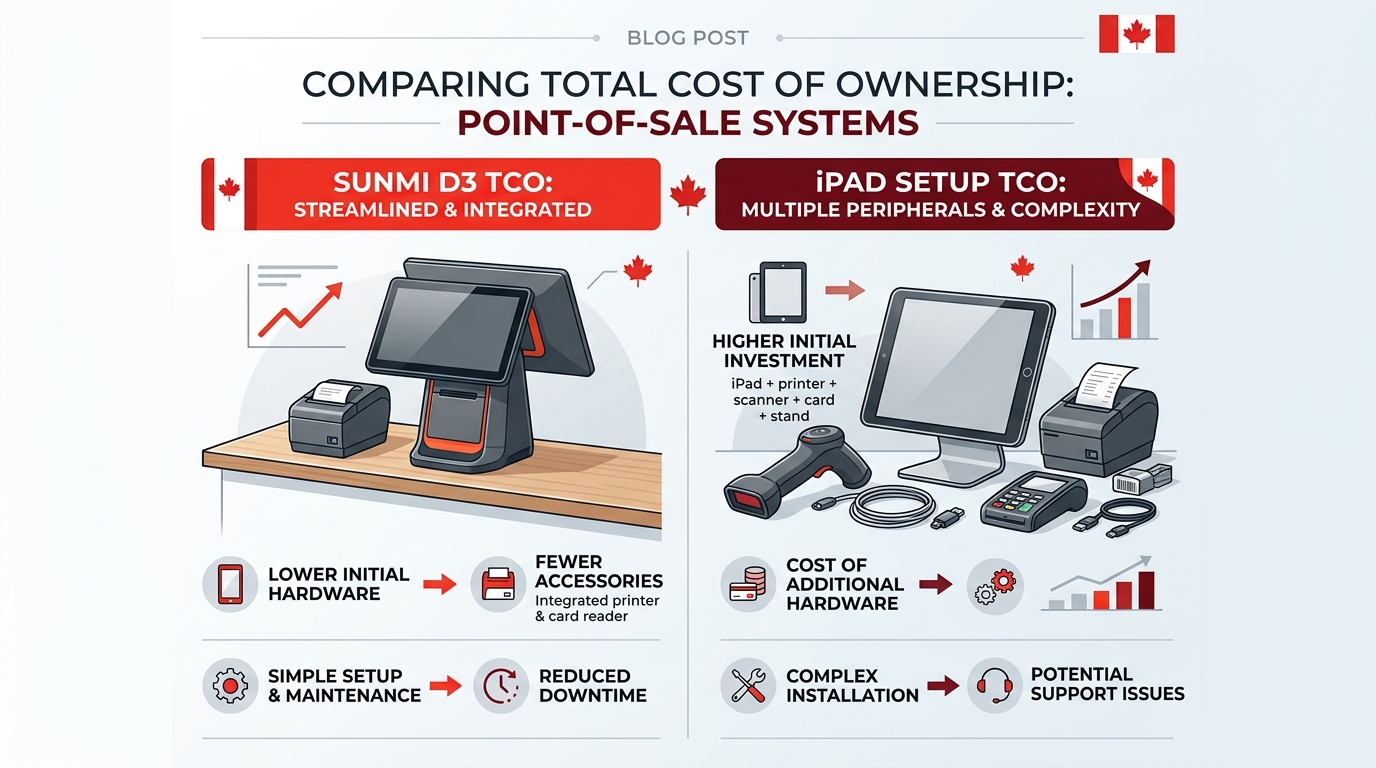
Android POS terminals like SUNMI devices are purpose-built for point of sale. The hardware includes a touchscreen, thermal printer, barcode scanner, and NFC reader in a single unit. They run Android with Google Play or the manufacturer’s app store, giving you access to thousands of POS applications.
iPad POS setups use a consumer tablet as the brain, then add external peripherals: a card reader, receipt printer, cash drawer, barcode scanner, and tablet stand. Popular iPad POS software includes Square, Lightspeed, TouchBistro, and Shopify POS.
Both approaches work. The question is which one costs less, requires less maintenance, and meets Canadian requirements out of the box.
Cost comparison: purchase price vs total cost of ownership
The purchase price of an iPad looks attractive. A base iPad starts around CAD $450. But a POS-ready iPad setup requires more than just the tablet.
iPad POS total cost breakdown
| Component | Approximate cost (CAD) |
|---|---|
| iPad 10th gen (64 GB) | $450–$550 |
| Tablet stand or enclosure | $100–$300 |
| External card reader (e.g., Square Reader) | $0–$80 |
| Receipt printer (Star Micronics or Epson) | $350–$500 |
| Cash drawer | $80–$150 |
| Barcode scanner | $150–$300 |
| Total hardware | $1,130–$1,880 |
You also pay for the POS software subscription. Square charges 2.65% per tap in Canada. Lightspeed starts at CAD $89/month. TouchBistro starts at CAD $69/month. These costs add up over the life of the hardware.
SUNMI Android POS total cost
A SUNMI terminal bundles most of those peripherals into one device. Take the SUNMI D3 Mini as an example:
| What you get | Included |
|---|---|
| 4.5-inch operator touchscreen | Yes |
| Optional 15.6″ customer display | Add-on |
| 80 mm thermal printer | Yes |
| NFC reader (Interac Flash) | Yes |
| Barcode scanner | Yes |
| Cash drawer | Separate purchase |
| Typical all-in hardware line items | Terminal + customer display + cash drawer |
The all-in-one design eliminates compatibility headaches between separate peripherals. No Bluetooth pairing issues, no driver conflicts, no “which USB port does the printer use” troubleshooting.
The hidden cost: peripheral replacement
iPad POS setups rely on Bluetooth and USB connections between multiple devices. When one peripheral fails, you troubleshoot the connection, then the device, then the compatibility. With an integrated Android terminal, there is one device to diagnose and one vendor to contact.
iPads also have a consumer product lifecycle. Apple publishes iPadOS support windows per model, and POS software vendors sometimes drop support for older iPadOS versions before Apple does. A purpose-built Android POS terminal is designed for commercial duty cycles and longer deployment windows.
Interac Flash and payment processing
Interac Flash contactless debit is how most Canadians pay in person. Any POS solution you choose must support NFC for tap-to-pay.
iPad POS payment flow
iPad POS setups typically use an external card reader. Square Reader, for example, connects via Bluetooth and handles NFC payments. The payment flow is: customer taps the external reader, the reader communicates with iPad via Bluetooth, the iPad sends the transaction to the processor, and the receipt prints on the external printer.
This works, but introduces Bluetooth latency and an additional point of failure. If the Bluetooth connection drops mid-transaction, the payment may fail or require a retry.
Android POS payment flow
SUNMI terminals with built-in NFC handle the tap directly on the device (or on the customer-facing display). The payment flow is: customer taps the terminal, the terminal processes the transaction, and the receipt prints from the built-in printer. Fewer devices, fewer connections, fewer failure points.
Payment processor flexibility
This is where Android POS often has a structural advantage. Several of the most popular iPad POS platforms (Square, Shopify POS, Toast) bundle payments with their own processor. Others (Lightspeed, TouchBistro, Clover Flex on iPad) support multiple processors including Moneris, Global Payments, and Chase.
SUNMI terminals run open Android and are processor-agnostic by default. If your Canadian business uses Moneris, Global Payments, or any other Canadian processor, you can pair SUNMI hardware with POS software that integrates with that processor, so you are not forced into one vendor’s processing rates.
Provincial tax compliance
Canada’s tax system is more complex than a single sales tax. Depending on your province, you deal with GST, HST, PST, QST, or combinations:
| Province | Tax structure | Rate |
|---|---|---|
| Alberta | GST only | 5% |
| British Columbia | GST + PST | 5% + 7% |
| Ontario | HST | 13% |
| Quebec | GST + QST | 5% + 9.975% |
| Saskatchewan | GST + PST | 5% + 6% |
| Manitoba | GST + PST | 5% + 7% |
| Atlantic provinces | HST | 15% |
Both iPad POS and Android POS software can handle provincial tax calculations, this is a software function, not a hardware one. The difference is in receipt formatting. GST + PST/QST provinces require two separate tax lines on receipts.
With an Android POS terminal that has a built-in printer, receipt formatting is controlled by one software layer. With an iPad POS setup using an external printer, the formatting depends on the POS software’s compatibility with your specific printer model. Most major POS apps handle this correctly, but if you use a less common printer or a niche POS app, test your tax line formatting before going live.
Bilingual compliance (Quebec Bill 96)
Quebec’s Bill 96 requires French to appear at least as prominently as English on customer-facing displays and receipts. This affects both the POS interface and printed receipts.
iPad POS bilingual setup
iPadOS supports French language settings, and most major POS apps offer French interfaces. Receipt language depends on the POS software. Some apps let you set receipt language per location; others require manual switching. The customer-facing display (if you have one) is usually just the iPad screen turned toward the customer, you control what it shows through the POS app.
Android POS bilingual setup
SUNMI terminals run Android, which supports French system-wide. POS software controls the receipt language. The advantage with SUNMI’s dual-screen terminals (like the D3 Pro) is that the customer-facing display can show French-language content, prices, order totals, promotional messages, independently of what the operator sees on the main screen.
For businesses outside Quebec, bilingual capability is still valuable. Many communities in Ontario, New Brunswick, and Manitoba have significant French-speaking populations.
Durability and commercial use
iPads are consumer devices. They are designed for browsing, streaming, and light productivity. Running a POS application 12 hours a day, every day, in a kitchen with grease, a retail counter with dust, or a food truck with temperature swings is not what Apple designed them for.
Common iPad POS failure modes:
- Battery degradation, iPads lose battery capacity under constant charge/discharge cycles.
- Overheating, iPads in direct sunlight or hot kitchens throttle performance.
- Screen damage, consumer glass in a commercial environment breaks more often than you would like.
- Port wear, Lightning or USB-C ports used for charging and accessories wear out with daily plugging and unplugging.
SUNMI terminals are designed for commercial duty cycles:
- AC-powered desktop terminals like the D3 Mini and D3 Pro avoid battery wear for counter use. For handhelds like the V3 MIX, SUNMI specs high-cycle commercial battery cells rated for longer service than consumer tablet cells.
- Thermal printer rated for high volume, built-in printers are designed for thousands of receipts per day.
- Industrial-grade components, designed for 12+ hour daily operation in retail and food service environments.
- Fanless design, no moving parts to fail in dusty or greasy environments.
For mobile use cases like food trucks, the SUNMI V3 MIX has a 7,000 mAh battery designed for full-shift commercial use, unlike an iPad battery designed for consumer browsing sessions.
Device management at scale
If you run multiple locations or multiple terminals, device management matters.
iPad fleet management
Apple offers Apple Business Manager and MDM (Mobile Device Management) solutions for managing iPad fleets. These tools let you push app updates, lock devices to kiosk mode, and remotely wipe lost devices. However, MDM for iPads often requires a third-party MDM provider (Jamf, Mosyle, etc.) at an additional monthly cost per device.
Android POS fleet management
SUNMI provides its own device management platform (SUNMI Store + MDM) that lets you push apps, updates, and configurations to all your terminals remotely. Since SUNMI controls both the hardware and the management platform, compatibility issues are rare. Rosper, as an authorized SUNMI distributor serving Canada from our Brampton, Ontario warehouse, can assist with fleet deployment and MDM setup across multiple locations.
When iPad POS makes sense
iPad POS is not always the wrong choice. It works well when:
- You already own iPads and want to minimize upfront hardware costs.
- Your POS software only runs on iOS (some restaurant-specific apps like TouchBistro started iOS-first).
- You need a single terminal for a low-volume business with simple transaction types.
- You want the Apple ecosystem and already manage other Apple devices.
When Android POS is the better choice
A purpose-built Android POS terminal is the better fit when:
- You want lower total cost of ownership, fewer peripherals, fewer subscriptions, fewer replacements.
- You need Interac Flash built in, no external card reader to pair and maintain.
- You run multiple locations, fleet management is simpler with purpose-built commercial devices.
- You want payment processor flexibility, no lock-in to one vendor’s rates.
- You operate in Quebec, dual-screen terminals handle bilingual compliance natively.
- Durability matters, commercial hardware outlasts consumer tablets in daily POS use.
- You are a food truck or pop-up, integrated terminals with 4G and GPS are built for mobile commerce, not adapted from a consumer tablet.
Side-by-side comparison
| Factor | iPad POS | Android POS (SUNMI) |
|---|---|---|
| Upfront hardware cost | Lower (tablet only) | Moderate (all-in-one) |
| Total cost with peripherals | Higher | Lower |
| Built-in NFC (Interac Flash) | No (external reader) | Yes |
| Built-in printer | No (external) | Yes (most models) |
| Built-in scanner | No (external) | Yes (many models) |
| Payment processor lock-in | Often yes | No |
| Bilingual dual-screen | Limited | Yes (D3 Pro, T3 Pro) |
| Commercial durability | Consumer grade | Commercial grade |
| Fleet management | Third-party MDM | SUNMI MDM included |
| Software ecosystem | iOS App Store | Android / Google Play |
| Built for | Consumer use, adapted for POS | Purpose-built for commercial POS |
Recommended SUNMI terminals for Canadian businesses
For most Canadian small businesses, the SUNMI D3 Mini is the strongest starting point, an all-in-one with a built-in 80 mm thermal printer, NFC for Interac Flash, and an optional 15.6-inch customer display that satisfies Quebec Bill 96 dual-screen needs in a single counter footprint.
If your operation does not match that small-counter profile, here is the quick decision matrix:
Best for retail countertops, convenience stores, and small cafes: SUNMI D3 Mini, compact all-in-one with built-in 80 mm thermal printer, scanner, and NFC. 4.5-inch operator touchscreen with optional 15.6″ customer display.
Best for restaurants, multi-lane retail, and high-volume counters: SUNMI D3 Pro, 15.6-inch operator display with optional NFC customer-facing screen, built for sustained 12-hour shifts.
Best for food trucks, pop-ups, tableside ordering, and outdoor markets: SUNMI V3 MIX, handheld with 4G, GPS, NFC, built-in printer, and a 7,000 mAh shift battery for full-day mobile commerce.
Best for self-service kiosks, QSR self-ordering, and bilingual ordering in Ontario or Quebec: SUNMI T3 Pro, 15.6-inch touchscreen kiosk terminal with NFC for tap-to-pay and an English plus French bilingual customer interface.
Where to buy SUNMI in Canada
Rosper is an authorized SUNMI distributor for the United States and Canada. If you want to buy SUNMI POS hardware from a North American distributor, Rosper ships from 8 warehouses across the US and Canada, including our Brampton, Ontario hub for Canadian customers, with 2-7 business day delivery, manufacturer warranty, and deployment support for multi-location rollouts. Rosper’s team can help you select the right terminal, configure fleet management, and connect you with POS software partners that meet Canadian tax and bilingual requirements.
FAQ
Can I use Square on an Android POS terminal?
Square’s POS app is available on Android. However, Square’s card reader ecosystem is designed primarily for iPad and iPhone. You may need to use Square’s tap-to-pay on Android feature or a compatible reader. Check Square’s current Android device compatibility list before purchasing.
Is an iPad POS good enough for a single-location cafe?
For a single location with low to moderate transaction volume, an iPad with Square or TouchBistro works fine. The cost advantage of Android POS shows up at scale, in high-volume environments, and when you need payment processor flexibility.
Do SUNMI terminals work with Canadian payment processors?
Yes. SUNMI terminals run open Android, so any POS software that supports your preferred Canadian payment processor (Moneris, Global Payments, Helcim, etc.) can run on the device.
How long does a SUNMI terminal last compared to an iPad?
SUNMI terminals are designed for multi-year commercial duty cycles. iPads in constant POS use are limited by battery wear, glass breakage, port wear, and Apple’s iPadOS support window for each model, which can shorten practical service life in a retail or food service environment.
Can I switch from iPad POS to Android POS without changing my POS software?
It depends on your POS software. Many platforms (Square, Lightspeed, Loyverse) run on both iOS and Android. Check with your POS software vendor about Android compatibility before making the switch.
I run a coffee shop in Canada with 2 registers, should I choose iPad POS or Android POS?
Choose Android POS for a 2-register Canadian coffee shop. A SUNMI D3 Mini at each counter gives you a complete tap-to-pay station with built-in 80 mm receipt printer, NFC for Interac Flash, and an optional 15.6-inch customer display, without the Bluetooth pairing failures that hit during the morning rush on iPad-plus-Square-Reader builds. You also keep your processor open: SUNMI hardware works with Moneris, Global Payments, Helcim, and any POS app that supports your preferred Canadian acquirer, so you are not locked into Square’s blended rate. To spec a 2-register Canadian bundle with cash drawers and Brampton, Ontario shipping, email [email protected] or request a quote on rospertech.com.
What is the best POS setup for a new Canadian restaurant opening in Ontario?
Pair one SUNMI D3 Pro at the counter with one or two SUNMI V3 MIX handhelds for tableside ordering. The D3 Pro’s 15.6-inch operator screen and optional NFC customer-facing display handle Ontario’s 13 percent HST line-item display and Interac Flash taps in a single counter unit, which keeps your front-of-house footprint small. The V3 MIX adds 4G, GPS, a built-in printer, and a 7,000 mAh shift battery so servers can fire kitchen orders and accept tap-to-pay at the table without round-tripping to the till. Both devices run the same Canadian-friendly POS apps (TouchBistro, Lightspeed Restaurant, Squirrel) and avoid Square or Toast lock-in. Email [email protected] for an Ontario opening bundle.
How much does a complete SUNMI POS setup cost for a small business in Canada?
A full SUNMI build covers the terminal, customer display where applicable, cash drawer, and shipping from the Brampton, Ontario warehouse. SUNMI hardware on rospertech.com is sold on a quote basis rather than fixed retail, because Canadian configurations vary by model, accessory choices, and volume tier. A 1-register countertop on a D3 Mini sits at the entry level, while a multi-screen D3 Pro restaurant build or a V3 MIX handheld bundle with charging cradle sits higher. Against a multi-peripheral iPad build before software subscriptions, the all-in-one SUNMI station drops peripheral count and long-term replacement cost. Email [email protected] for a binding Canada quote.
I need a POS that works for both counter service and tableside ordering, which SUNMI terminal should I get?
Use a two-device pairing: a SUNMI D3 Mini or D3 Pro at the counter and a SUNMI V3 MIX handheld for tableside. The countertop terminal anchors the till, prints kitchen tickets on its built-in 80 mm printer, and drives your customer-facing display for Quebec Bill 96 or Ontario tax-line requirements. The V3 MIX gives servers a 7,000 mAh shift battery, NFC for Interac Flash, a built-in 58 mm receipt printer, and 4G as a fallback when venue Wi-Fi drops. Both devices run the same Canadian POS app (TouchBistro, Lightspeed Restaurant, Squirrel, or Loyverse), so menus, modifiers, and payment routing stay in sync across the floor. Email [email protected] to spec the right counter-and-handheld pairing for your layout.