
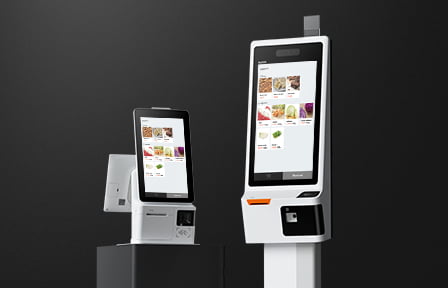
Guests increasingly expect to serve themselves, and hotels are adding kiosks for lobby check-in, grab-and-go markets, and quick-service ordering. This 2026 guide covers hotel self-service kiosk hardware, what to look for, where kiosks pay off, and how to keep them accessible and secure in the United States and Canada.
The short answer. Hotel self-service kiosk hardware needs a large touch display, a card reader for contactless and chip payment, and a mounting option that fits the space, whether a lobby check-in stand or a countertop market unit. It runs Android, so your chosen software drives the screen.
How Guests Actually Use a Lobby Kiosk
A kiosk only earns its cost if guests choose it over the counter, so the guest experience decides the return. The good news is that hospitality guests already expect self-service, and a well-placed unit sees steady use from day one.
Speed is the draw. A guest who wants a quick room key, a bottle of water, or a coffee does not want to wait for an agent, and a fast tap-and-go interaction meets that expectation. The screen has to be simple, with large touch targets and a short path to done.
Trust is the second factor. Guests will only tap a card on a machine that looks secure and cared for, so a clean, well-branded unit with an obvious payment area gets more use than a generic terminal. Contactless payment feels safer and faster to most guests, which lifts adoption.
Placement seals it. A unit on the natural walking path, at a reachable height, with clear signage, gets used. One hidden in a corner gets ignored, no matter how good the screen is.
Where Hotel Self-Service Kiosk Hardware Pays Off
Lobby check-in and check-out
A self-check-in kiosk shortens the front desk line at peak arrival and gives guests a fast path to a room key. It handles the routine arrivals so agents can focus on guests who need help.
Grab-and-go markets
The unattended lobby market is now a standard amenity, and a self-checkout kiosk lets guests buy a snack or drink at any hour without staffing the counter. Our micro-market self-checkout guide covers the unattended setup.
Quick-service and cafe ordering
Lobby cafes and food courts use order kiosks to cut the wait line and lift average ticket through prompts and modifiers. The kiosk takes the order and the payment, and the kitchen gets a clean ticket.
Accessibility Is Not Optional
A public self-service kiosk in the United States is expected to be usable by guests with disabilities, and accessibility law applies to hospitality. Designing for it from the start avoids a costly retrofit.
Accessible kiosk hardware means reachable screen height, tactile and audio options, and screen contrast that works for low vision. The US Access Board and the ADA guidance at ada.gov set the expectations.
For a deeper checklist, see our ADA-compliant self-service kiosk hardware guide. Canadian operators should also plan for provincial accessibility standards such as those in Ontario.
Payment and Security on an Unattended Kiosk
An unattended kiosk takes payment with no staff watching, so the payment path has to be self-contained and certified. A PCI PTS certified reader keeps card data inside the device.
Contactless tap is the fastest guest interaction and reduces wear on the reader, so a kiosk reader that supports tap, chip, and mobile wallets covers the range of guest preferences.
Because the unit is exposed in a public space, kiosk lockdown matters. Android kiosk mode restricts the device to the ordering app so guests cannot exit to the home screen. See our SUNMI kiosk mode setup guide.
SUNMI Hotel Self-Service Kiosk Hardware
SUNMI builds hotel self-service kiosk hardware in floor-standing and countertop formats, with integrated payment and scanning options. They run Android, so a hotel runs its check-in or ordering software directly on the unit.
A property can match the format to the space, a slim floor stand for the lobby, a compact countertop unit for a market or cafe. Product detail sits on the Rosper kiosk hardware page.
To compare restaurant-style order kiosks, our SUNMI kiosk buyer’s guide breaks down models and cost.
Choosing the Right Kiosk Format
Format matters as much as features, because a kiosk that does not fit the space or the guest flow will not get used. Match the kiosk format to where it lives.
Floor-standing for the lobby
A lobby check-in point wants a floor-standing unit at a reachable height, with a clear sightline from the entrance. It has to feel like a natural part of the arrival path, not a machine tucked in a corner.
Floor stands also give room for a card reader, a key dispenser where used, and accessible controls. The footprint is larger, so plan the lobby layout around it.
Countertop for markets and cafes
A grab-and-go market or a lobby cafe usually wants a compact countertop unit that sits on the existing counter. It keeps the amenity small and self-contained, with tap payment for a fast guest interaction.
Countertop kiosks are easier to add to a space that was not designed for self-service, which makes them a low-friction first step for a property testing the idea.
Start with one pilot
Whichever format you pick, deploy one kiosk first, watch how guests use it, and refine the placement and the on-screen flow before scaling. A single pilot teaches more than a spec sheet, and it protects the larger rollout.
Common Hotel Self-Service Kiosk Hardware Mistakes
Self-service is easy to get wrong at the hardware level. A few common errors keep a hospitality kiosk from earning its place.
Ignoring accessibility until launch
Accessibility is not a feature to add later. A public kiosk that does not meet ADA and provincial standards may need a full replacement, so build it into the hardware choice from the start.
Choosing the wrong format for the space
A floor stand crammed into a tiny lobby, or a countertop unit with no counter, will sit unused. Match the kiosk format to the room before you buy.
Guests avoid a kiosk that feels awkward to reach, so placement and height matter as much as the screen.
Leaving the device unlocked
An unattended kiosk that can exit to the home screen invites tampering. Lock it in Android kiosk mode so it only runs the ordering or check-in app, and keep card data inside a certified reader.
Ignoring uptime and connectivity
A kiosk that drops offline stops taking guests, so the unit needs a reliable network path and a plan for outages. A wired connection is steadier than shared guest Wi-Fi, and a fallback keeps the unit selling during a hiccup.
Monitoring matters too. Managing the kiosk fleet through a remote console lets staff see a stalled unit and act before a guest walks away, which protects the revenue the kiosk was bought to capture.
Sourcing Hotel Self-Service Kiosk Hardware in the US and Canada
The Android hardware is identical on both sides of the border, so a cross-border operator can standardize one kiosk fleet. The differences are the payment rails and the language requirements, not the devices.
US properties settle through US processors, while Canadian properties commonly add Interac and need bilingual receipts in Quebec. Plan the accessibility approach for both ADA and provincial standards so one kiosk spec covers every location.
Rosper stocks kiosk units in eight North American warehouses, including Brampton, Ontario for Canada, so most orders arrive in 2 to 7 business days with warranty coordinated locally.
Key Takeaways
- Hotel self-service kiosk hardware needs a large touch display, a certified tap and chip reader, and a mounting format that fits the space.
- The three highest-value uses are lobby check-in, grab-and-go markets, and lobby cafe ordering.
- Design for ADA accessibility and provincial standards from the start, not as a retrofit.
- Lock the device in Android kiosk mode and keep card data inside a PCI PTS certified reader.
Rosper is a SUNMI authorized distributor in North America, and we help hotels and resorts spec accessible, secure kiosks for check-in and self-service. See the Rosper hospitality solutions page, or request a quote.
Frequently Asked Questions
What hardware does a hotel self-service kiosk need?
A hotel self-service kiosk needs a large touch display, a PCI PTS certified reader for tap and chip payment, and a mounting format that fits the space, either a floor-standing lobby unit or a countertop market unit. Running Android lets the hotel drive it with its own check-in or ordering software.
Do hotel kiosks have to be ADA accessible?
Yes. A public self-service kiosk in the United States is expected to be usable by guests with disabilities under ADA guidance, which means reachable height, tactile and audio options, and readable contrast. Canadian operators should also plan for provincial accessibility standards. Designing for it from the start avoids a costly retrofit.
How do you secure an unattended lobby kiosk?
Lock the device in Android kiosk mode so guests cannot exit to the home screen, and keep all card data inside a PCI PTS certified reader. This keeps an unattended, publicly exposed unit both tamper-resistant and payment-secure.
Where do hotel kiosks add the most value?
The three highest-value hospitality kiosk uses are lobby self-check-in to cut the arrival line, grab-and-go market self-checkout for around-the-clock snack and drink sales, and lobby cafe order kiosks that reduce wait time and lift average ticket.