
Self-ordering kiosks are no longer a luxury reserved for major fast-food chains. In 2026, restaurants, retailers, healthcare facilities, and hospitality businesses of all sizes are deploying kiosks to reduce labor costs, speed up service, and increase average order values. Industry data consistently shows that a self-ordering kiosk can boost ticket sizes by 15–30%, while 85% of large retailers have already integrated some form of self-checkout technology.
But not every kiosk is created equal. Screen size, mounting options, built-in peripherals, software compatibility, and total cost of ownership all vary dramatically between products. Choosing the wrong kiosk means wasted investment, poor customer adoption, and ongoing maintenance headaches.
This guide walks through the five critical factors to evaluate when selecting a self-ordering kiosk, compares three purpose-built SUNMI kiosk models, and helps you determine the right fit for your business.
Why self-ordering kiosks are growing rapidly in 2026
The adoption curve for self-ordering kiosks has accelerated sharply over the past two years. Several market forces are driving this trend:
- Labor shortages: Many quick-service restaurants and retail stores struggle to staff front-of-house positions. Kiosks reduce the number of cashiers needed during peak hours without reducing throughput.
- Higher order values: Studies consistently show that customers ordering through a kiosk spend more per transaction. Without the perceived social pressure of holding up a line, customers are more likely to add extras, upsize, or explore the full menu.
- Speed of service: Self-ordering kiosks process orders faster than traditional counter service, especially during rush periods when lines build up.
- Order accuracy: Customers entering their own orders eliminates miscommunication between staff and guests, reducing remakes and waste.
- Customer preference: A growing percentage of consumers – particularly younger demographics – actively prefer self-service ordering over traditional counter interactions.
5 factors to evaluate when choosing a self-ordering kiosk
1. Screen size and orientation
Screen size directly affects the customer experience. Larger screens display more menu items per page, show higher-quality images, and feel more intuitive to navigate. However, larger kiosks also require more floor space and cost more.
- 15.6″ screens are ideal for compact spaces like small cafes, counter-service spots, and retail self-checkout areas. They work well as tabletop or wall-mounted units.
- 22″ screens strike a balance between visibility and footprint. They are the most popular size for quick-service restaurants and fast-casual dining.
- 24″ screens are the premium option for high-traffic environments where maximum visibility and menu real estate matter – think busy QSR locations, large retail stores, and hotel lobbies.
Most modern kiosks support both portrait and landscape orientations. Portrait is standard for menu browsing (similar to a phone layout), while landscape works better for retail product displays and visitor check-in workflows.
2. Built-in peripherals
A self-ordering kiosk needs more than just a touchscreen. Consider which peripherals are built in versus which require external add-ons:
- Receipt printer: Most kiosk orders require a printed receipt or order number ticket. Built-in 58mm or 80mm printers save space and reduce wiring complexity.
- Barcode scanner: Essential for retail self-checkout (scanning product barcodes) and loyalty program integration (scanning member cards or app codes).
- NFC reader: Enables tap-to-pay directly on the kiosk, streamlining the payment process without a separate payment terminal.
- Camera: 3D cameras support facial recognition for loyalty programs, age verification, or personalized menu recommendations. 2D cameras work for basic QR code scanning.
3. Mounting and placement options
Where and how you install your kiosk affects customer flow, accessibility, and maintenance:
- Floor-standing: Free-standing kiosks with a base or pedestal. Most versatile – can be repositioned as layouts change. Ideal for restaurant lobbies and retail floor areas.
- Wall-mounted: Saves floor space and keeps walkways clear. Best for narrow spaces, corridors, or when you want to maximize the dining area.
- Countertop/desktop: Compact kiosks that sit on existing counters. Perfect for smaller businesses that cannot dedicate floor space to a full-size kiosk.
ADA compliance is a critical consideration for public-facing kiosks. Ensure your mounting height and kiosk design allow wheelchair access and meet local accessibility requirements.
4. Software compatibility
The kiosk hardware is only as useful as the software it runs. When evaluating a self-ordering kiosk, confirm:
- Operating system: Android-based kiosks with GMS certification offer the widest software ecosystem. You can run POS apps, ordering platforms, and custom applications from the Google Play Store.
- POS integration: Your kiosk software needs to communicate with your main POS terminal for order routing, payment processing, and menu management.
- MDM support: Mobile device management lets you push software updates, lock the kiosk to a single app, and monitor device health remotely – essential for multi-location deployments.
5. Total cost of ownership
The purchase price of a kiosk is only part of the equation. Factor in:
- Software licensing: Monthly or annual fees for the kiosk ordering platform
- Installation costs: Floor stand assembly, wall mounting, electrical work, network drops
- Maintenance: Printer paper rolls, screen cleaning, component replacements
- Warranty: How long is the hardware covered, and what does the warranty include?
For a detailed breakdown comparing purpose-built kiosks to DIY tablet-based solutions, read our guide on self-ordering kiosk vs custom build: cost, lead time, and ROI.
3 SUNMI kiosk models compared
SUNMI’s kiosk lineup includes purpose-built commercial devices designed for high-traffic, customer-facing environments. Here is how the three main models compare:
SUNMI K2 – the 24″ premium kiosk
The SUNMI K2 is a full-size self-ordering kiosk with a 24-inch display, built-in 80mm receipt printer, 2D barcode scanner, and NFC reader. It is available in wall-mounted and floor-standing configurations.
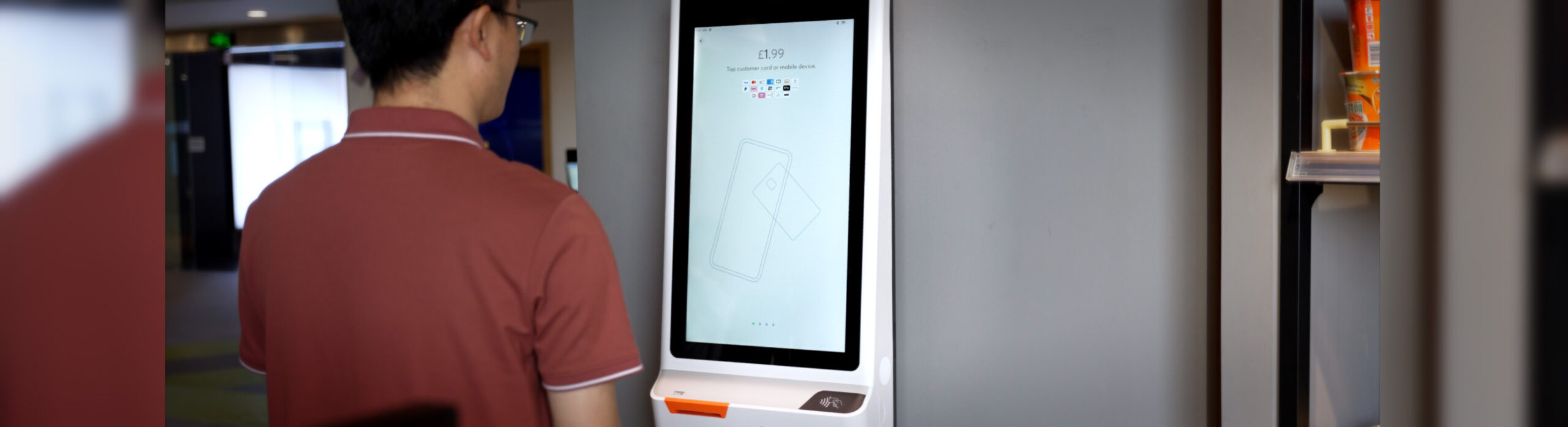
- Display: 24″ Full HD touchscreen
- Processor: QCS6490 (latest gen) or RK3399
- Memory: Up to 6 GB RAM / 128 GB storage
- Printer: Built-in 80mm thermal
- Scanner: 2D barcode (Datalogic or Newland)
- NFC: Built-in
- Camera: Optional 3D camera module
- Mounting: Wall mount or floor stand (with optional platform shelf)
- Best for: High-traffic QSR, fast-casual restaurants, hotel lobbies, large retail self-checkout
The K2’s large screen makes it the best choice for menu-heavy restaurants where customers need to browse extensive options, customize orders, and view high-resolution food images.
SUNMI K2 Mini – the 15.6″ compact kiosk
The SUNMI K2 Mini delivers the same core kiosk functionality as the K2 in a smaller 15.6-inch form factor. It is designed for environments where space is limited but self-service is still needed.
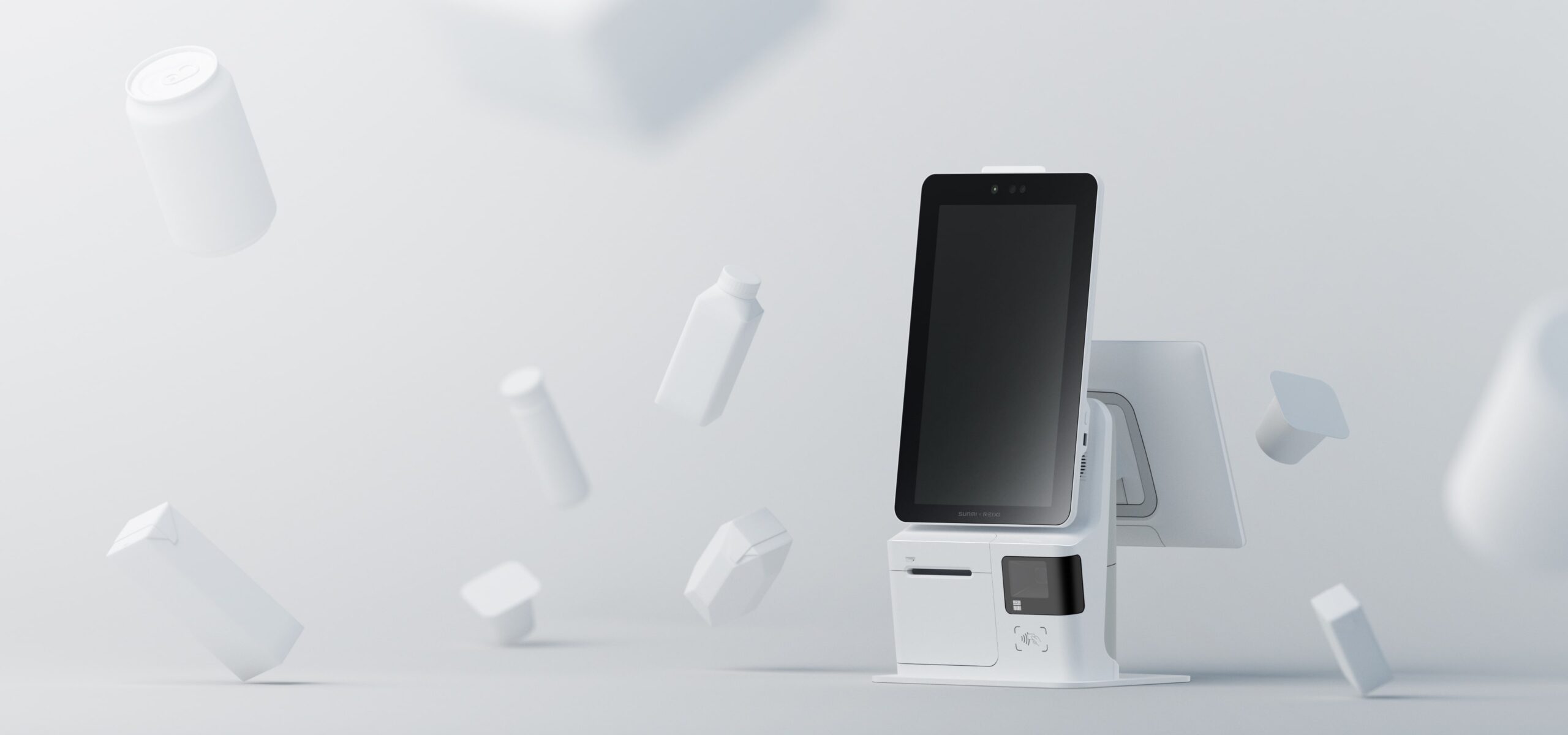
- Display: 15.6″ touchscreen
- Processor: Qualcomm SDM660
- Memory: 4 GB RAM / 64 GB storage
- Printer: Built-in 58mm or 80mm thermal
- Scanner: 2D barcode scanner
- NFC: Built-in
- Camera: Optional 3D camera
- Mounting: Desktop stand, wall mount, or floor stand
- Best for: Small restaurants, coffee shops, counter-service spots, visitor check-in
The K2 Mini’s desktop mounting option makes it particularly useful for businesses that want to add self-ordering to an existing counter without dedicating floor space to a full-size kiosk.
SUNMI FLEX 3 – the versatile interactive display
The SUNMI FLEX 3 is not a traditional kiosk – it is a modular interactive display that can serve as a self-ordering kiosk, kitchen display system (KDS), customer-facing display, or digital signage. Available in 18.5″, 22″, and 27″ screen sizes.
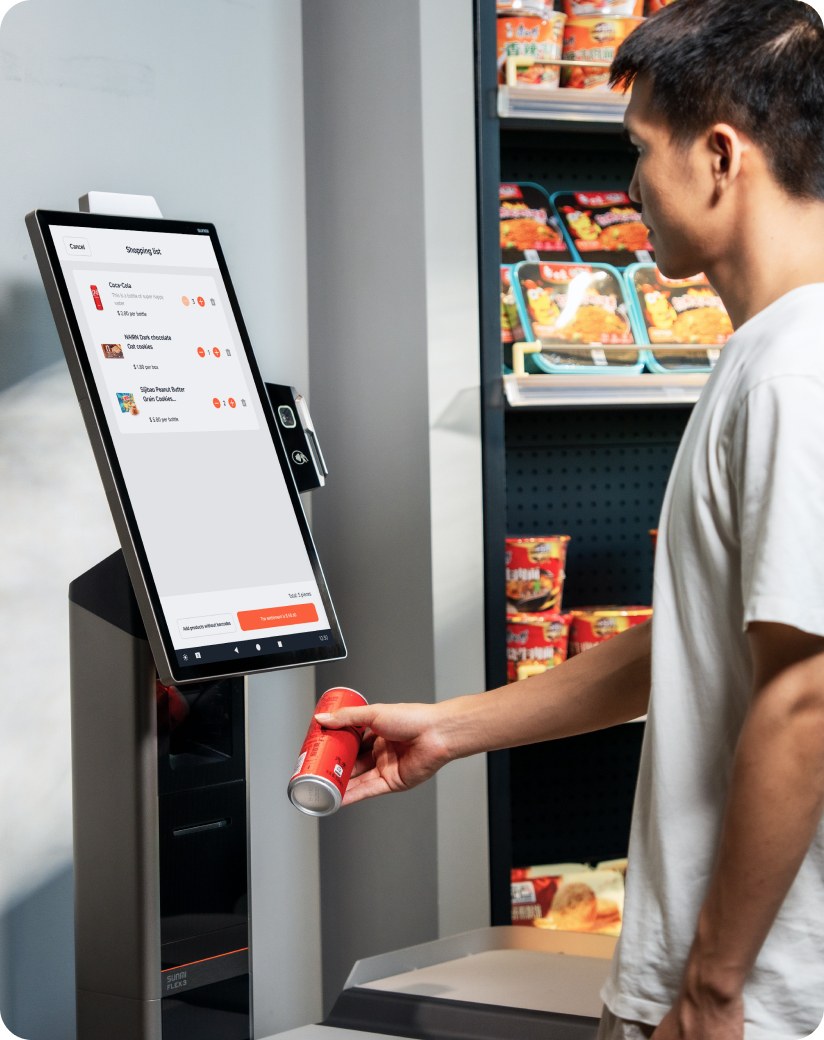
- Display: 18.5″, 22″, or 27″ Full HD touchscreen
- Processor: Octa-core up to 2.4 GHz
- Memory: Up to 6 GB RAM / 128 GB storage
- NFC: Built-in
- Modularity: Add-on scanner, printer, camera, POE, and MSR modules
- Mounting: Desktop stand, L-shape stand, floor stand (retail or restaurant variants), wall mount, articulating arm
- Best for: Multi-purpose deployments, KDS + kiosk combos, retail checkout, restaurants needing flexible hardware
The FLEX 3’s modular design means you can start with just the display and add peripherals as needed. For restaurant operators who want both a customer-facing kiosk and a kitchen display system, the FLEX 3 can serve both roles with the same hardware platform.
Self-ordering kiosk use cases by industry
Quick-service and fast-casual restaurants
This is the most common use case for a self-ordering kiosk. QSR operators typically deploy 2–4 kiosks per location to handle peak lunch and dinner rushes. The K2 (24″) is the standard choice for high-traffic locations, while the K2 Mini works for smaller stores with limited floor space.
Key benefits: reduced wait times, higher ticket sizes from upsell prompts, and the ability to reallocate front-counter staff to food preparation or delivery operations.
Retail self-checkout
Retailers use kiosks for self-checkout lanes where customers scan, bag, and pay for items independently. The FLEX 3 with a scanner module is ideal for this application – its modular design allows retailers to configure each station exactly as needed.
Hotel and visitor check-in
Hotels deploy lobby kiosks for guest self-check-in, reducing front desk wait times and enabling 24/7 check-in service. The K2 on a floor stand with a payment terminal bracket provides a professional, self-contained check-in station.
Healthcare and government offices
Patient check-in kiosks and government service queuing systems benefit from the K2 Mini‘s compact form factor. Wall-mounted or desktop configurations fit into reception areas without dominating the space.
Installation and deployment tips
Successful self-ordering kiosk deployment goes beyond hardware selection. Keep these practical considerations in mind:
- Power and network planning: Each kiosk needs a power outlet and either an Ethernet drop or strong Wi-Fi coverage. For floor-standing units, plan cable routing during construction or renovation.
- Customer flow design: Position kiosks where they naturally intercept customers entering the store or restaurant. Avoid placing them in corners where they will be overlooked.
- Staff training: Even with self-service kiosks, staff need to know how to assist customers, clear printer jams, and restart devices. Plan for a 1–2 day training period per location.
- Payment terminal integration: Most kiosk deployments pair the kiosk with an external payment terminal (mounted on a bracket). Ensure your payment processor supports the terminal and kiosk software integration.
- Signage and wayfinding: Use clear signage to direct customers to kiosks. “Order Here” signs and screen-level prompts significantly improve adoption rates in the first weeks.
Frequently asked questions
How long does it take to deploy a self-ordering kiosk?
Hardware setup and software installation typically take 1–2 hours per unit. Planning, network preparation, and staff training may add 1–2 weeks to the overall deployment timeline. Rosper provides MDM support to help pre-configure devices before shipping.
Do customers actually use self-ordering kiosks?
Yes. Industry data shows high adoption rates, especially in QSR and fast-casual restaurants. Younger demographics prefer kiosks, and even older customers adopt quickly when staff provide initial guidance. Locations typically see 60–80% kiosk adoption within the first month.
Can a self-ordering kiosk work with my existing POS terminal?
Most modern POS platforms offer kiosk integration or a dedicated kiosk ordering module. SUNMI kiosks run Android with GMS certification, so they support a wide range of POS and ordering software. Check with your POS provider for compatibility.
What size screen is best for a restaurant kiosk?
For high-traffic QSR and fast-casual restaurants, 22″ to 24″ screens are recommended – they display full menus clearly and are easy for customers to navigate. For smaller cafes or counter-service spots, a 15.6″ kiosk like the K2 Mini works well without overwhelming the space.
How do self-ordering kiosks handle payment?
Most kiosk deployments pair the kiosk with an external payment terminal mounted on a POS bracket. The kiosk sends the order total to the payment terminal, and the customer pays via card, tap, or mobile wallet. Some kiosks also support NFC for direct contactless payment on the kiosk screen.
Get self-ordering kiosks from Rosper
Rosper is the official SUNMI distributor for the United States and Canada. All kiosk models – K2, K2 Mini, and FLEX 3 – are available with floor stands, wall mounts, and payment terminal brackets. Most orders arrive in 2–7 business days from warehouses across the US and Canada.
Every purchase includes access to free MDM setup support and the SUNMI 3-year warranty program. Rosper assists with warranty claims – helping you connect with SUNMI faster. Request a quote to get started with your kiosk deployment.