
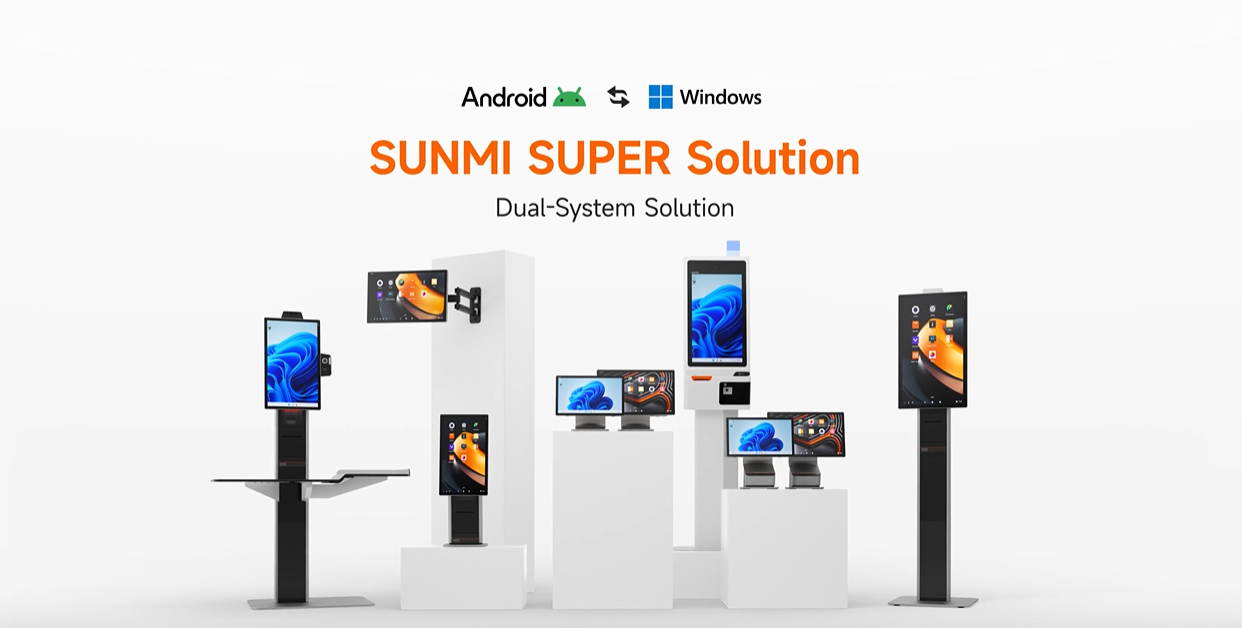
Switching from Windows to Android POS hardware is one of the biggest headaches in the industry right now. Thousands of restaurants, retail stores, and hospitality businesses across the US and Canada are stuck running legacy Windows software on aging terminals that are expensive to maintain and increasingly unsupported. But ripping out the old setup and starting fresh with Android overnight is risky and often unrealistic.

The SUNMI SUPER Solution eliminates that dilemma. It is a dual-operating-system architecture that lets you run both Windows and Android on a single SUNMI POS terminal, so you can keep existing Windows software running today while preparing for a full Android transition on your own timeline. No duplicate hardware. No forced overnight migration.
As an authorized SUNMI distributor serving the US and Canadian markets, Rosper has deployed SUNMI SUPER Solution terminals for businesses ranging from single-location cafes to multi-unit restaurant chains. In this guide, we break down how the technology works, which devices support it, and how to plan a migration that makes sense for your operation.
What is the SUNMI SUPER Solution?
The SUNMI SUPER Solution is a dual-system digital solution that enables a single SUNMI Android POS terminal to run both Windows and Android operating systems simultaneously. Rather than choosing one OS or managing two separate devices, businesses get both platforms on one piece of hardware.
SUNMI designed this solution for the global POS market, where a massive installed base of Windows-dependent software still drives daily operations. The SUPER Solution bridges the gap between legacy Windows applications and the growing Android ecosystem by letting merchants operate in both environments from the same terminal.
The SUNMI SUPER Solution offers three core capabilities:
- Dual-OS operation: Switch between Windows and Android on the same terminal depending on your workflow needs.
- Shared storage partition: A shared disk enables data exchange between the two operating systems, so information does not live in isolated silos.
- Unified device management: SUNMI’s Device Management Platform (DMP) and SUNMI App Store support both operating systems, giving IT teams a single console for updates, remote diagnostics, and app distribution.
How it works: dual-OS architecture explained
The SUNMI SUPER Solution runs on ARM-based Qualcomm processors, which is an important architectural detail. Unlike traditional x86 Windows machines, ARM chips deliver comparable performance with significantly better power efficiency, which translates to lower electricity costs and less heat generation in busy commercial environments.
Here is how the dual-OS setup works in practice:
1. Genuine, standalone operating systems. Both the Windows and Android instances are real, fully licensed operating systems. This is not emulation or virtualization. Each OS runs natively and delivers the stability you would expect from a dedicated single-OS device.
2. Seamless switching. Operators can switch between Windows and Android based on what they need at any given moment. During a lunch rush, the terminal might run your legacy Windows POS application. After hours, you could switch to Android for inventory management using a newer cloud-based app.
3. Shared disk partition. SUNMI implemented a shared storage partition (SHAREDDISK) that both operating systems can access. Transaction logs, configuration files, or export data created in one OS are available to applications running in the other.
4. ARM-based power efficiency. The underlying ARM architecture consumes less power than traditional x86 Windows POS terminals while handling the same workloads. For businesses running 10 or more terminals across multiple locations, the energy savings add up quickly.
When we shipped a batch of T3 Pro Max units to a restaurant chain in Texas that was stuck on a 10-year-old Windows POS setup, the migration took less than a week. Their kitchen display software ran on Windows from day one, while front-of-house ordering gradually moved to an Android app over the following month. The shared disk partition let both systems access the same menu database, eliminating the double-entry nightmare that usually comes with parallel POS environments.
Compatible SUNMI devices for the SUPER Solution
Not every SUNMI terminal supports the dual-OS SUPER Solution. Currently, the following devices are confirmed compatible:
SUNMI T3 Pro series (SUPER edition)
The T3 Pro Max is the flagship device for the SUPER Solution. It features a 15.6-inch FHD capacitive touchscreen, Qualcomm octa-core processor clocked at 2.7 GHz, 6 GB RAM, and 128 GB storage. The dual-system version is also available with an optional 18.5-inch main screen for businesses that need a larger display footprint. A modular design with an internal high-speed Seiko printer makes the T3 Pro Max a complete all-in-one terminal.
SUNMI FLEX 3 (coming soon)
A flexible-format terminal designed for environments where counter space is limited.
SUNMI K2 (coming soon)
A self-service kiosk terminal that will bring dual-OS capability to unattended checkout and ordering scenarios.
Additional models are expected in 2026 and beyond. If you need help selecting the right device, contact our team for a consultation.
Real-world use cases for the SUNMI SUPER Solution
The SUNMI SUPER Solution is not a theoretical concept. It solves concrete, everyday problems for businesses that sit at the intersection of legacy Windows infrastructure and modern Android capabilities.
Restaurant chains migrating from legacy Windows POS
Full-service and quick-service restaurants represent the single largest use case we see. Many chains invested heavily in Windows-based POS software five to ten years ago, and that software still handles order management, kitchen routing, and reporting. Replacing it overnight means retraining staff and risking downtime during peak service hours.
With the SUNMI SUPER Solution, these restaurants deploy T3 Pro Max terminals that boot into Windows on day one. Over weeks or months, individual functions migrate to Android alternatives. The front counter might switch to an Android ordering app first, while the kitchen display stays on Windows until the replacement is fully tested.
Retail stores consolidating hardware
Retail businesses often run separate Windows terminals for POS software and Android tablets for inventory scanning. The SUNMI SUPER Solution collapses that into a single device. One terminal handles the Windows-based point-of-sale during business hours and runs Android inventory apps after closing. Fewer devices means lower hardware costs and simplified IT support.
Hotels and hospitality managing mixed software stacks
Hotels frequently run Windows-based property management systems alongside Android applications for guest check-in kiosks and concierge services. Rather than maintaining two separate hardware ecosystems, the SUNMI SUPER Solution lets a single terminal serve double duty, with front desk staff switching between OS environments depending on the task.
Benefits for ISVs and software partners
Independent software vendors (ISVs) and technology partners also gain significant advantages from the dual-OS architecture.
Easier customer acquisition. ISVs building Android POS applications can now target customers who are still running Windows without asking them to abandon their existing setup entirely. Propose a gradual migration where the new Android app runs alongside old Windows software on the same terminal. That is a much easier sales conversation.
Reduced deployment friction. When an ISV deploys their Android app through the SUNMI App Store, it lands on a device that already has the customer’s Windows environment intact. No hardware swap, no network reconfiguration, no downtime.
Fleet management via SUNMI DMP. Software partners can leverage SUNMI’s Device Management Platform to push updates, monitor device health, and troubleshoot issues remotely across both operating systems.
The global Android POS market is projected to grow at a compound annual growth rate of over 27% through 2033, according to industry research from SkyQuest Technology. For ISVs, the SUNMI SUPER Solution provides a practical bridge to capture customers during this transition window.
Migration roadmap: from Windows to Android
Moving from Windows to Android does not have to be a single, high-risk event. The SUNMI SUPER Solution enables a phased approach that we recommend to every customer.
Step 1: Audit your current software stack. Identify every Windows application running on your POS terminals. Categorize them as “Android alternative available,” “Android alternative in development,” or “no Android alternative yet.”
Step 2: Deploy SUNMI SUPER Solution terminals. Replace aging Windows hardware with T3 Pro Max or other SUPER-compatible devices. Configure them to boot into Windows by default so daily operations continue without interruption.
Step 3: Run parallel environments. Install Android POS applications alongside Windows. Use the shared disk partition to synchronize data between both operating systems. Train staff on Android during off-peak hours.
Step 4: Migrate functions incrementally. Move one workflow at a time from Windows to Android. Start with lower-risk functions like inventory management or loyalty programs before tackling the core transaction flow.
Step 5: Complete the transition. Once all critical applications run on Android and staff are trained, switch the default boot OS to Android. Keep Windows available as a fallback for edge cases during the first few weeks.
Step 6: Decommission Windows. After a confidence period with no issues, remove the Windows partition entirely to free up storage and simplify device management.
This phased approach typically takes two to six months. The key advantage is that business operations never stop, and there is no “big bang” cutover weekend where everything could go wrong.
Limitations and considerations
No technology solution is perfect, and we believe in being upfront about what the SUNMI SUPER Solution can and cannot do.
Not all Windows software runs flawlessly on ARM. Because the SUPER Solution uses ARM-based processors, some legacy Windows applications compiled exclusively for x86 may require compatibility layers or may not run at full performance. We always recommend testing your specific software stack before a large-scale deployment.
Hardware peripherals need compatibility checks. If your setup relies on specific USB peripherals like receipt printers, barcode scanners, or cash drawers, verify that drivers exist for both operating systems. Most standard POS peripherals are supported, but niche or older hardware may need replacements.
Dual-OS DMP and App Store timeline. SUNMI has announced that dual-system-compatible versions of the Device Management Platform and App Store will launch in H2 2025. Early adopters should be aware that some remote management features may have limited functionality until that rollout is complete.
Learning curve for staff. Your team still needs training on the Android environment. Budget time for this, especially for employees who have only ever worked with Windows POS terminals.
Storage allocation. Running two operating systems on one device means storage is shared. The 128 GB on the T3 Pro Max is generous, but businesses with large databases should plan partition sizes carefully.
Being transparent about these limitations is part of why our customers trust us. We would rather help you plan around a known constraint than sell you on a promise the technology cannot keep.
Why buy your SUNMI SUPER Solution from Rosper
Rosper is an authorized SUNMI distributor with 8 warehouses across the US and Canada, which means your SUNMI SUPER Solution hardware ships fast. Most orders arrive in 2 to 7 business days, with tracking from the moment your package leaves our facility.
Here is what sets us apart:
- Pre-deployment consultation. We help you audit your Windows software stack, select the right hardware, and build a realistic migration timeline before you order.
- 3-year warranty. Every SUNMI terminal from Rosper includes SUNMI Care Standard, a 3-year warranty that covers hardware defects throughout your migration.
- US and Canada support. Whether you are deploying in Toronto or rolling out across 50 stores in the US, we support both markets with local inventory.
- Volume pricing. Multi-unit deployments qualify for volume pricing. Reach out for a custom quote on your SUNMI SUPER Solution project.
Browse the full SUNMI product catalog to see which terminals fit your business, or explore our solutions by industry for tailored recommendations.
Frequently asked questions
What is the SUNMI SUPER Solution?
The SUNMI SUPER Solution is a dual-operating-system architecture that lets a single SUNMI POS terminal run both Windows and Android. It is designed for businesses that need to maintain legacy Windows software while transitioning to the Android ecosystem.
Which SUNMI devices support the SUPER Solution?
The T3 Pro Max (SUPER edition) is the primary compatible terminal. SUNMI has also announced upcoming support for the FLEX 3 and K2 models.
Can I run my existing Windows POS software on a SUNMI SUPER Solution terminal?
In most cases, yes. However, because the SUPER Solution uses ARM-based processors, some legacy x86-only applications may require compatibility testing. We recommend running a pilot with your specific software before a full deployment.
How long does a typical Windows-to-Android migration take?
Most businesses complete the transition in two to six months using a phased approach. The timeline depends on how many applications need to migrate and how complex your integrations are.
Does the SUNMI SUPER Solution cost more than a standard Android terminal?
The SUPER-edition hardware carries a modest premium over standard Android-only models, but it eliminates the need to purchase and maintain separate Windows terminals during the migration period. For most businesses, the total cost of ownership is lower.
Is the SUNMI SUPER Solution available in Canada?
Yes. Rosper stocks SUNMI SUPER Solution compatible terminals at our Brampton, Ontario warehouse and ships across Canada within 2 to 7 business days. Canadian businesses running legacy Windows POS software can use the dual-OS architecture to transition to Android at their own pace, with full support for Canadian payment processors like Moneris and Global Payments.
Can both operating systems access the same data?
Yes. SUNMI includes a shared disk partition (SHAREDDISK) that both Windows and Android can read and write to, enabling data exchange between the two environments.