
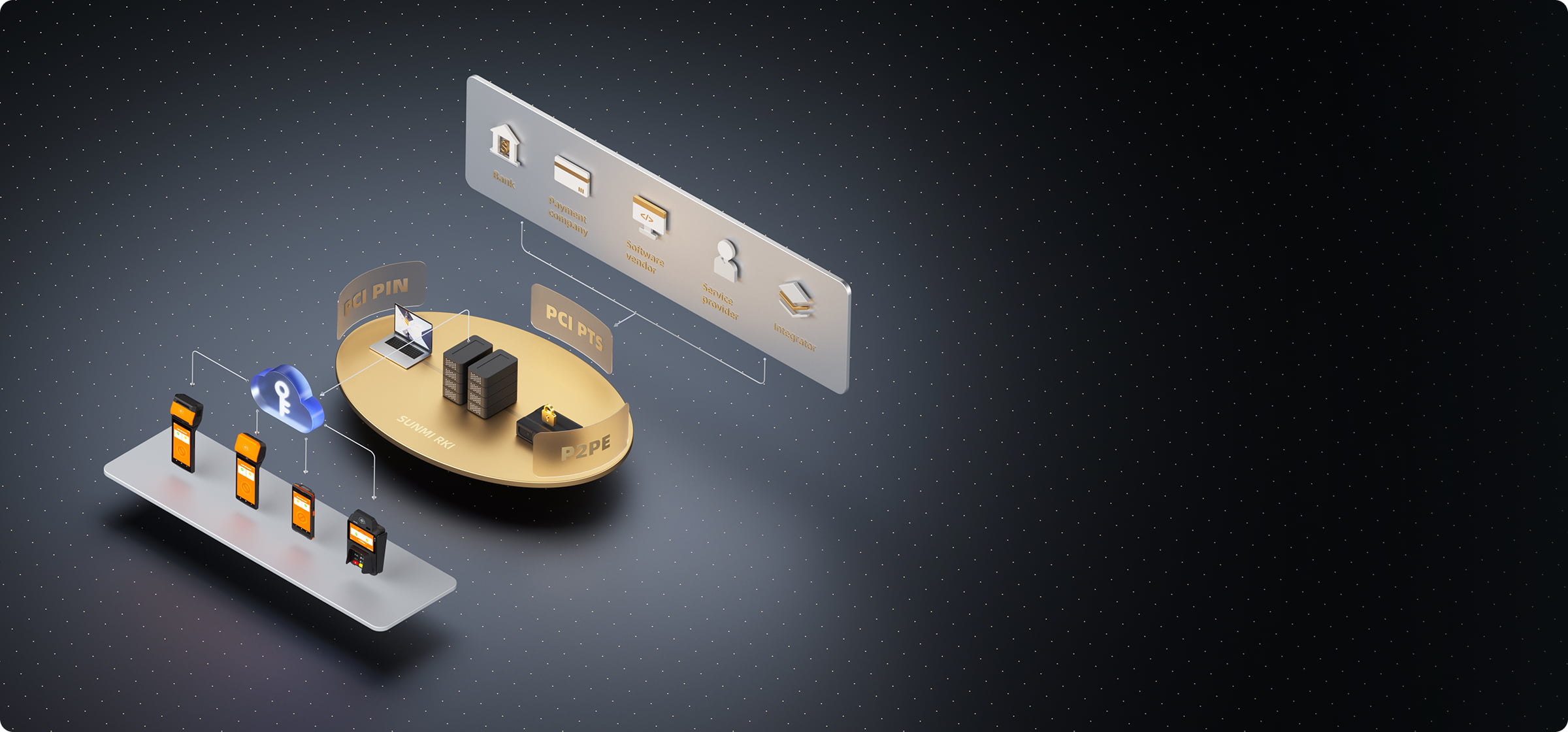
Managing a fleet of payment terminals across dozens or hundreds of locations is one of the most operationally expensive challenges facing ISVs, ISOs, and payment service providers today. Every firmware update, configuration change, and application deployment traditionally required either a technician visit or a complicated multi-vendor remote management setup. SUNMI TMS (Terminal Management System) was designed to consolidate all of these functions into a single platform purpose-built for commercial Android devices.
This guide covers how SUNMI TMS terminal management works in practice, what features matter most for North American deployments, and how to get the most value from the platform.
What is SUNMI TMS?
SUNMI TMS is a comprehensive device management system designed to support the full lifecycle of SUNMI payment terminals and commercial devices, from initial registration through end-of-life recycling. It provides centralized control over device configuration, application distribution, security settings, and remote diagnostics from a single web-based dashboard.
Unlike generic mobile device management (MDM) solutions that are built for smartphones and tablets, SUNMI TMS is specifically engineered for commercial POS and payment hardware. This means the feature set is tailored to the workflows that ISVs and payment processors actually use: pushing payment app updates, configuring transaction parameters, locking devices into kiosk mode, and managing fleet-wide security policies.
SUNMI TMS supports deployment across industries including finance, retail, hospitality, logistics, and healthcare. For the payment sector specifically, it integrates directly with SUNMI OS, RKI (Remote Key Injection), and the FSK app distribution framework to create a cohesive management layer across the entire SUNMI ecosystem.
Private cloud deployment: keeping your data on your infrastructure
SUNMI TMS can be deployed on customer-specified servers rather than relying solely on SUNMI’s shared cloud infrastructure. This private deployment model is essential for banks, financial institutions, and regulated payment processors that must comply with strict data residency and sovereignty requirements.
The platform supports two deployment architectures:
- Single-server deployment: Suitable for smaller fleets or pilot programs where a single server handles all TMS functions
- Cluster deployment: Designed for enterprise-scale operations where high availability and load balancing are requirements
SUNMI TMS is compatible with major cloud infrastructure providers including AWS, Microsoft Azure, and Alibaba Cloud. Communication between the TMS server and terminals is secured via TLS/HTTPS and MQTT protocols, with MySQL and Redis databases handling backend data storage.
When we help payment service providers evaluate their infrastructure options, the private cloud model consistently wins for regulated industries. A regional bank operating in both the US and Canada, for example, can deploy TMS on AWS US East and AWS Canada Central to meet data residency requirements in both countries while maintaining a unified management interface.
The platform also includes data backup and recovery services, which is a frequently overlooked feature. If a server failure occurs, TMS can restore device configurations, application assignments, and organizational structures from automated backups, minimizing downtime for the entire terminal fleet.
App distribution and lifecycle management
One of the most time-consuming tasks in terminal fleet management is ensuring every device runs the correct version of every application. SUNMI TMS handles this through a structured app distribution system that gives operators precise control over what software runs on which devices.
The app distribution framework includes:
- App Market management: TMS includes a built-in App Market that operators manage independently. Unlike consumer app stores, this App Market supports multiple app signature mechanisms, which is critical when distributing applications from different development teams or third-party vendors.
- Version-controlled releases: Upload new application versions to TMS and deploy them to specific device groups, branches, or individual terminals. The release process includes approval workflows to prevent untested software from reaching production devices.
- Targeted deployment: Push different app versions to different segments of your fleet. A restaurant chain might run version 3.2 of their payment app on countertop terminals and version 3.1 on handheld devices because the newer version includes features specific to countertop hardware.
- Rollback capability: If a new version causes issues in the field, TMS allows operators to roll back to the previous version across affected devices.
The FSK (SUNMI App Store/Distribution) component integrates with TMS to provide this distribution pipeline. For ISVs developing custom payment applications, this means you can manage your entire software deployment lifecycle, from internal testing through staged rollout to full production, from a single console.
A practical example: when we onboard a new ISV partner, we typically recommend setting up three device groups in TMS (development, staging, production) and using the staged release process to catch issues before they reach merchant-facing terminals. This approach has prevented multiple production incidents for partners deploying SUNMI hardware across the US and Canada.
Remote device control and diagnostics
SUNMI TMS gives operators real-time visibility into every terminal in their fleet and the ability to take action without dispatching a technician. This remote control capability is where TMS delivers its most immediate cost savings.
Core remote management functions include:
- Device status monitoring: View real-time status for every terminal including online/offline state, battery level, connectivity type, and last communication timestamp
- Remote reboot: Restart unresponsive terminals without a physical visit
- Remote power off: Shut down devices that need to be taken out of service
- Settings management: Adjust device-level settings including Wi-Fi configuration, display brightness, volume, and system preferences
- Remote assistance: Access a terminal’s screen remotely to diagnose issues, guide merchants through configuration steps, or troubleshoot application problems in real time
The remote assistance feature deserves special attention. When a merchant calls your support line because their terminal is displaying an error, your support agent can see exactly what the merchant sees, identify the issue, and often resolve it during the same call. For PSPs operating support centers, this eliminates the back-and-forth of asking merchants to describe what they see on screen.
One important note: remote assistance requires explicit permission from the end user. SUNMI’s device privacy policy governs this feature, and terminal operators must configure consent workflows before enabling remote access. This is a privacy-by-design approach that aligns with data protection regulations in both the US and Canada.
For support teams managing terminals across multiple time zones, TMS also logs remote control history, creating an audit trail of every remote action taken on every device. This documentation is valuable for compliance reviews and internal quality assurance.
Bulk configuration and parameter management
Configuring transaction parameters across a large terminal fleet is one of the most error-prone processes in payment operations. A single misconfigured parameter can cause declined transactions, incorrect receipts, or compliance violations. SUNMI TMS addresses this with a template-based bulk configuration system.
The parameter management system works in three layers:
- Template management: Create configuration templates that define transaction parameters, receipt formatting, network settings, and security policies. Templates can be versioned and organized by use case (e.g., restaurant, retail, unattended).
- Global parameters: Set baseline parameters that apply to every device in your fleet. These typically include security policies, TLS certificates, and mandatory compliance settings.
- Parameter inquiry: Query the current parameter state of any terminal or group of terminals to verify that configurations have been applied correctly.
The one-click batch parameter delivery feature is specifically designed for the financial industry, where payment processors need to push identical transaction parameters (merchant IDs, terminal IDs, acquirer settings, receipt templates) to hundreds of devices simultaneously.
When we configure TMS for new PSP clients, we always recommend documenting your parameter templates before the first deployment. A well-organized template library makes it straightforward to onboard new merchants, swap out devices, or roll out configuration changes across your fleet. For guidance on selecting the right terminals for your deployment, starting with clear parameter templates saves significant time later.
Kiosk mode and system customization
Kiosk mode is an advanced security feature that locks SUNMI devices to a single application or a controlled set of applications. For payment terminals, this is a critical feature that prevents end users from exiting the payment application, installing unauthorized software, or accessing the Android desktop.
SUNMI TMS supports two approaches to kiosk mode:
- Single-app kiosk: The device boots directly into one designated application. The Android status bar is hidden, the navigation buttons are disabled, and there is no way for the end user to exit the app without administrator credentials.
- Multi-app kiosk: The device is restricted to a curated list of approved applications. The end user can switch between these apps but cannot access anything outside the approved list.
Kiosk mode can be configured and enforced remotely through TMS, which means you can lock down an entire fleet of terminals without touching a single device. If a terminal needs to exit kiosk mode for maintenance, TMS provides a remote override capability.
Beyond kiosk mode, TMS offers broader system customization options:
- Boot logo and branding: Replace the default boot animation with your company’s branding
- Status bar customization: Show or hide specific system indicators
- Navigation button behavior: Configure or disable the Android back, home, and recent apps buttons
- USB debugging control: Enable or disable USB debugging for specific devices (useful for development devices while keeping production terminals locked down)
For ISVs building branded payment solutions, these customization features ensure that every terminal in the field presents a consistent, professional appearance that reinforces your brand rather than SUNMI’s. Learn more about branding options when you explore SUNMI devices through Rosper.
Branch management for multi-tier organizations
SUNMI TMS includes a hierarchical branch management system designed for organizations with complex operational structures. This feature is particularly relevant for banks, payment processors with agent networks, and ISOs that manage terminal fleets on behalf of multiple merchants or sub-merchants.
The branch management hierarchy supports:
- Parent institution: The top-level organization that owns the TMS deployment
- Sub-institutions: Regional offices, partner companies, or divisions that manage their own subset of devices
- Branches: Individual locations or merchant sites within a sub-institution
- Device groups: Logical groupings within a branch (e.g., countertop terminals vs. handheld terminals)
Each level has its own administrators with scoped permissions. A regional manager might have full control over their territory but no visibility into another region. A merchant-level operator might only see their own terminals with permission to reboot but not push software updates.
This tiered model is essential for ISOs and payment facilitators. When a PSP signs a new restaurant chain with 50 locations, the TMS administrator creates a sub-institution, assigns branch structures, and deploys pre-configured terminal groups before the first device ships.
ROMOTA and device upgrade management
ROMOTA (Remote Over-The-Air) is SUNMI TMS’s firmware and system update mechanism. It handles the distribution of SUNMI OS updates, security patches, and system-level firmware to terminals across your fleet.
The ROMOTA workflow includes SN group management (organize devices by serial number for targeted deployments), staged rollouts (test with a small group before expanding fleet-wide), off-peak scheduling (push updates overnight to minimize disruption), and real-time status tracking that identifies devices that failed to update and queues retries automatically.
For payment terminals, firmware updates often include critical security patches. ROMOTA ensures these patches reach every terminal in a controlled, auditable manner rather than relying on merchants to manually update their devices.
One practical consideration: firmware updates require the terminal to be powered on and connected to the internet. For mobile terminals that may be powered off overnight, TMS tracks pending updates and retries automatically when connectivity is restored.
Getting started with SUNMI TMS in North America
Payment service providers, ISVs, and ISOs in the United States and Canada can access SUNMI TMS through their hardware procurement relationship. When you purchase SUNMI terminals through Rosper, an Authorized SUNMI Distributor with 8 warehouses across the US and Canada, TMS onboarding is part of the deployment conversation.
The typical setup process involves:
- Infrastructure decision: Choose between SUNMI’s shared cloud or private deployment on your own servers
- Organizational structure: Define your branch hierarchy and permission model in TMS
- Template creation: Build configuration templates for your terminal types and use cases
- Pilot deployment: Deploy 50-100 terminals in a controlled environment to validate your TMS configuration
- Production rollout: Scale to your full fleet with confidence
Rosper provides 2-7 business day delivery on all SUNMI hardware, and every device ships with a 3-year warranty (SUNMI Care Standard). For volume deployments, request a quote to discuss pricing, TMS setup, and deployment timelines.
Frequently asked questions
What is SUNMI TMS?
SUNMI TMS (Terminal Management System) is a cloud-based device management platform that provides centralized control over SUNMI payment terminals and commercial devices. It covers the full device lifecycle including registration, configuration, app distribution, remote control, firmware updates, and end-of-life management.
Can SUNMI TMS be deployed on private servers?
Yes. SUNMI TMS supports private cloud deployment on customer-specified servers. It is compatible with AWS, Microsoft Azure, and Alibaba Cloud, with both single-server and cluster architectures available. Communication is secured via TLS/HTTPS and MQTT protocols.
Does SUNMI TMS support kiosk mode?
Yes. TMS can remotely configure and enforce kiosk mode on SUNMI devices, locking them to a single application or a curated list of approved applications. The Android status bar and navigation buttons can be hidden, and end users cannot exit the designated app without administrator credentials.
How does app distribution work in SUNMI TMS?
TMS includes a built-in App Market where operators upload application packages, manage versions, and deploy software to targeted device groups, branches, or individual terminals. The system supports multiple app signature mechanisms, version-controlled releases, approval workflows, and rollback capability.
What devices does SUNMI TMS manage?
SUNMI TMS manages all SUNMI commercial devices including P-Series payment terminals (P2, P2 SE, P2 LITE SE, P3, P3H), V-Series handheld POS terminals, T-Series desktop terminals, D-Series all-in-one devices, K-Series kiosks, and L-Series mobile devices. Any SUNMI device running SUNMI OS can be enrolled in TMS.