
If you run a full-service restaurant, a busy retail counter, or a fleet of locations that need a dependable workstation at every checkout, the SUNMI T3 Pro desktop POS is what most operators shortlist first. It is purpose-built for commercial duty cycles, runs a modern Android platform, and consolidates the components of a traditional POS workstation into an integrated terminal that ships ready to deploy.
As the authorized SUNMI distributor for the United States and Canada, Rosper stocks the SUNMI T3 Pro desktop POS in our Maryland and Los Angeles warehouses with SUNMI’s manufacturer warranty (3 years on Gen 2-3 device bodies; 1 year on wear parts and Gen 1). This guide walks through what the T3 Pro is, where it fits, how it compares to other desktop POS options, and what to expect when rolling it out across multiple locations.
What the SUNMI T3 Pro is
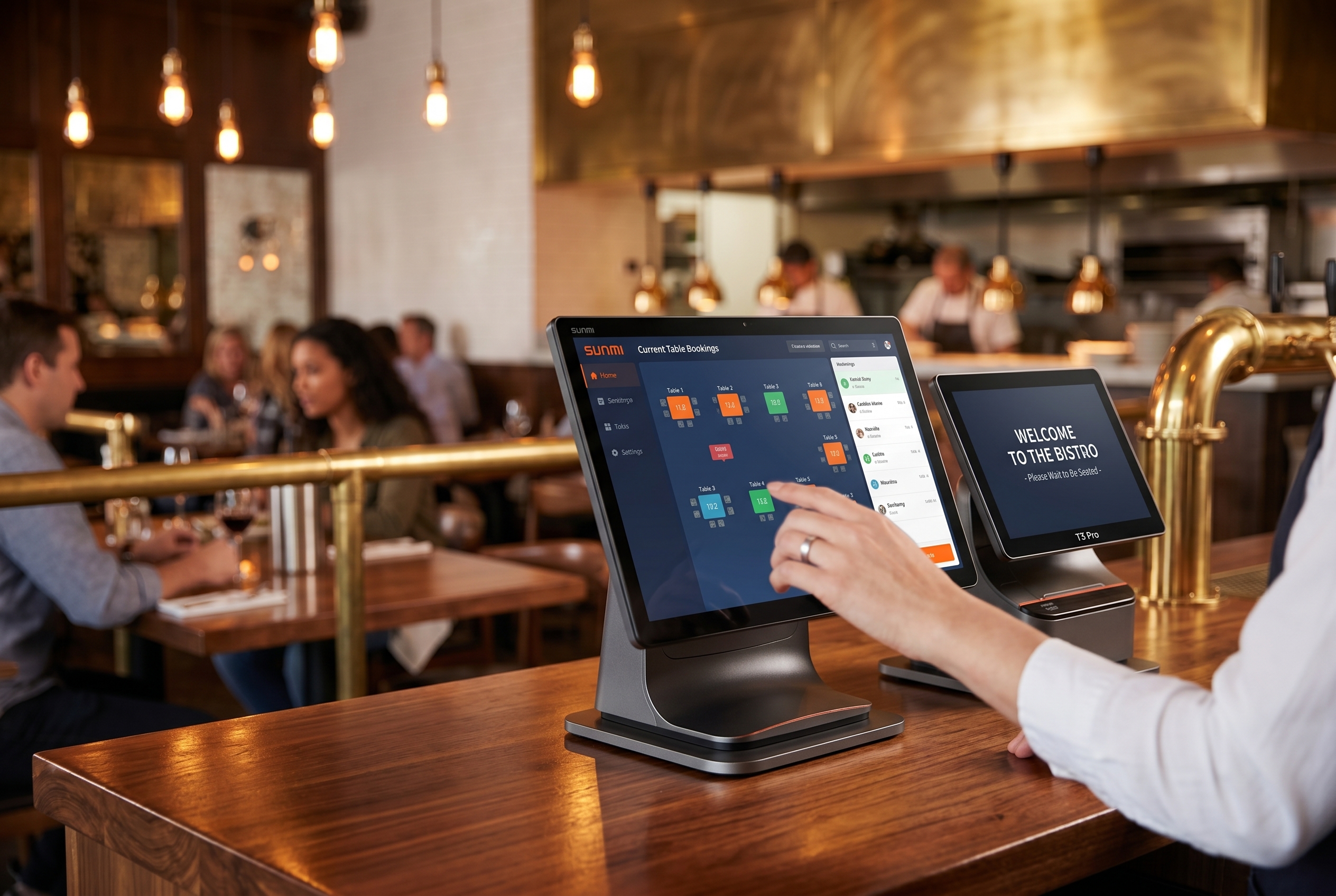
The SUNMI T3 Pro is SUNMI’s flagship commercial desktop Android POS terminal, positioned one tier above the base T3 Family. It is built around a 15.6-inch bezel-less primary touchscreen, a flippable main display that can pivot toward staff or customer, an aluminum alloy body, and an extensive I/O set for kitchen printers, barcode scanners, cash drawers, and payment peripherals.
What separates the T3 Pro from a consumer Windows all-in-one or an iPad-on-a-stand is commercial-grade engineering: a bezel-less touchscreen, aluminum alloy chassis, an integrated 80 mm Seiko thermal printer with auto-cutter on the T3 Pro MAX variant, enterprise-class Android with remote fleet management through SUNMI Cloud, and a warranty and repair footprint designed for operators who cannot afford a dead register during service.
Verified hardware configurations, pulled from SUNMI’s published T3 Pro page:
| Spec | SUNMI T3 Pro |
|---|---|
| CPU | Octa-core |
| Primary display | 15.6-inch, bezel-less, flippable |
| Display configurations | 15.6″ main only, or 15.6″ main + 10.1″ secondary, or dual 15.6″ main + 15.6″ secondary |
| Optional premium display | 18.5-inch main, available on the dual-system version (launched Q1 2026) |
| Operating system | Android version and optional Dual-OS version (Android + Windows) |
| Body | Aluminum alloy |
| Integrated printer | T3 Pro MAX variant adds an 80 mm Seiko thermal printer with auto-cutter; T3 Pro standard has no built-in printer and pairs with an external or cloud printer |
| Remote management | SUNMI Cloud MDM |
| Warranty (via Rosper) | SUNMI official 3-year manufacturer warranty |
For the full datasheet on the exact SKU – CPU clock speed, RAM, storage, I/O port count, Wi-Fi and Bluetooth versions, and accessories matrix – contact Rosper and we will send the current SUNMI T3 Pro desktop POS datasheet for the US and Canada.
Who the T3 Pro is built for
The SUNMI T3 Pro desktop POS fits a specific shape of operation. It is not a handheld, it is not a payment terminal, and it is not a kitchen-only device. It is the workstation at the heart of a checkout or service counter. Three operating patterns drive most of the demand.
1. Full-service restaurants and table-service bars
Full-service restaurants typically need multiple stations: a host stand, one or two service stations, the bar, and the expo. Each station needs a workstation large enough for a full menu, table map, and order modifiers, responsive enough for a rush, and durable enough to live on a bar top or service stand for years. The T3 Pro hits all three because it was designed around those exact constraints.
2. High-volume retail counters
Apparel, specialty retail, beauty supply, groceries, and convenience stores all share the same counter workflow: a cashier scans fast, an integrated customer display shows prices and loyalty options, and the receipt prints to an external 80 mm printer or a cloud printer. The T3 Pro’s barcode-friendly I/O, cash-drawer port, and secondary customer display make it a natural counter terminal.
3. Multi-location operators standardizing hardware
When you run 10, 50, or 200 locations, the simplest way to reduce support cost is to standardize on one desktop POS across every store. The T3 Pro is built for this because it is the same SKU everywhere, the same Android platform, the same MDM-managed fleet, and the same Rosper warranty and spare parts handling across the US and Canada.
SUNMI T3 Pro vs T3 Family: which one is right for your counter?
SUNMI publishes two distinct desktop terminal product lines: the T3 Family (entry and mid-tier commercial desktop) and the T3 Pro Family (flagship desktop with larger displays, aluminum body, and dual-OS option). Within the T3 Pro Family there are multiple display configurations to match different counter layouts.
| Line | Primary display | Typical use case | When to pick it |
|---|---|---|---|
| SUNMI T3 Family | Bezel-less commercial touchscreen, dual-sided NFC on the main screen, flippable main display, 4 GB + 64 GB, Qualcomm octa-core | Boutique retail, single-station bars, membership-driven retail counters | Budget-conscious, one-station deployments that benefit from dual-sided NFC membership scans |
| SUNMI T3 Pro – 15.6″ main | Bezel-less 15.6″ primary, aluminum alloy body; T3 Pro standard has no built-in printer (pairs with an external or cloud printer), while the T3 Pro MAX variant shares the same display and adds an integrated 80 mm Seiko thermal printer with auto-cutter | Full-service restaurants, busy QSR, retail chains | The default choice for most commercial counters |
| SUNMI T3 Pro – 15.6″ + 10.1″ dual display | 15.6″ main + 10.1″ customer-facing secondary | Boutique store, member-focused retail where the customer needs a smaller branded display | Customer-facing engagement without the cost of a second large screen |
| SUNMI T3 Pro – dual 15.6″ | 15.6″ main + 15.6″ secondary | Premium retail, flagship stores, multi-step checkouts with loyalty, promotions, and digital signage on the customer side | When customer-side UI complexity justifies a full-size second display |
| SUNMI T3 Pro dual-system (Q1 2026) | 18.5″ main available, runs both Android and Windows | Operators with Windows POS software today that are planning a dual-boot transition to Android | When you need Android hardware that still runs legacy Windows POS in the interim |
The most common upgrade path is from the T3 Family to the T3 Pro (15.6″ main) when an operator grows past a single station or moves from retail to full-service hospitality. Stepping up within T3 Pro to the dual-display or 18.5″ configurations is usually driven by customer-experience requirements – larger customer display, richer loyalty UI, or a premium flagship finish – more than by raw computing headroom.
For a full head-to-head spec comparison with exact CPU clock speeds, RAM, storage, I/O port counts, and accessories, reach out to Rosper – our team maintains an up-to-date T3 Pro comparison sheet and can match the right configuration to your store layout.
T3 Pro versus iPad POS and Windows all-in-one
Operators evaluating the T3 Pro usually compare it to one of two alternatives: an iPad-on-a-stand or a Windows all-in-one from a traditional POS reseller.
T3 Pro versus iPad POS
iPad POS is attractive because the tablet is cheap, the ecosystem is familiar, and many cloud POS apps look good on iPadOS. The trade-offs show up in deployment:
| Dimension | iPad POS stack | SUNMI T3 Pro |
|---|---|---|
| Bill of materials | iPad + stand + reader + printer + drawer | Integrated workstation + printer + drawer |
| Operating system lifecycle | Consumer iPadOS cycle | Enterprise Android with SUNMI Cloud MDM |
| Commercial duty cycle | Consumer-grade hardware | Commercial-grade, fan-less, built for always-on |
| Peripheral reliability | Bluetooth-paired, multiple vendors | Integrated I/O, single vendor |
| Fleet management | Limited, MDM via third party | Native SUNMI Cloud fleet management |
| Total cost of ownership at year 3 | Often higher than expected once replacements add up | Predictable, warranty-covered |
The iPad-on-a-stand stack is fine for a single-location pop-up or boutique. For full-service or multi-location, the total cost of ownership and support footprint usually favor the T3 Pro.
T3 Pro versus Windows all-in-one
Windows all-in-one POS terminals are the traditional incumbent in North American restaurants and retail. They are familiar and they work, but they bring a set of structural costs: ongoing Windows license fees, anti-virus and patching overhead, longer boot times, and more moving parts. The T3 Pro addresses each of those:
- No Windows license fee on the Android version
- No Windows anti-virus licensing or patch-Tuesday reboots
- Significantly faster cold boot into the POS app compared to a Windows workstation
- Enterprise Android fleet management through SUNMI Cloud instead of a heavier Windows patching workflow
One nuance worth flagging: the T3 Pro also ships in a Dual-OS version that runs both Android and Windows on the same hardware. For operators with critical Windows-only POS software, this is the refresh path that buys you an Android-ready future without forcing a same-day software migration. Enterprise Android deployments still require fleet management, of course – SUNMI Cloud or a third-party MDM – but the operational footprint is lighter than patching a fleet of Windows workstations.
Deployment checklist for the T3 Pro
Before you roll out the T3 Pro across stores, the following checklist saves time.
- Confirm your POS or ordering platform runs on Android. Most modern cloud POS platforms do; legacy Windows-only POS software does not. Ask your vendor directly for T3 Pro compatibility.
- Decide on primary plus secondary display layout. A secondary customer-facing display changes the counter ergonomics – plan the mount before ordering.
- Map peripheral I/O per station. Kitchen printer routing (Ethernet or cloud), cash drawer, barcode scanner, and card reader all connect to the T3 Pro. Map each before deployment so nothing is missed.
- Enroll units in SUNMI Cloud MDM. Every T3 Pro shipped through Rosper can be pre-enrolled into SUNMI Cloud for remote management, which makes scaling beyond a handful of stores manageable.
- Standardize a boot-into-POS launcher. Commercial deployments should never show a generic Android home screen to staff. A locked-down launcher that boots directly into the POS app is standard practice.
- Train on paper loading, rebooting, and peripheral troubleshooting. Hardware is only as good as the staff running it; 15 minutes of training per store pays back 10x in reduced support calls.
Why operators buy the T3 Pro from Rosper
For restaurants and retail chains in the US and Canada, buying direct from SUNMI overseas creates problems: lead times of weeks, no local warranty honor, customs paperwork on every shipment, and no one to call when a device fails during Friday dinner service. Rosper solves each of those.
- Local stock: T3 Pro units ship from our Maryland and Los Angeles warehouses with 2-7 day delivery across the US and Canada.
- Warranty: SUNMI’s manufacturer warranty (3 years on Gen 2-3 devices; 1 year on Gen 1 and wear parts) is coordinated through Rosper, so replacements do not cross a border a second time.
- Volume pricing: Chains, franchise networks, and ISVs get tiered pricing and dedicated account support.
- Rollout support: We coordinate pre-configuration, MDM enrollment, and spares planning so Day 1 at a new location is not a scramble.
- Spec matching: Our team maintains a living T3 Family and T3 Pro Family comparison sheet and will match the right configuration (T3 Family, T3 Pro 15.6″, 15.6″ + 10.1″ dual, dual 15.6″, or Q1 2026 dual-system with 18.5″ main) to each store layout.
Frequently asked questions
What is the SUNMI T3 Pro?
The SUNMI T3 Pro is a commercial Android desktop POS terminal with a large primary touchscreen, optional customer-facing secondary display, and full I/O for kitchen printers, cash drawers, barcode scanners, and payment peripherals. It is designed for full-service restaurants, retail counters, and multi-location operators in the US and Canada.
How is the T3 Pro different from the T3 Family?
The T3 Family is the entry and mid-tier commercial desktop, with a bezel-less touchscreen, dual-sided NFC on the main screen, a flippable main display, a Qualcomm octa-core CPU, and 4 GB RAM plus 64 GB storage. The T3 Pro Family is the flagship tier, with a larger 15.6-inch primary display, aluminum alloy body, an optional built-in thermal printer with auto-cutter, multiple secondary-display configurations (15.6″ main only, 15.6″ + 10.1″ dual, or dual 15.6″), and an Android-plus-Windows dual-system option. A premium 18.5-inch main display on the dual-system version launched in Q1 2026. Rosper can share the current T3 Pro comparison sheet and match the right configuration to your store layout.
Does the T3 Pro run my cloud POS software?
If your POS platform supports Android, yes. Most modern cloud POS platforms do. Legacy Windows-only POS software does not run on the T3 Pro – reach out to your vendor directly for Android compatibility.
Can the T3 Pro replace my Windows POS workstations?
For most full-service restaurants and retail operators, yes. The T3 Pro eliminates Windows licensing, anti-virus overhead, and long boot times, while running a modern Android platform that is remotely manageable through SUNMI Cloud. The refresh path is most straightforward when your POS software already has an Android build.
How is the T3 Pro different from an iPad-on-a-stand POS?
The T3 Pro is a single commercial workstation with integrated I/O, commercial duty cycle engineering, and enterprise Android fleet management. An iPad-on-a-stand is a consumer tablet plus Bluetooth peripherals, which works for boutique single-location operations but adds cost and support overhead at scale.
Is the T3 Pro warranty honored in the US and Canada?
Yes. When purchased through Rosper, the authorized SUNMI distributor for the US and Canada, the T3 Pro (a Gen 3 device) carries SUNMI’s 3-year manufacturer warranty, with wear parts under a 1-year warranty. Rosper helps you connect with SUNMI for after-sales support and coordinates replacements through our Maryland and Los Angeles warehouses.
Can I deploy the T3 Pro across a franchise network?
Yes. Rosper supports multi-location roll-outs with pre-configured SUNMI Cloud enrollment, tiered volume pricing, and spares planning. Contact us with your store count and target deployment window and we will scope the plan.
Buying the SUNMI T3 Pro in the US and Canada
Rosper is the authorized SUNMI distributor for the United States and Canada. We stock the SUNMI T3 Pro family in our Maryland and Los Angeles warehouses, with SUNMI’s manufacturer warranty (3 years on Gen 2-3 device bodies; 1 year on wear parts and Gen 1), US and Canada shipping, and local account support for multi-location operators and ISVs.
Whether you are refreshing a full-service restaurant, standardizing retail checkout across a chain, or building an ISV hardware bundle for merchants, request a quote and we will match the right T3 tier, accessories, and deployment plan to your operation.
Contact the Rosper team via our contact page to discuss your requirements.
About Rosper
Rosper is the authorized SUNMI distributor for the United States and Canada. We ship POS terminals, kiosks, payment devices, and accessories from eight warehouses across North America, backed by SUNMI’s manufacturer warranty (3 years on Gen 2-3 devices; wear parts and Gen 1 devices: 1 year) and local account support. Read more on our official blog or connect with us on LinkedIn and YouTube.