
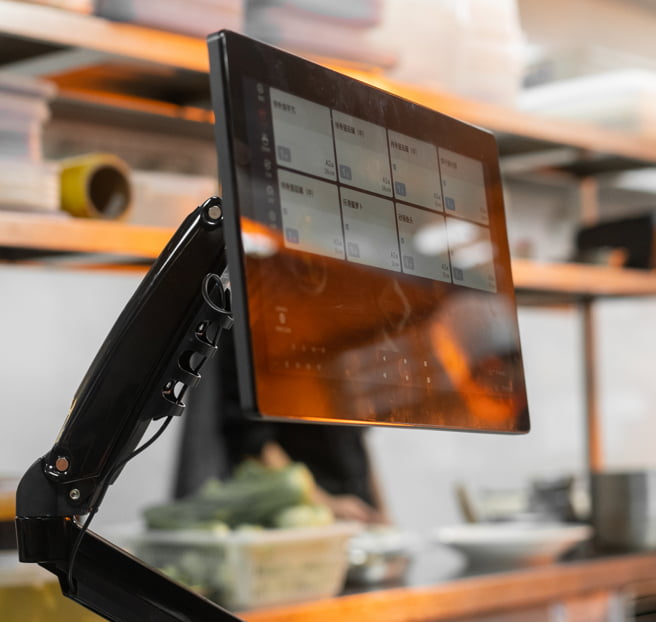
Restaurant kds hardware from Rosper Technology and SUNMI is quietly becoming the most-touched device in a modern kitchen. According to the National Restaurant Association 2026 State of the Restaurant Industry report, 60 percent of operators plan to invest more in tech this year, with roughly 50 percent targeting back-of-house upgrades.
SUNMI already serves 1.5 million+ merchants globally and Rosper stocks the full Android KDS catalog in North American warehouses.
Yet 47 percent of QSR employees told researchers at Canopy in a 2026 report covered by QSR Magazine that they still rely on workarounds like re-entering orders at least once a week. The underlying kitchen hardware was never designed for the environment it runs in.
This 2026 buyers guide is written for two audiences. Multi-location operators standardizing kds hardware across 5 to 50 kitchens who need a spec sheet they can hand to procurement. And independent restaurant owners replacing paper tickets or a cracked consumer tablet with a real Android KDS terminal for the first time.
We cover the seven specs that separate a two-year kitchen device from a five-year one, walk through the two SUNMI KDS models Rosper Technology stocks in North American warehouses, and give you a shortlist you can act on this quarter.
Every recommendation below is anchored to Rosper Technology’s field experience across 50+ North American restaurant deployments and SUNMI’s global installed base of 1.5 million+ merchants. No consumer tablet workarounds, no vendor lock-in.
KDS hardware: Key takeaways
- Screen size drives station design. 15.6 inch is the sweet spot for expo and prep stations, 21.5 inch and up for high-volume line stations or pass windows.
- IP rating is non-negotiable. IP54 handles steam and splashes, IP55 handles direct water spray and grease cleanup. Consumer tablets have no IP rating at all.
- PoE saves the install. Power over Ethernet means one cable per kds hardware unit, no dedicated outlet behind the wall, no tripped circuits at peak.
- Android KDS terminals stay open. Rosper’s SUNMI D2s KDS and FLEX 3 run Loyverse KDS, Fresh KDS, Petpooja, and custom kitchen apps side by side. No forced software subscription.
What is a KDS and why Android in 2026
A kitchen display system, or KDS, is the touchscreen terminal that replaces paper tickets and receipt printers on the kitchen line. Orders arrive from the POS terminal, front-of-house tablets, or online ordering channels. Cooks bump tickets when items are ready, and the display auto-routes what comes next.
The Global Kitchen Display Systems market was valued at roughly USD 520 million in 2024 and is projected to grow at 7.15 percent CAGR through 2030 according to MarkNtel Advisors. Growth is driven by delivery volume, multi-location expansion, and labor shortages that force restaurants to do more with fewer hands.
That growth is almost entirely Android based. Android gives operators three practical advantages over legacy Windows or proprietary displays.
First, Android KDS terminals ship with commercial-grade touch, sealed housings, and glove-friendly screens at price points that consumer tablets cannot match.
Second, the Android app model means you can run the KDS software you already use, or switch software later without replacing the hardware.
Third, Android devices are managed at scale through MDM, which every multi-location operator will need once the fleet passes 10 units.
The alternative, consumer iPads or Galaxy tablets in rugged cases, still shows up in food trucks and small cafes. It works until it does not. Industry buyers guides consistently note that high heat and grease shorten consumer tablet life to two or three years, versus five plus for purpose-built Android KDS hardware.
Screen size guide: 10.1 inch, 15.6 inch, 21.5 inch and up
Screen size is the first decision because it dictates where the kds hardware physically fits and how many tickets a cook can see at a glance.
10.1 inch to 11 inch. Best for expo confirmation, drink stations, or a secondary display in a tight prep corner. Not enough real estate to show four to six concurrent tickets on a busy Saturday, so avoid as your primary line display.
15.6 inch FHD. The industry standard for line stations, expo, and pass windows in independent restaurants and 90 percent of QSR back-of-house workflows. 1920×1080 gives you four to six large ticket cards with legible item modifiers from three feet away. This is where the SUNMI D2s KDS lives.
18.5 inch to 22 inch. Right for high-volume QSRs, ghost kitchens running three or more delivery channels concurrently, and any kitchen where multiple cooks share one display. This is FLEX 3 territory.
27 inch. Pass window, kitchen manager overview station, or ghost kitchen central expo. Displays 10 plus tickets at once with room for a sidebar summary. FLEX 3 also offers this size.
A common mistake is over-sizing every station. A 27 inch display at a two-cook line station wastes wall space and money. A common under-sizing mistake is putting an 11 inch tablet at a 200 ticket per hour QSR expo, which forces the expo cook to scroll and creates missed items.
Durability rating: why IP54 and IP55 matter in kitchens
The IP rating (Ingress Protection) is a two-digit code. First digit for solids, second for liquids. In a commercial kitchen, only the second digit does the work you care about.
IP54 handles limited dust ingress and water splashes from any direction. This is enough for a station away from the direct spray zone, or any prep, expo, or ordering location where you clean with a damp cloth. The SUNMI FLEX 3 carries IP54.
IP55 steps up to sustained low-pressure water jets from any direction. That means a line cook can hit the screen with a spray bottle at end of shift, and grease cleanup with a foaming degreaser will not kill the device. This is the standard for hot line stations, fryer areas, and dish return. The SUNMI D2s KDS is IP55 sealed.
Consumer tablets have no IP rating. The best rugged cases add IP54 at best, and only for the tablet body, not the touchscreen surface. In practice this is why restaurants replace consumer tablets every 18 to 30 months while commercial Android KDS hardware runs five plus years.
Connectivity: Wi-Fi, Ethernet, and Power over Ethernet
Kitchen kds hardware needs three things from a network: reliable throughput, a fallback path, and simple cabling. Wi-Fi alone is not enough in most commercial kitchens because stainless steel surfaces, high-voltage equipment, and thick walls degrade 2.4 GHz and 5 GHz signals unpredictably.
Dual-band Wi-Fi (2.4 GHz and 5 GHz). The floor. Every Android KDS terminal Rosper sells supports both. The FLEX 3 goes further with Wi-Fi 6 (802.11ax) for congested multi-device networks.
Gigabit Ethernet. Non-negotiable for any station handling more than 100 tickets per hour. Wired backhaul eliminates the mid-service disconnect that consumer tablets are notorious for.
Power over Ethernet (PoE). This is the install-time win. One CAT6 cable delivers both power and network to the device. No dedicated 110V outlet behind the display, no adapter dangling in a grease zone, no tripped circuit at the fryer.
Both the SUNMI D2s KDS and SUNMI FLEX 3 support PoE. For a chain rolling out 30 KDS units across 10 locations, PoE alone can cut electrical install cost by 40 to 60 percent per site.
Mounting options: wall, counter, arm, and VESA
Where the display sits matters as much as the display itself. Commercial Android KDS hardware supports VESA (Video Electronics Standards Association) mounting patterns, typically 75×75 mm or 100×100 mm, which lets you use any standard bracket.
Wall mount. The dominant install for the line and expo. Keeps the counter clear, puts the display at cook eye level, and simplifies cable management when combined with PoE. Both D2s KDS and FLEX 3 wall-mount with a standard VESA bracket.
Counter or desktop stand. Right for prep stations, pass windows, and any location where the display needs to swivel for two cooks working opposite sides. FLEX 3 ships with a desktop stand option, and G-sensor auto-rotates portrait or landscape.
Articulating arm. The pro install for high-volume line stations where cooks need to pull the display closer, push it out of the way for cleaning, or share it between two zones. VESA-compatible arms from third parties work with both models.
Pole mount. Ghost kitchens and central expo counters use pole mounts to put a large FLEX 3 above the pass window, visible to every cook on the line. Cable routes through the pole and terminates behind the wall.
Software compatibility: open Android KDS ecosystem
The single most misunderstood decision in kds hardware is software lock-in. Many closed kitchen displays only run the software from the same vendor that sold the hardware, so if you ever want to switch POS or add a delivery aggregator, you buy new displays too.
Rosper’s Android KDS terminals are open Android. That means you install the KDS app your kitchen actually uses, and swap it later without changing the hardware. Verified open Android KDS apps that run on SUNMI D2s KDS and FLEX 3 include:
- Loyverse KDS, free tier plus paid, popular with cafes, coffee shops, and independent full-service restaurants running Loyverse POS.
- Fresh KDS, purpose-built kitchen display app with modifier grouping, all-day view, and expo screen support. Common in fast casual.
- Petpooja KDS, full restaurant management platform with strong presence in cloud kitchens and multi-brand ghost kitchen operators.
- Custom kitchen apps, any Android app targeting API 30 or newer will run on the D2s KDS (Android 11) and FLEX 3 (Android 13).
Multi-location operators typically standardize on one KDS app across the fleet, then use SUNMI MDM (included free with every Rosper device) to push updates, lock down permissions, and remotely reboot devices from a single console. That last capability matters more than most buyers realize until the first time a KDS freezes at 7 pm on a Friday.
Featured Rosper Android KDS terminals
SUNMI D2s KDS: the 15.6 inch kitchen workhorse
The SUNMI D2s KDS is the direct answer to the 15.6 inch line station question. Winner of the iF Design Award 2024, it targets independent restaurants standardizing kitchen ops and multi-location operators building a consistent KDS spec.
Core specs:
- Display: 15.6 inch FHD (1920×1080) PCAP touchscreen, glove-compatible high-sensitivity touch
- OS: SUNMI OS 4.0 based on Android 11
- CPU / RAM / Storage: Quad-core Cortex-A55 at 1.8 GHz, 4 GB RAM, 64 GB storage
- Durability: IP55 sealed housing, resistant to grease, steam, and cleaning agents
- Connectivity: Dual-band Wi-Fi (2.4 GHz + 5 GHz), Gigabit Ethernet with PoE, 4x USB, RJ11 serial, audio jack
- Mounting: VESA 75 or 100, wall / pole / arm, horizontal or vertical orientation
- Design touches: Concealed wiring, rounded corners for easy cleaning, side button design
The D2s KDS is the recommended default for restaurants deploying one to three KDS units per location on the line and expo. Price positioning sits in the mid tier of commercial Android KDS hardware.
SUNMI FLEX 3: the interactive display for high-volume kitchens
The SUNMI FLEX 3 is a 2026 SKU positioned as an Interactive Display, tagline “Flexibility for endless options.” It scales past the D2s KDS for kitchens that need bigger screens, faster processors, and dual-purpose deployment (KDS by day, self-order kiosk by evening for hybrid concepts).
Core specs:
- Display: 18.5 inch, 22 inch, or 27 inch FHD (1920×1080), 400 nits brightness, capacitive multi-touch, anti-fingerprint coating, 16 mm narrow bezel
- OS: SUNMI OS 4.0 based on Android 13
- CPU / RAM / Storage: Qualcomm 8-core up to 2.7 GHz (6 nm), 6 GB RAM, 128 GB storage, expandable microSD up to 2 TB
- AI: Up to 13 TOPS accelerator, voice interaction and facial recognition ready
- Durability: IP54 protection against dust and water splashes
- Connectivity: Dual RJ45 Gigabit Ethernet, Wi-Fi 6 (802.11ax), Bluetooth 5.2, NFC (EMVCo PCD L1 certified), USB / Type-C, RS485/RS232
- Mounting: Desktop stand, floor stand, wall mount, POS bracket, most install in under 10 minutes
The FLEX 3 is the recommended pick for pass windows, ghost kitchens running three or more delivery channels, and any operator planning a dual KDS plus self-order deployment on the same hardware SKU.
Comparison table: SUNMI Android KDS hardware
| Model | Screen | Resolution | Android | IP Rating | PoE | Best For | Price Tier |
|---|---|---|---|---|---|---|---|
| SUNMI D2s KDS | 15.6 in | 1920×1080 | 11 | IP55 | Yes | Line and expo, 1-3 units per location | Mid |
| SUNMI FLEX 3 (18.5 in) | 18.5 in | 1920×1080 | 13 | IP54 | Yes | Prep and expo, dual-use with kiosk | Mid-High |
| SUNMI FLEX 3 (22 in) | 22 in | 1920×1080 | 13 | IP54 | Yes | Pass window, high-volume line | High |
| SUNMI FLEX 3 (27 in) | 27 in | 1920×1080 | 13 | IP54 | Yes | Ghost kitchen central expo | High |
For exact price quotes and volume pricing, contact Rosper Technology. Rosper stocks all four SKUs in North American warehouses with 2 to 7 day delivery.
Warranty and support: what you actually get
Every SUNMI device sold through Rosper includes SUNMI’s official manufacturer warranty. Both the D2s KDS and FLEX 3 are Gen 2 or Gen 3 hardware, which carries a 3-year SUNMI warranty. Wear parts (chargers, batteries, printer components) are covered for 1 year regardless of generation.
Rosper Technology handles North American coordination. Customers submit RMA tickets through Rosper rather than contacting SUNMI directly. Rosper can also dispatch emergency replacement units from local inventory while warranty claims are processed.
For multi-location operators, this is the difference between a 48-hour ticket and a 3-week international RMA delay.
How to shortlist your kds hardware in three steps
Step 1: Map the stations. Walk the kitchen with a notepad. Note every location that currently uses a paper ticket printer, consumer tablet, or open station where a KDS would land. For each, record station name, expected tickets per hour at peak, and whether it sits inside or outside a direct spray zone.
Step 2: Match the model. Direct spray zone plus under 150 tickets per hour equals D2s KDS 15.6 inch IP55. Pass window plus 300 plus tickets per hour equals FLEX 3 22 inch. Ghost kitchen central expo running 3 plus delivery channels equals FLEX 3 27 inch.
Step 3: Plan the install. Confirm CAT6 runs to each station for PoE. Confirm VESA mount pattern. If you have any doubt about network coverage, run a Wi-Fi survey with a phone app before ordering. Rosper’s team can help you scope the install if you share a floor plan.
Frequently asked questions
What is the difference between a KDS and a POS terminal?
A POS terminal takes orders and payment at the front of house. A KDS receives those orders and displays them to kitchen staff for preparation. The two devices talk to each other via the restaurant’s software layer.
You can run POS and KDS on the same hardware SKU, but in most kitchens separate devices are the right call because the environments differ (customer-facing versus grease and steam).
Do I need Android 13 or is Android 11 fine for a KDS?
Android 11 is fine for the vast majority of KDS deployments. All major open Android KDS apps (Loyverse, Fresh KDS, Petpooja) target Android 8 or later and run without issue on the D2s KDS. Choose Android 13 (FLEX 3) if you plan to run AI features, facial recognition, or newer custom apps that require API 33 or higher.
How many KDS units does a typical restaurant need?
Independent full-service restaurants typically deploy 2 to 3 units: one at the line, one at expo, one optional at prep or bar. QSR and fast casual usually run 3 to 5 units to route by station (grill, fryer, cold prep, expo, drive-thru). Ghost kitchens running multiple delivery brands often need 4 to 8 units to keep each channel visually separate.
Can I use a consumer tablet as a KDS instead of buying dedicated kds hardware?
Technically yes, and it is a legitimate starter path for a food truck or 20-cover cafe. In practice, consumer tablets in kitchens fail on IP rating, glove touch, and mounting.
Multi-location operators who tried the consumer tablet path almost always upgrade to commercial Android KDS hardware within 18 to 30 months because of replacement cycles and inconsistent uptime.
What KDS software works with SUNMI D2s KDS and FLEX 3?
Any Android KDS app that targets Android 8 or newer. Popular verified apps include Loyverse KDS, Fresh KDS, and Petpooja KDS. Restaurants running custom in-house kitchen apps or vertical-specific platforms (pizza, sushi, ghost kitchen orchestration) can side-load their app via SUNMI’s app store or MDM push.
How does Power over Ethernet (PoE) install actually work in a restaurant?
You need a PoE switch (or PoE injector) on the network side. A single CAT6 cable runs from the switch to each KDS unit, carrying both data and up to 30 watts of power. The KDS unit needs no separate power outlet.
For a 10-location rollout with 30 KDS units, PoE typically cuts electrical install cost by 40 to 60 percent because you skip dedicated outlets behind every display.
How long does commercial Android kds hardware last in a real kitchen?
Purpose-built Android KDS hardware with IP54 or IP55 sealing typically runs 5 plus years in a real kitchen environment. This is why the 3-year SUNMI warranty on the D2s KDS and FLEX 3 is a fair proxy for expected minimum service life. Consumer tablets in the same environment tend to fail at 18 to 30 months.
Ready to spec your KDS deployment
Rosper Technology stocks the SUNMI D2s KDS, SUNMI FLEX 3, and the full SUNMI Android hardware catalog in North American warehouses.
Free SUNMI MDM is included with every device. Rosper’s team can help you scope a multi-location deployment, plan the PoE install, and coordinate warranty support once you are live. Reach out for a quote sized to your restaurant footprint.
— ## Cover image prompt (for ChatGPT GPT-生图 project) **Prompt**: Studio product photography of a SUNMI D2s KDS 15.6-inch kitchen display terminal mounted on a stainless steel restaurant kitchen counter. Modern commercial kitchen in soft morning light through a nearby window. The KDS device is centered, angled slightly to show the black bezel and glowing FHD screen. Screen displays a clean, generic order queue interface with anonymous ticket cards (no visible brand names or logos). Background: blurred stainless steel prep counter, a matte-finish steel wall panel, subtle warm daylight. Aesthetic: premium restaurant tech, minimalist, editorial. Color palette: cool steel gray, warm morning light, deep black device. No text overlay, no vendor branding, no logos visible. Sharp focus on the KDS device. 1200×630 landscape aspect ratio. Style: high-end commercial product photography, natural light, shallow depth of field. **Alt text**: sunmi-d2s-kds-hardware-restaurant-kitchen — ## External data sources (for reference) 1. National Restaurant Association, 2026 State of the Restaurant Industry, technology investment intent (60% front of house, ~50% back of house) 2. Canopy 2026 Restaurant Tech report (“Fast Food Fault Lines”), 47% of QSR employees use workarounds weekly, coverage via QSR Magazine 3. MarkNtel Advisors, Global Kitchen Display Systems Market USD 520M in 2024, 7.15% CAGR through 2030 4. SUNMI D2s KDS official product page (sunmi.com/en/d2s-kds), iF Design Award 2024, specs 5. Rosper Technology product pages (rospertech.com/products/d2s-kds, /products/flex3, /warranty)