
SUNMI D3 Mini review: Key takeaways
- D3 Mini sits between handheld and full counter. Its 10.1-inch form factor and detachable card reader make it the right choice for tableside, mobile checkout, and tight counter footprints where a T3 Pro is overkill.
- Android 13 GMS with Play Store is shipping today. The D3 Mini ships with Play Services in North America, so cloud POS apps and processor SDKs install through standard MDM flows without AOSP workarounds.
- Peripherals attach over USB-C and Bluetooth. Receipt printer, cash drawer, and handheld scanner all certified on the D3 Mini reference design – no custom integration work.
- Restaurants and small retail are the sweet spot. Most ROI comes from quick-service restaurants, salons, and specialty retail where counter space is the binding constraint and an all-in-one beats a tower PC stack.
Table of contents
- Table of contents
- What the D3 Mini is
- Form factor and build
- Performance in real-world use
- Connectivity and ports
- Payments and certifications
- Where the D3 Mini shines
- D3 Mini vs Clover Mini and Square Register
- What we would change about the D3 Mini
- The verdict
- Ready to deploy the D3 Mini
- Frequently asked questions
- Further reading
The SUNMI D3 Mini sits in an awkward part of the POS hardware market. It is not a handheld, so it does not compete with mobile devices like the V2 or M3. It is not a full desktop POS, so it does not compete with the SUNMI T3 family. It is a compact all-in-one with an integrated printer, scanner, and NFC reader, the size of a small cash register. That used to be a category dominated by the Square Register and the Clover Mini. The D3 Mini is SUNMI’s answer.
This review covers the D3 Mini for North American operators. It is not a paid placement. We sell the D3 Mini at Rosper as the authorized SUNMI distributor for the US and Canada, but the goal here is to tell you when the D3 Mini is the right answer and when it is not. Skip to the verdict at the end if you want the short version.
What the D3 Mini is
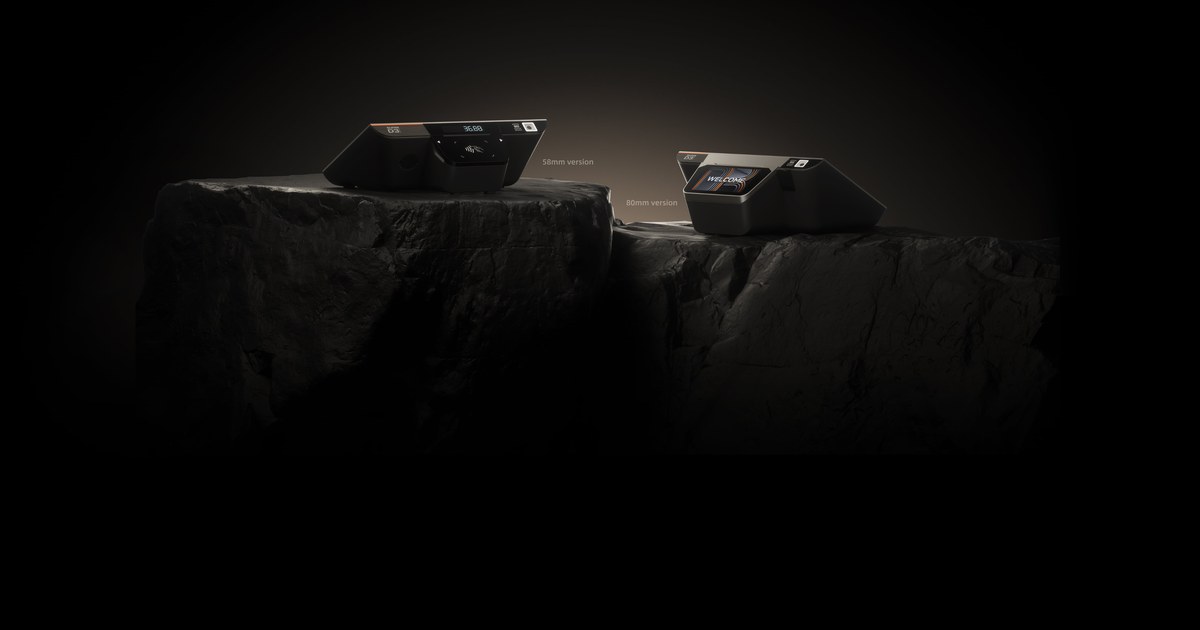
The D3 Mini is a compact all-in-one POS terminal in two physical variants:
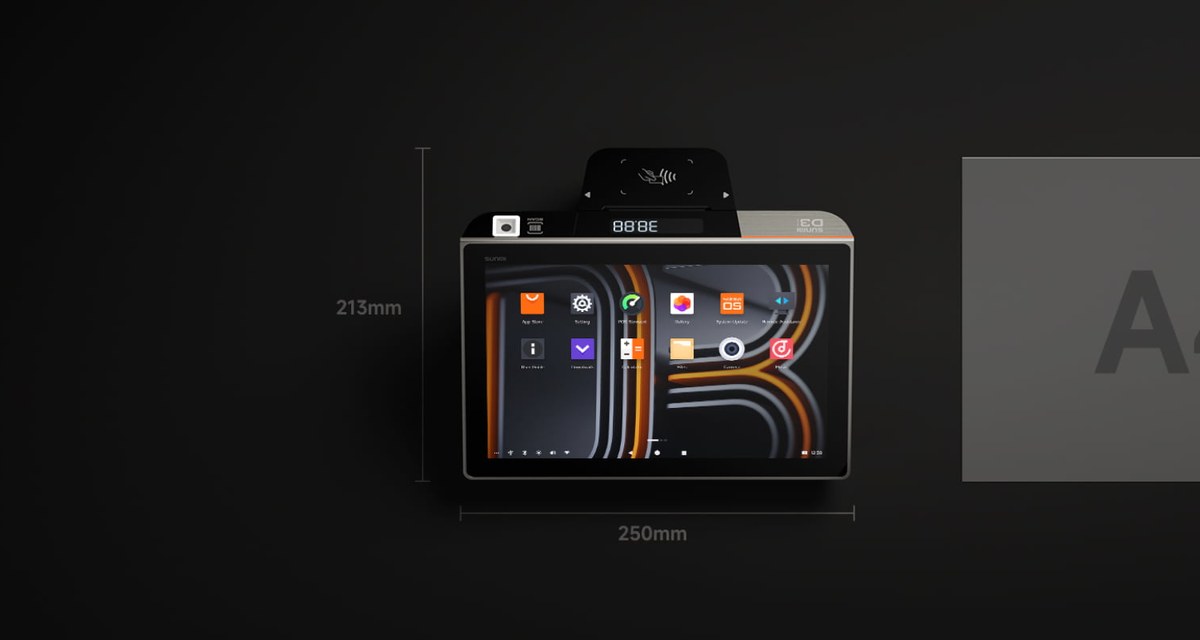
- D3 Mini 58 mm (model TT720 or TT721): 10.1-inch main display, 2.4-inch secondary seven-segment display for showing the customer the total, 58 mm thermal printer, optional built-in 2600 mAh battery rated for up to 4 hours of operation. Weighs 1.1 kg. Dimensions 250 by 213 by 91 mm.
- D3 Mini 80 mm (model TT730 or TT731): 10.1-inch main display, 4-inch IPS WVGA secondary touchscreen for customer-facing displays, 80 mm thermal printer with auto cutter, no battery. Weighs 1.4 kg. Dimensions 250 by 231 by 108 mm.
Both run SUNMI OS based on Android 13, on a Qualcomm hexa-core processor at up to 2.4 GHz, with 3 GB RAM and 32 GB ROM. Both include a built-in 1 megapixel barcode scanner that reads 1D and 2D codes, an NFC reader for contactless payments, dual-band Wi-Fi, Bluetooth 5.0, and 4G LTE.
The 10.1-inch main display is 800 by 1280 IPS at 300 nits with a 10-point capacitive touch panel. It is bright enough for indoor use, dim for direct outdoor sun. The chassis is a single-piece molded shell with a flat counter footprint. The printer compartment opens with a single latch.
Form factor and build
Pick up a D3 Mini next to a Square Register or a Clover Mini and the first thing you notice is the integration. Square pairs its register with a separate printer puck. Clover’s Mini wraps a tablet in a base that hosts the printer and the customer-facing payment surface. The D3 Mini does both jobs in a single chassis the size of a hardback book, with a built-in cellular modem on top.
The 58 mm version with the battery is the surprise. A 1.1 kg POS terminal that runs on its own battery for half a shift is genuinely portable. You can move it from the inside of a coffee bar to an outdoor patio cart and back without re-cabling. The 80 mm version is heavier and AC-powered, which makes it the right choice for a fixed counter.
Construction quality is consistent with the SUNMI product line. The thermal printer compartment uses a rubber-sealed door to keep coffee splash and dust out. The card reader window is recessed slightly so it does not collect debris. The power button doubles as a screen lock. The reset button is hidden under a pinhole, which is correct for a customer-facing device.
Performance in real-world use
The hexa-core 2.4 GHz Qualcomm processor is over-specced for the workload most operators will ever throw at this device. A Square Register runs on an iPad-class chip; the D3 Mini’s silicon is comparable. In practice this means:
- App launch is fast. A cold-start of a typical POS app on the D3 Mini lands in 2 to 4 seconds.
- The printer is the bottleneck on transactions, not the CPU. A 250 mm per second print speed on the 80 mm version handles a six-line receipt in under 2 seconds. The 58 mm variant prints at 100 mm per second, which is fine for short receipts but slower than the 80 mm.
- Multi-app workflows work. Switching from a POS app to a kitchen display app to a back-office inventory app is fluid. The 3 GB RAM is the constraint long term; we have not seen RAM exhaustion in normal POS workloads.
- The barcode scanner is fast and accurate on screens and paper. The integrated 1 MP scanner reads 1D and 2D codes including QR codes on phone screens, which is the modern coupon and pay format.
Where the D3 Mini falls down is on graphics-heavy workloads. If you run a digital signage app or video-loop content on the customer-facing 4-inch secondary screen, you will see the performance ceiling. SUNMI does not target this device for video signage, and it shows.
Connectivity and ports
The port array on the D3 Mini is unusually generous for a compact POS. The 80 mm version exposes:
- 3 USB 2.0 Type A ports
- 1 RJ11 serial port for legacy peripherals
- 1 RJ12 cash drawer port
- 1 RJ45 LAN port for wired ethernet
- 1 audio jack
- 1 power port
The 58 mm version has the same array except the USB ports are Type A without the 2.0 designation called out, the RJ12 cash drawer port is identical, and the device adds a 2600 mAh battery socket internally.
For card reading, the device complies with ISO 14443 and ISO 15693, supports Type A and B, Mifare, and Felica cards, and reads at 0 to 4 cm. There are 2 PSAM card slots at 3.0 V and 2 SIM slots supporting 1.8 V or 3.0 V for cellular operation.
The result is a POS that talks to almost any peripheral you already own. A wired ethernet drop is rare in food trucks but common in cafés and small retail. The RJ12 cash drawer port is the same pinout as Square’s, so existing cash drawers carry over. The legacy RJ11 serial port is the surprise; it accommodates pole displays and weighing scales that older operators still have on the counter.
Payments and certifications
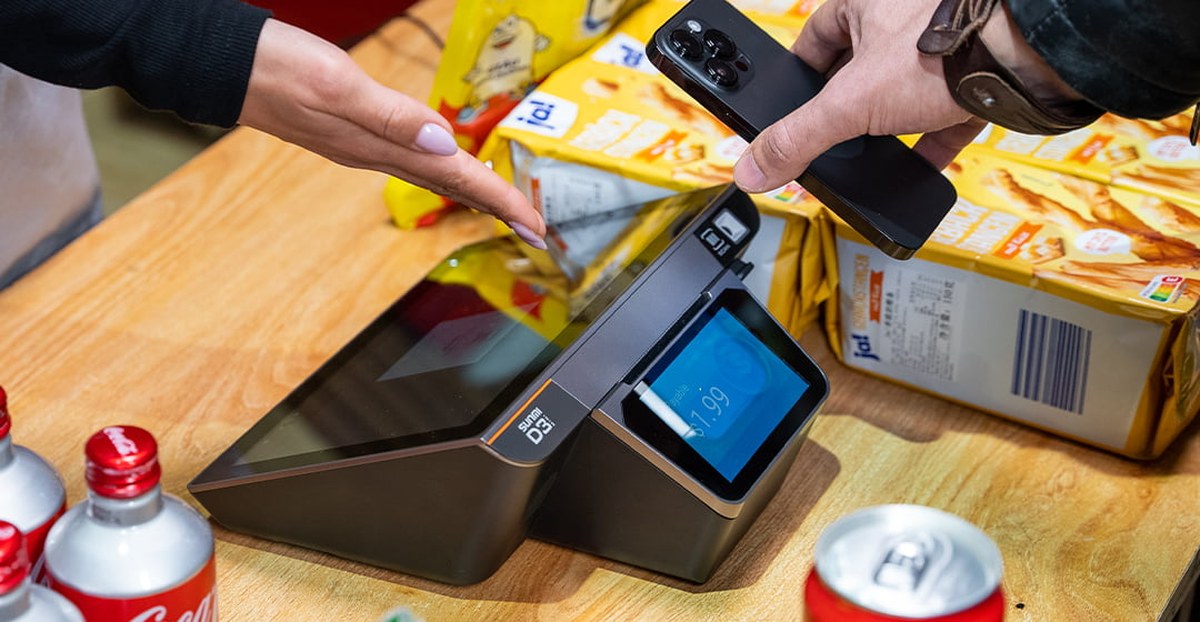
The D3 Mini accepts contactless payments through the embedded NFC reader. SoftPOS works on the device for tap-to-pay credit and debit, subject to the acquirer’s SoftPOS support. For chip-and-PIN, an external EMV PIN pad is required; the D3 Mini does not have a built-in EMV slot. This is the same architecture as the Clover Mini.
For the US, EMV-bearing transactions typically route through an external PAX or Ingenico EMV terminal connected via USB or Bluetooth. For Canada, Interac Flash contactless works through SoftPOS where supported. Operators running PCI scope considerations should review the SoftPOS architecture with their acquirer.
Where the D3 Mini shines
Three deployment patterns get the most out of the D3 Mini.
Coffee shops, cafés, and small retail counters. The 80 mm version with auto-cutter sits permanently on a counter, runs the POS app, prints receipts, reads barcodes, and accepts contactless payments. The fixed counter footprint is a feature: customers see a real piece of POS hardware, not a tablet on a stand. The 4-inch customer-facing display shows the total clearly.
Food trucks and mobile vendors. The 58 mm version with the 4-hour battery is the right pick. Take it out of the truck for an event, run a half-day pop-up, recharge overnight. The cellular modem keeps payments and cloud sync working even when the venue’s Wi-Fi is spotty.
Pop-up retail, farmers markets, and seasonal kiosks. Same use case as food trucks but with the 80 mm version if you have AC power at the venue.
The D3 Mini is not the right pick for:
- High-volume QSR self-order kiosks. That is the K2 Mini or full-size K2 territory. Read our K2 Mini for restaurants guide for the kiosk story.
- Pure handheld payment scenarios. For at-table payment in full-service restaurants or in-aisle payment in big-box retail, use a SUNMI V3 family or M3 handheld.
- Large retail formats with full back-office workstations. A SUNMI T3 Pro desktop POS is the better answer.
D3 Mini vs Clover Mini and Square Register
The most common comparison shoppers run is D3 Mini against the Clover Mini and the Square Register. The honest version:
Hardware. The three devices are comparable. Display sizes are within an inch. Printer speeds are in the same range. Processor performance is comparable. The D3 Mini has a wider port array and a battery option that Clover and Square do not match.
Software lock-in. This is the real difference. The Clover Mini runs Clover’s software stack with a monthly per-device fee and is bound to Fiserv as the acquirer. The Square Register runs Square’s software stack with Square’s payment processing built in. The D3 Mini runs Android. Whatever POS app you choose, whatever acquirer you choose, the hardware does not lock you in. Switch POS vendors next year and you keep the D3 Mini.
Total cost. Three to five years out, the D3 Mini is materially cheaper than a Clover Mini or a Square Register because there is no per-device monthly software fee paid to the hardware vendor. Your POS software cost is whatever app vendor you choose, paid to them directly, often less than the bundled all-in-one fee.
Support. Clover and Square handle their own support. The D3 Mini’s warranty is provided by SUNMI, with Rosper coordinating RMA in the US and Canada. We carry the 3-year main-unit warranty and 1-year wear-parts warranty as published on the Rosper warranty page.
The honest verdict: if you are early stage, do not have a POS preference yet, and want a vendor to handle everything end to end, Square or Clover are fine. If you want hardware that survives a software vendor switch and costs less over three to five years, the D3 Mini wins on TCO.
What we would change about the D3 Mini
Three honest critiques after sitting with the device for an extended period:
- The customer-facing 4-inch display on the 80 mm version is small. A 5-inch or 6-inch secondary display would be more legible for elderly customers reading the total.
- The barcode scanner is fixed-angle. The K2 Mini has a tilt-forward scanner that makes scanning phone screens easier; the D3 Mini’s scanner is recessed and requires the customer to angle the phone toward it.
- No built-in EMV slot. This is a deliberate architectural choice (it keeps the device out of PCI scope as a SoftPOS-only or external-EMV device) but it does mean a second piece of hardware on the counter for chip-and-PIN deployments.
None of these are deal-breakers. All three are common to compact POS terminals in this price class.
The verdict
The D3 Mini is the best compact all-in-one Android POS in the North American market for operators who want hardware they own and software they choose. The build quality is solid, the spec sheet over-delivers for typical POS workloads, the 58 mm battery option is a genuine differentiator, and the TCO over three to five years beats Clover Mini and Square Register meaningfully because there is no per-device monthly software fee paid to the hardware vendor.
Where the D3 Mini loses is on the all-in-one software experience. Square and Clover sell a turnkey package; the D3 Mini sells you hardware and asks you to pick your own software. For operators who already know which POS software they want to run, that is a feature. For operators who want one throat to choke for everything, the all-in-one vendors still make sense.
For cafés, food trucks, small retail counters, pop-ups, and small QSR concepts where the operator wants a real POS terminal on the counter without locking themselves into a single software vendor, the D3 Mini is the right answer in 2026.
Ready to deploy the D3 Mini
If you are sizing a D3 Mini deployment in the US or Canada, Rosper stocks both 58 mm and 80 mm variants in our Maryland and Los Angeles warehouses. Start with the D3 Mini product page and then send a note to [email protected] with your store count and target use case.
Frequently asked questions
Q: What is the difference between the D3 Mini 58 mm and 80 mm versions?
The 58 mm version uses 58 mm thermal receipt paper, prints at up to 100 mm per second, and includes a built-in 2600 mAh battery for up to 4 hours of operation. The 80 mm version uses 80 mm paper, prints at up to 250 mm per second with auto cutter, weighs slightly more, and does not include a battery. The 58 mm is the mobile pick; the 80 mm is the fixed-counter pick.
Q: Does the SUNMI D3 Mini accept tap-to-pay credit cards?
Yes. The built-in NFC reader supports SoftPOS where the acquirer offers it, accepting Apple Pay, Google Pay, and contactless credit and debit. For chip-and-PIN, an external EMV PIN pad is required.
Q: What POS software runs on the SUNMI D3 Mini?
Any Android POS app. The D3 Mini runs SUNMI OS based on Android 13 and is not bound to a single POS software vendor. Operators choose their own POS stack and acquirer.
Q: How long does the D3 Mini battery last?
The 58 mm version’s built-in 2600 mAh battery is rated for up to 4 hours of operation, which is the practical half-shift battery life for a coffee cart or pop-up. The 80 mm version is AC-powered and does not include a battery.
Q: What warranty does the D3 Mini ship with?
SUNMI provides a 3-year hardware warranty on the D3 Mini main unit and a 1-year warranty on wear parts including the thermal printer head. Rosper coordinates RMA in the US and Canada. Full schedule at rospertech.com/warranty.
Q: Is the D3 Mini suitable for outdoor use?
The D3 Mini is rated for indoor counter use. For outdoor or rugged scenarios, SUNMI’s V3 family or M3 handhelds are the better choice. The D3 Mini’s 300-nit display is bright for indoor work but dim in direct sunlight.
Further reading
- SUNMI K2 Mini for restaurants
- Android POS vs iPad POS for Canadian businesses
- SUNMI vs PAX vs Ingenico payment terminal comparison
- D3 Mini product page on rospertech.com
Further reading: See SUNMI D3 Mini official product page for primary-source detail.