
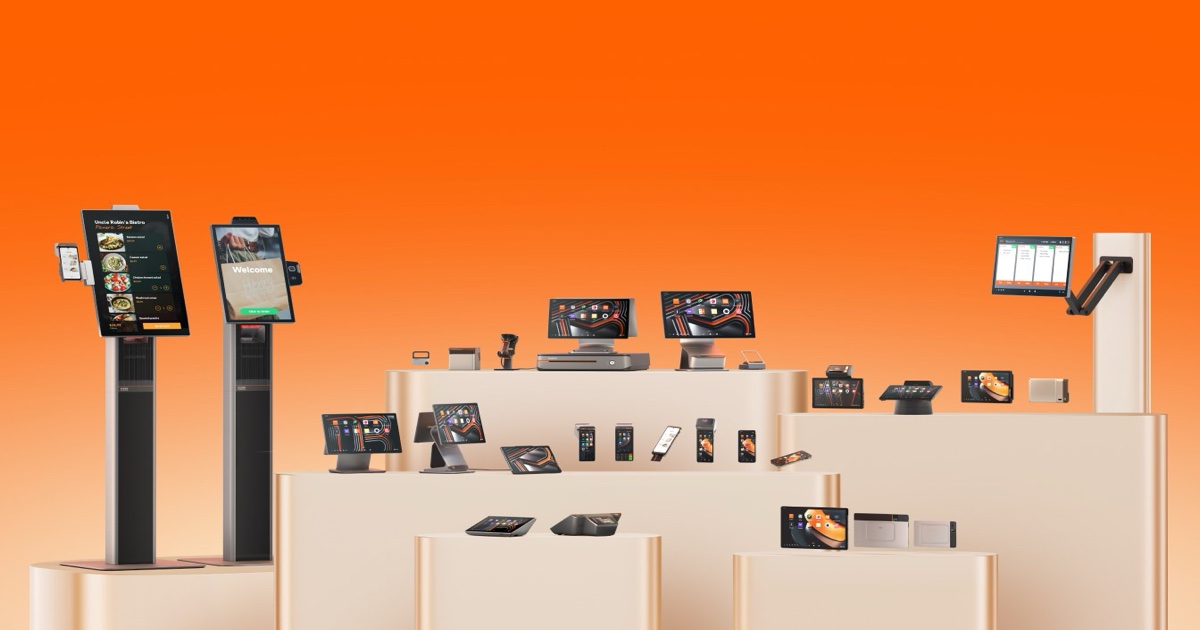
If you build software for retail, restaurants, or payments, you cannot certify an integration against a spec sheet. You need real hardware on your desk, running your build, printing real receipts. That is what a SUNMI demo unit is for.
This guide explains exactly how independent software vendors (ISVs) in the United States and Canada request a SUNMI demo or evaluation unit in 2026, what to prepare before you ask, how long delivery takes, and how an evaluation converts into a production order.
Rosper is the authorized SUNMI distributor in North America, shipping from eight warehouses across the US and Canada. Every timeline and policy below reflects how evaluation requests are actually handled, not a generic vendor template.
Key Takeaways
- Evaluation units are current production hardware. A SUNMI demo unit is the same revision, same OS build, and same SDK behavior as the devices you will deploy at scale.
- Most orders arrive in 2-7 business days anywhere in the US or Canada, shipped from the nearest of eight North American warehouses.
- Rosper responds to quote and supply requests within one business day, so the slow part of an evaluation is your own test plan, not procurement.
- Ask for 1 to 2 units per form factor, not one of everything. Most integration bugs surface on a single device class.
- Warranty coverage is generation specific. Gen 2 and Gen 3 devices carry a 3-year SUNMI manufacturer warranty, Gen 1 devices carry 1 year, and wear parts such as batteries and print heads carry 1 year.
- Prepare five things before you ask: peripherals you need, target OS version, payment path, deployment volume forecast, and shipping destination country.
What a SUNMI Demo Unit Actually Is
A SUNMI demo unit, also called an evaluation unit or a dev kit, is a small quantity of production hardware supplied to a software company so it can validate an integration before committing to volume.
A SUNMI demo unit is not a stripped-down sample, a mock-up, or a previous-generation device pulled from a shelf. The unit that lands on your desk is the same SKU your customers will receive.
That distinction matters. If evaluation hardware differed from production hardware, every test you ran would need to be repeated after your first bulk shipment.
What an evaluation unit is not
- It is not a free giveaway. Evaluation devices are quoted at ISV partner pricing tied to your projected volume.
- It is not a loaner with a return deadline in most cases. Units are typically purchased outright and kept in your lab.
- It is not a substitute for certification. Testing on a demo unit is step one, listing on the SUNMI App Store is a separate track.
- It is not limited to one product line. You can evaluate a mobile device and a desktop device in the same request.
Who Qualifies for a SUNMI Evaluation Unit
Evaluation requests are open to software companies with a concrete build target. You do not need an existing SUNMI relationship, and you do not need to be a large enterprise.
In practice, the requests that move fastest come from teams that can answer one question clearly: what will run on this device, and roughly how many devices does that become?
- POS software vendors porting an Android application to purpose-built commercial hardware.
- Payment software providers validating card reader, NFC, and PIN entry behavior on certified hardware.
- Kiosk and self-service developers testing kiosk mode, lockdown policy, and unattended reliability.
- Vertical SaaS teams in salon, gym, hospitality, or clinic software adding a hardware tier to their offering.
- Systems integrators and resellers validating a stack before quoting a multi-site rollout.
Canadian software companies follow the identical path. Rosper ships to Canada from a Brampton, Ontario warehouse, so a Toronto or Vancouver ISV is not routed through a US-only process.
What to Prepare Before You Request a SUNMI Demo Unit
The single biggest cause of a slow evaluation is a vague request. “Send me a POS terminal to try” forces a round trip of clarifying questions before anything ships.
Have these five inputs ready and a hardware recommendation usually comes back in the first reply.
The five-item pre-request checklist
- Peripheral requirements. Do you need a built-in printer, 1D or 2D scanning, NFC, a customer-facing second screen, or a cash drawer port? Peripherals narrow the device list faster than screen size does.
- Target Android version and SDK scope. Note the minimum API level your build supports and which SUNMI SDKs you plan to call, such as printer, scanner, NFC, or device management.
- Payment path. State whether you are handling payments in-app, through a separate terminal, or not at all. This determines whether you need payment-certified hardware.
- Volume forecast. A rough 12-month unit estimate, even a range, determines your evaluation pricing tier and staging options.
- Ship-to country and address. US or Canada, and whether the destination is an office, a lab, or a customer pilot site.
If you are unsure which device family fits, the Rosper ISV partner program page maps common use cases such as restaurant, retail checkout, kiosk, mobile, kitchen display, and inventory to the matching SUNMI hardware families.
For SDK documentation and sample code you can review before the hardware arrives, see the SUNMI Developer portal. Reading the printer and scanner SDK docs in advance often saves a full week of the evaluation window.
The Request Process, Step by Step
Rosper runs ISV onboarding as a five-stage path. Stages one through three cover the evaluation itself, stages four and five cover certification and scale.
| Stage | What happens | Typical timing |
|---|---|---|
| 1. Initial request | You submit your software profile, target market, and deployment plan | Response within 1 business day |
| 2. Technical consultation | Rosper recommends devices based on peripherals, screen size, connectivity, and form factor | Same or next business day |
| 3. Dev kit order | Evaluation units quoted at ISV partner pricing and released for shipment | In-stock units ship within 2 business days |
| 4. Integration and certification | You validate your build, then Rosper helps coordinate SUNMI App Store listing | Driven by your test plan |
| 5. Volume deployment | Volume pricing, optional pre-staging and MDM setup, fulfillment from 8 warehouses | Most orders arrive in 2-7 business days |
Note what is missing from that table: there is no multi-week qualification review and no minimum order gate before you can get test hardware in hand.
How Long SUNMI Demo Unit Delivery Takes in the US and Canada
A SUNMI demo unit ships from the same North American inventory as production orders. There is no factory lead time and no transpacific transit for in-stock SKUs.
In-stock devices ship within 2 business days of order release. Most orders arrive in 2-7 business days depending on the distance between the origin warehouse and your destination.
The eight North American warehouses
| Warehouse location | Region served | Country |
|---|---|---|
| City of Industry, CA (2 facilities) | Southern California and Southwest | United States |
| Ontario, CA | Inland Empire and Southwest | United States |
| Tracy, CA | Northern California and Pacific Northwest | United States |
| The Colony, TX | South Central and Mountain | United States |
| McLean, VA | Mid-Atlantic and Southeast | United States |
| Allentown, PA | Northeast and Great Lakes | United States |
| Brampton, ON | Greater Toronto Area and national Canadian coverage | Canada |
Canadian evaluation orders ship domestically from Brampton where the SKU is stocked, which avoids cross-border brokerage delay on the test units themselves.
Demo Unit vs Production Unit: What Is Identical and What Differs
This is the question ISV engineering leads ask most often, because a mismatch here invalidates test results.
| Attribute | Evaluation / demo unit | Production volume order |
|---|---|---|
| Hardware revision | Current production revision | Identical |
| SUNMI OS build | Current shipping build | Identical |
| SDK and API behavior | Identical | Identical |
| Peripherals and ports | Identical | Identical |
| Manufacturer warranty | Same generation-based SUNMI warranty | Identical |
| Typical quantity | 1 to 2 units per configuration | 10 to 10,000 or more |
| Pre-staging | Usually shipped as stock, unconfigured | Optional software preload and MDM profile setup |
| Pricing basis | ISV partner pricing | Tiered volume pricing |
| Purpose | Integration, certification, and demo | Field deployment |
The short version: the device is the same, the commercial terms and the staging services are what scale.
What to Test During Your Evaluation Window
A demo unit is only worth its lead time if you test the things that actually break in the field. A focused four-week plan covers most of it.
Week 1: core integration
- Install your APK and confirm it launches cleanly on the device Android build.
- Exercise the printer SDK with your real receipt template, including logos, barcodes, and paper cut behavior.
- Test the scanner across your actual barcode symbologies, not just a sample QR code.
Week 2 and 3: real-world conditions
- Run a full shift on battery for mobile devices, measuring drain with your app in the foreground.
- Test network handoff between Wi-Fi and cellular, and behavior during a total connectivity loss.
- Validate NFC and card reader flows if your build touches payments.
- Push a remote configuration change through SUNMI SBS, the free cloud device management platform, to confirm your fleet workflow.
Week 4: deployment readiness
- Test kiosk mode or lockdown policy so end users cannot exit your application.
- Simulate a factory reset and re-provisioning to confirm your onboarding flow survives it.
- Run an unattended 48-hour soak test to catch memory leaks and thermal throttling.
- Record a demo video on the real hardware for your own sales team.
Teams that skip the soak test and the reset-and-reprovision test are the ones that discover problems after 500 units are already in customer hands.
Warranty, Support, and Compliance During Evaluation
Evaluation units carry the same manufacturer warranty as production hardware. Coverage is set by SUNMI and varies by device generation.
| Coverage category | Warranty term |
|---|---|
| Gen 2 and Gen 3 devices | 3 years, SUNMI official manufacturer warranty |
| Gen 1 devices | 1 year |
| Wear parts (batteries, print heads, and similar) | 1 year |
The warranty is provided by SUNMI as the manufacturer. Rosper assists with warranty claims, helping you connect with SUNMI faster, which matters more during an evaluation than at any other time because a dead test unit stalls your entire release schedule.
Compliance questions worth asking early
If your application handles cardholder data, confirm your device and payment path against the current requirements published by the PCI Security Standards Council before you finalize your architecture, not after your pilot.
For managed deployments, ask whether the device family carries Android Enterprise Recommended certification. Enterprise customers in both the US and Canada increasingly make this a procurement requirement.
What Happens to the SUNMI Demo Unit Afterwards
Ask this before the unit ships, because the answer changes how you treat it during testing. Some evaluation units are sold outright at partner pricing and stay with you as a permanent development device. Others are placed on loan against an agreed return date.
If the unit is yours to keep, it becomes your regression bench. Every OS update, firmware release, and application build gets validated on the same hardware your customers run, which is far cheaper than discovering a peripheral regression after a rollout has started.
If it is a loan, agree in writing on the return window, who pays return freight, and whether the device must be factory reset first. Wipe any customer data and remove device management enrollment before it goes back.
Either way, keep a written record of the serial number, the OS build, and the accessory bundle you tested against. That record is what lets a distributor match your production order to the exact configuration you validated, rather than shipping a close-enough variant. You can compare configurations across the full range on the SUNMI hardware catalog before you lock the SKU list.
Converting an Evaluation Into a Volume Order
Once your integration passes, the transition to production is mostly a commercial and logistics conversation rather than a technical one.
- Lock the SKU list. Confirm the exact model, configuration, and accessory bundle you validated. Changing form factor after testing restarts part of your QA.
- Share a rolling forecast. A 12-month estimate lets inventory be positioned at the warehouses closest to your customers, which is what keeps orders inside the 2-7 business day window.
- Decide on pre-staging. Rosper can pre-install your application, apply device management profiles, and test each unit before it leaves the warehouse, so your customer opens a box that is already configured.
- Plan your App Store listing. Publishing to the SUNMI Digital Store puts your application in front of SUNMI merchants across more than 200 countries.
- Set your support boundary. Agree in writing on who handles software issues, who handles hardware faults, and how warranty claims get routed.
The pre-staging step is the one most ISVs underestimate. Shipping 200 pre-configured devices instead of 200 boxes of raw hardware removes an entire onboarding burden from your implementation team.
Once your SUNMI demo unit arrives, structure the trial with our ISV pilot program blueprint.
Frequently Asked Questions
How do I request a SUNMI demo unit in the US or Canada?
Submit a request to Rosper, the authorized SUNMI distributor in North America, describing your software, required peripherals, target Android version, and estimated 12-month volume. Rosper responds with a device recommendation and pricing within one business day, and in-stock evaluation units ship within 2 business days.
How long does it take to receive a SUNMI evaluation unit?
In-stock devices ship within 2 business days of order release, and most orders arrive in 2-7 business days. Units ship from the nearest of eight warehouses across the US and Canada, so there is no factory lead time or overseas transit for stocked models.
Is a SUNMI demo unit different from the production hardware?
No. Evaluation units are current production revision devices with the same SUNMI OS build, the same SDK behavior, the same peripherals, and the same manufacturer warranty. What changes at volume is pricing, quantity, and optional pre-staging services, not the device itself.
How many SUNMI evaluation units should I request?
Most ISVs request 1 to 2 units per configuration they intend to support. Requesting one device from each family you are seriously considering is more useful than requesting a large quantity of a single model, because form factor differences surface more integration issues than unit count does.
What warranty applies to a SUNMI evaluation unit?
Gen 2 and Gen 3 SUNMI devices carry a 3-year official manufacturer warranty, Gen 1 devices carry 1 year, and wear parts such as batteries and print heads carry 1 year. The warranty is provided by SUNMI. Rosper assists with warranty claims, helping you connect with SUNMI faster.
Request Your SUNMI Evaluation Unit
If you have a build ready and a device list in mind, the fastest path is to send the five inputs from the checklist above in a single message. Include your peripherals, target Android version, payment path, volume forecast, and ship-to country.
Rosper stocks the full SUNMI product line across eight US and Canadian warehouses, responds to supply and pricing requests within one business day, and ships in-stock evaluation units within 2 business days.
Request a quote for your SUNMI evaluation unit and get a device recommendation plus pricing back within one business day.
Related reading: SUNMI reseller and ISV partner guide.