
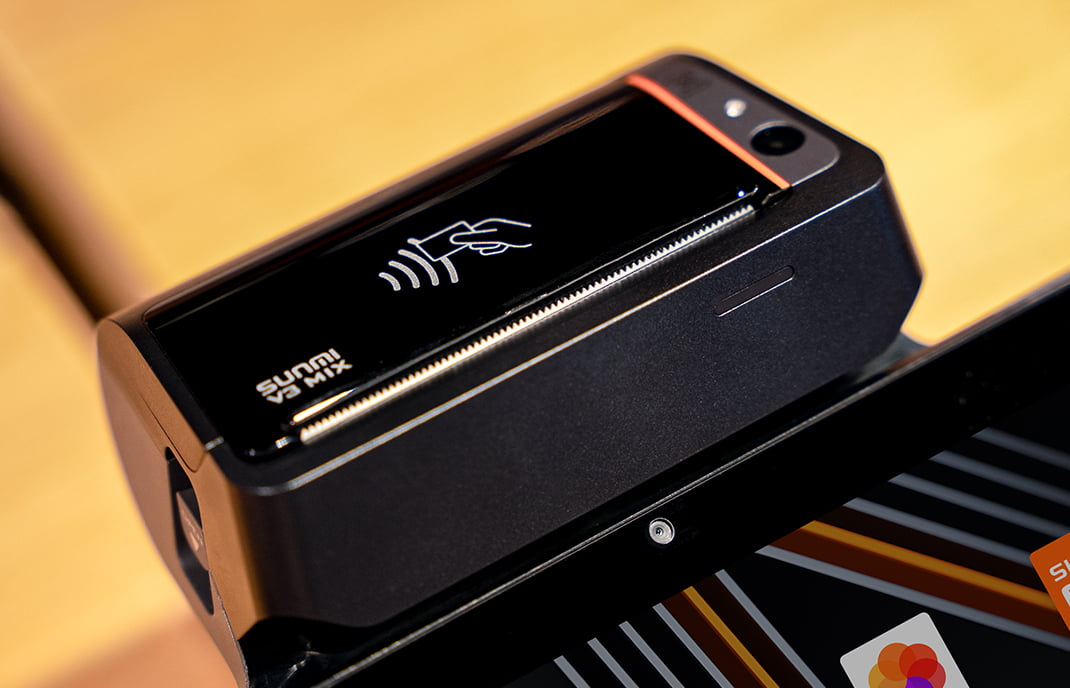
Published: April 2026 | Category: Integration Guide | Reading time: ~12 min
Disclosure: This guide is for payment service providers (PSPs), independent software vendors (ISVs) payment service providers, and independent sales organizations (ISOs) seeking to integrate SUNMI Android terminals with Fiserv payment processing in the United States and Canada. Rosper Technology is a licensed SUNMI distributor for North America.
Table of Contents
1. [Why SUNMI + Fiserv?](#why-sunmi–fiserv)
2. [Which SUNMI Devices Are Fiserv Certified?](#which-sunmi-devices-are-fiserv-certified)
3. [SUNMI POSRouter: The Certified Payment Layer](#sunmi-posrouter-the-certified-payment-layer)
4. [Integration Architecture Options](#integration-architecture-options)
5. [Step-by-Step Integration Path](#step-by-step-integration-path)
6. [SUNMI SDK Reference](#sunmi-sdk-reference)
7. [Known Compatibility Notes](#known-compatibility-notes)
8. [Why Source Through Rosper?](#why-source-through-rosper)
9. [Get Started](#get-started)
Why SUNMI + Fiserv?
Fiserv is one of the largest payment processors in North America, supporting hundreds of thousands of merchants across the U.S. and Canada. For PSPs, ISVs, and ISOs building or managing payment ecosystems, pairing Fiserv’s processing network with SUNMI’s Android-based POS hardware gives you access to:
– Fiserv Rapid Connect — a widely adopted front-end acquisition platform
– EMV Level 3 certified payment terminals that reduce PCI-DSS compliance burden
– A broad range of Android-powered form factors (handhelds, countertops, all-in-ones)
– A developer-friendly SDK for integrating payment acceptance into your software
As of August 2023, SUNMI’s P-Series payment terminals received official EMV Level 3 certification through the Fiserv Rapid Connect platform, making this a production-ready combination for North American deployers.
Which SUNMI Devices Are Fiserv Certified?
EMV Level 3 Certified on Fiserv Rapid Connect
The following SUNMI P-Series devices are certified with Fiserv Rapid Connect via SUNMI’s POSRouter payment application:
| Device | Model Code | Form Factor | Status |
|---|---|---|---|
| SUNMI P2 | T6900 | Handheld / Mobile | ✅ Certified |
| SUNMI P2 MINI | T5810 | Handheld | ✅ Certified |
| SUNMI P2 PRO | T6920 | Handheld / Countertop | ✅ Certified |
| SUNMI P2 SMARTPAD | TA10 | Handheld with keypad | ✅ Certified |
| SUNMI P2 LITE SE SE | T6810 | Handheld | ✅ Certified (added post-launch) |
> Source: SUNMI EMV Level 3 Certification Announcement, August 10, 2023 ([PR Newswire](https://www.prnewswire.com/news-releases/sunmi-announced-the-emv-level-3-payment-certifications-301897848.html))
TSYS Multipass (Also Certified)
In addition to Fiserv Rapid Connect, SUNMI P-Series terminals are also certified with TSYS Musunmi-p2-lite-se — anotjor North American payment platform. Some models (P2 LITE, P2 PRO) are listed as TSYS-only on certain distributor configurations. Verify the specific certification status of your model with Rosper before procurement.
Non-P-Series: Ingenico Reader Path
If your preferred device is a D3 PRO, CPad, or other SUNMI Android tablet/terminal, Fiserv integration is still achievable through an external card reader approach — pairing the SUNMI device with an Ingenico or compatible EMV reader via USB or Bluetooth. This architecture is common for ISVs that already have Fiserv integrated within their POS software layer. The reader handles card acceptance while your app manages the transaction flow.
SUNMI POSRouter: The Certified Payment Layer
SUNMI POSRouter is a pre-certified payment application that runs on P-Series devices. It handles the EMV transaction handshake, encryption, and communication with the payment processor — keeping your POS application out of PCI-DSS scope in semi-integrated deployments.
Key characteristics:
– EMV Common Kernel — shared across all P-Series devices, enabling faster certification of new models
– Three operating modes:
– Standalone — card-present transactions only on the terminal
– Fully Integrated — your POS app and POSRouter run on the same P-Series device
– Semi-Integrated — your POS app runs on a separate device; communicates with POSRouter on the P-Series over USB or TCP/IP (reduces PCI scope)
– Unified SDK — integrate POSRouter payment capabilities into your own application via SUNMI’s SDK
Integration Architecture Options
Option 1: Full POSRouter Integration (Recommended for P-Series)
Your POS software sends transaction requests to the SUNMI POSRouter running locally on the P-Series device. POSRouter communicates with Fiserv Rapid Connect over the internet.
[Your POS App] → [SUNMI POSRouter] → [Fiserv Rapid Connect] → Card Networks → Issuing Banks
Best for: ISOs and PSPs who want the certified, turnkey path with the broadest merchant acceptance (chip, swipe, tap, NFC).
Option 2: External Reader + Existing Fiserv SDK
Your Android app (running on SUNMI D3 PRO, SUNMI CPad, or any SUNMI Android device) communicates with an Ingenico or other Fiserv-compatible EMV reader. The app uses Fiserv’s own SDK to process payments.
[Your POS App + Fiserv SDK] → [External EMV Reader (Ingenico)] → Fiserv Backend
Best for: ISVs who already use the Fiserv CardPointe Mobile Android SDK and want to add hardware portability to their existing app.
Option 3: Semi-Integrated (PCI Scope Reduction)
Your POS runs on a non-payment device, POSRouter runs on the P-Series, and they communicate over LAN (TCP/IP or USB). The POS never touches raw card data.
[POS System (isolated)] ↔ TCP/IP ↔ [SUNMI P-Series + POSRouter] → Fiserv Rapid Connect
Best for: merchants or ISOs seeking to reduce PCI-DSS compliance requirements by isolating the payment terminal from the POS environment.
Step-by-Step Integration Path
Phase 1: Planning & Procurement
1. Identify your architecture — Fully Integrated, Semi-Integrated, or External Reader
2. Confirm device certification — verify the P-Series model you want is listed on the Fiserv Rapid Connect certified device list
3. Choose your Fiserv relationship — you’ll need a Fiserv merchant account or sponsorship (work with your Fiserv ISO/MLS relationship)
4. Source hardware — order certified devices from Rosper Technology (US warehouse stock, 3-year warranty, MDM support included)
Phase 2: Development & Integration
1. Get SUNMI SDK access — contact Rosper or SUNMI North America for the developer SDK and integration guides
2. Set up your development environment — SUNMI P-Series devices run Android; enable developer mode and USB debugging
3. Integrate SUNMI POSRouter SDK — follow the SUNMI SDK Integration Guide to initiate transactions, handle responses, and manage receipts
4. Connect to Fiserv Rapid Connect — configure your Fiserv Rapid Connect credentials and endpoint in the POSRouter configuration
5. Test in sandbox — use Fiserv’s sandbox/development environment to validate transaction flows before moving to certification
Phase 3: Testing & Certification
1. Terminal certification — SUNMI has already completed EMV Level 3 certification with Fiserv Rapid Connect for the P-Series, so hardware-level certification is not required per transaction. However, your specific app integration may need end-to-end testing.
2. Fiserv acceptance testing — conduct test transactions using Fiserv’s test card suite
3. PCI-DSS scope assessment — depending on your architecture, determine which SAQ or ROC applies
Phase 4: Deployment
1. MDM configuration — use Rosper’s MDM support to pre-configure devices at scale (Wi-Fi, merchant ID, app installation)
2. Device provisioning — push merchant credentials and terminal IDs to devices in the field
3. Go live — activate devices on the Fiserv merchant account and begin processing
SUNMI SDK Reference
SUNMI provides a unified SDK for integrating POSRouter into your application. Key documentation:
| Document | Description |
|---|---|
| SUNMI SDK Integration Guide | Core SDK setup, transaction initialization, result handling |
| SUNMI TCP/IP Integration Guide | LAN-based integration for semi-integrated configurations |
| SUNMI Service Integration Guide | Background service integration for persistent payment apps |
| SUNMI-first data SDK | Direct data-plane integration for advanced developers |
> Note: SDK access typically requires a developer partnership with SUNMI. Contact Rosper to get introduced to SUNMI’s North American developer team.
Fiserv Developer Resources:
– Fiserv Developer Studio: [developer.fiserv.com](https://developer.fiserv.com)
– CardPointe Mobile Android SDK: The official Fiserv SDK for Android-based POS integration
– Fiserv API Reference: [docs.fiserv.dev](https://docs.fiserv.dev)
– Rapid Connect Documentation: Contact your Fiserv representative for Rapid Connect technical specifications and UMF message format guides
Known Compatibility Notes
– Fiserv Rapid Connect certifications P-Series specific. Non-P-Series SUNMI devices (D3 PRO, CPad, etc.) do not carry the same pre-certified Rapid Connect path. For these devices, use an external EMV reader with your existing Fiserv SDK integration.
– TSYS and Fiserv are separate certifications. A device may be certified for one but not the other. Confirm the exact certification matrix with Rosper before ordering.
– Canada availability: Fiserv Rapid Connect and TSYS Multipass certifications are primarily validated for the U.S. market. Canadian deployments may have additional acquirer-specific requirements — consult your Fiserv relationship.
– NFC/Contactless: All certified P-Series terminals support NFC contactless (tap) payments through the POSRouter application.
– PCI-DSS: In fully integrated or standalone modes, the P-Series device is in scope for PCI-DSS. In semi-integrated mode, the POS terminal can be removed from scope. Engage a QSA for formal assessment if needed.
Why Source Through Rosper?
Rosper Technology is an authorized SUNMI distributor for North America, purpose-built to serve PSPs, ISVs, and ISOs who need reliable, scalable hardware procurement and deployment support.
What Rosper provides:
| Capability | Details |
|---|---|
| US Warehouse Stock | Most P-Series models ship from U.S. inventory — faster lead times than direct-from-factory orders |
| 3-Year Warranty | Extended hardware warranty on all SUNMI devices — standard industry warranty is typically 1 year |
| MDM Support | Device management, pre-configuration, and remote provisioning for bulk deployments |
| Developer Handoff | Introduction to SUNMI SDK documentation and engineering support for integration teams |
| Bulk Deployment | Volume pricing and staged delivery scheduling for merchant rollouts |
Whether you’re deploying 5 terminals or 5,000, Rosper’s U.S.-based logistics and technical support team can streamline your procurement and reduce deployment complexity.
Get Started
Ready to complete your SUNMI Fiserv integration for your North American merchant base? Rosper can help you:
– ✅ Confirm the right certified device for your Fiserv configuration
– ✅ Provide SDK access and integration guidance
– ✅ Supply hardware with MDM pre-configuration
– ✅ Offer volume pricing for PSP/ISO bulk orders
Contact Rosper Technology:
– 📧 Email: [[email protected]](mailto:[email protected])
– 🌐 Web: [rospertech.com](https://rospertech.com)
This guide was last updated April 2026. Certification status should be verified with Rosper and SUNMI before final procurement, as payment certifications are subject to change.
Keywords: SUNMI Fiserv integration, Fiserv certified POS, SUNMI payment processor, Fiserv Android POS, SUNMI North America Fiserv, SUNMI P2 Fiserv, SUNMI P2 PRO Fiserv Rapid Connect, SUNMI POSRouter, Fiserv Rapid Connect Android, SUNMI EMV certification, Rosper SUNMI Fiserv