
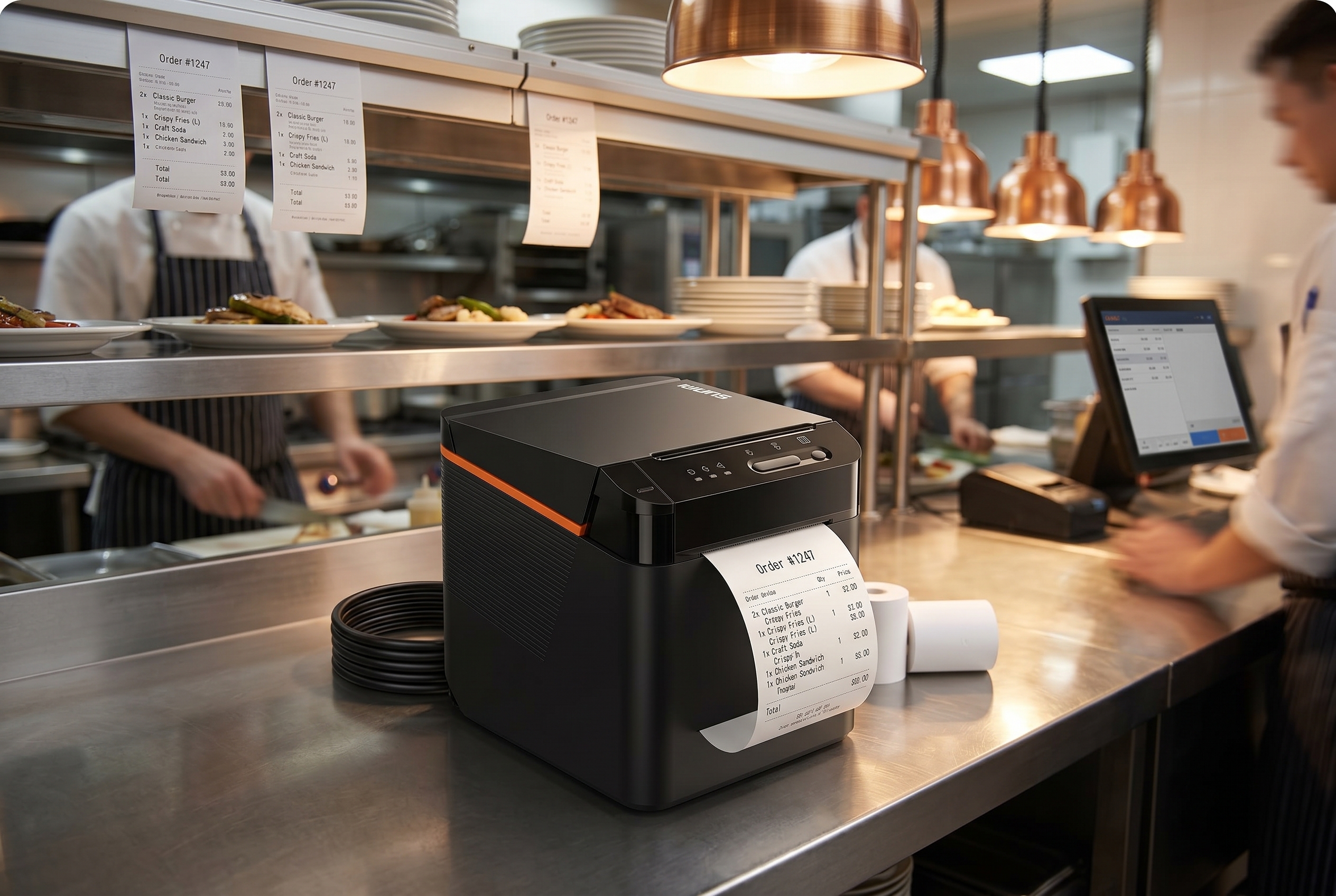
If your restaurant runs on a cloud POS, takes orders across Uber Eats, DoorDash, Grubhub, and your own online channel, and you are still fighting a tangle of USB cables and driver prompts at the kitchen printer, you are not alone. The SUNMI NT312 cloud printer is a commercial-grade cloud thermal printer designed for exactly this operating model: every order, from every channel, printed instantly at the kitchen or expo station without a local computer in the middle.
As the authorized SUNMI distributor for the United States and Canada, Rosper stocks the SUNMI NT312 cloud printer in our Maryland and Los Angeles warehouses for 2–7 day delivery. This guide walks through what the SUNMI NT312 cloud printer is, why it fits SaaS-first operators and cloud kitchens, and how it compares to the USB and Bluetooth printers most restaurants still use.
SUNMI NT312 cloud printer: Key takeaways
- NT312 is built for restaurants with multi-channel orders. Uber Eats, DoorDash, Grubhub, and your own online channel all hit the same kitchen printer over LAN, Wi-Fi, or cloud print – no driver tangle.
- Cloud printing eliminates USB driver pain. The NT312 prints directly from cloud POS over HTTPS without a host computer, so kitchen workflow does not depend on a Windows PC staying up at the line.
- 80 mm thermal at 250 mm/s. Fastest ticket throughput in the SUNMI printer line – sized for restaurants doing 200+ daily kitchen tickets where speed at the line directly drives table turn time.
- Rosper preprovisions the Wi-Fi profile. Order through Rosper with your network settings and the NT312 arrives prejoined to the restaurant Wi-Fi – no on-site provisioning required.
What the SUNMI NT312 is
The SUNMI NT312 cloud printer is an 80 mm thermal receipt and order printer with three connectivity paths built in: Ethernet, Wi-Fi, and optional 4G LTE. Instead of plugging into a POS computer, it connects directly to the cloud. Your POS platform, online ordering service, or delivery marketplace sends a print job over the internet, and the NT312 pulls it down and prints, with no driver software and no local server.
Key hardware and firmware features:
| Feature | SUNMI 80 mm Kitchen Cloud Printer (NT312) |
|---|---|
| Print width | 80 mm, with optional holder to run 58 mm rolls |
| Maximum paper roll | 80 mm × Φ80 mm |
| Interfaces | Ethernet (LAN), Wi-Fi, 4G, Bluetooth, USB |
| Auto cutter | Yes |
| Enclosure | Oleophobic ABS, designed to resist kitchen oil, water drips, and dust |
| Bug-proof design | Exterior holes under 0.8 mm with rubber seals |
| Built-in diagnostics | Network test tool that prints signal strength and channel-conflict reports |
| Resilience | Auto-reprints orders after paper change or jam; auto-retrieves up to 24 hours of pending cloud orders after a network outage |
| Audio | Customizable voice notifications; multi-language support (English, Mandarin, and more) |
| Fonts | Built-in vector font library with global languages including Chinese, Korean, Japanese, Thai, Arabic |
| Mounting | Desktop or wall-mount (four bottom screws) |
If you have bought thermal printers before, the feature that matters most here is the cloud-native firmware. On a traditional receipt printer, orders flow as ESC/POS jobs over USB or Ethernet from a POS computer – which means you are also responsible for maintaining that POS computer, its print service, and its drivers. On the SUNMI NT312 cloud printer, the cloud handshake is built into the printer itself. You register it, your POS or ordering platform sends print jobs directly, and the printer takes it from there – including retrieving any orders it missed while the network was down.
For the current published datasheet, including print speed, processor, exact I/O layout, and certification list, contact Rosper and we will send the latest SUNMI NT312 cloud printer spec sheet for the US and Canada.
Who the NT312 is built for
Not every restaurant needs a cloud printer. A single-location diner running a local-install POS on one terminal is probably fine with a wired 80 mm USB printer. The NT312 starts to pay for itself in three operating patterns:
1. SaaS POS on a tablet or all-in-one terminal
If your POS runs on an iPad, an Android tablet, or a web browser on a SUNMI V2s or D3 Mini, you have already separated your software from your hardware. Adding a cloud printer completes the pattern. Jobs flow from the SaaS backend to the printer without any local driver, so when you open a second register, a pop-up, or a new location, you onboard the printer in the admin panel, not at a workstation.
2. Delivery-heavy restaurants and cloud kitchens
Third-party marketplaces are not patient with disconnected printers. When DoorDash, Uber Eats, or Grubhub push an order and nothing prints, you miss tickets, you miss prep time, and you miss the promise time that drives your rating. The NT312 sits on its own internet connection, which means if the front-of-house tablet crashes, orders still land at the expo printer. Cloud kitchen operators running five, ten, or twenty virtual brands out of one back-of-house especially benefit, because each brand can have its own NT312 and its own sticker format, all driven from a single cloud platform.
3. ISVs and SaaS platforms serving restaurants
If you are a software vendor building for restaurants, hardware compatibility is a support cost. Every “printer offline” ticket pulls an engineer away from feature work. Shipping your customers an NT312 with your cloud print integration pre-configured reduces that support load substantially. You stop maintaining Windows and macOS print spoolers and start managing print fleets the same way you manage user accounts, from a web dashboard.
How the NT312 changes the print stack
The easiest way to understand the NT312 is to compare the old and new print paths.
Traditional restaurant print stack
POS app on PC or Mac
  |- OS print driver
       |- Local print service (CUPS, spooler, middleware)
            |- USB, serial, or LAN cable
                 |- Receipt printer (ESC/POS)
Every layer is a point of failure. The driver gets stuck, the service needs a restart, the cable unseats, Windows pushes an update that resets the default printer, or the front-of-house PC goes to sleep. Most restaurants have a staff member who “knows how to fix the printer,” and that is a real cost.
NT312 cloud print stack
POS platform or delivery marketplace
  |- Cloud Print API (HTTPS, WebSocket)
       |- Internet (Wi-Fi, Ethernet, 4G)
            |- NT312 firmware
                 |- Paper
The NT312 handles its own network queue, retries, and status reporting. From the POS side, you send a print job and get a status back. From the kitchen side, paper comes out. There is no Windows machine in the middle, no driver install, no USB cable tripping hazard.
Integrations that matter for US and Canadian operators
The NT312 speaks the SUNMI Cloud Print API, which is an HTTPS JSON API documented for developers. That means any modern POS or ordering platform can integrate directly. As of publication, we see the NT312 deployed alongside:
- Cloud-native POS platforms targeting quick-service and full-service restaurants
- Direct-integration services that pull orders from Uber Eats, DoorDash, Grubhub, and Skip the Dishes into a single queue, then fan them out to the right printer
- ISV platforms serving multi-brand virtual kitchens, where each brand has its own ticket template and printer station
- Self-ordering kiosks that print a customer receipt at the front counter and a prep ticket in the kitchen from a single order event
- Retail platforms that print shipping labels, pick tickets, or pickup-order receipts in warehouse and BOPIS workflows
If your POS or platform does not have an NT312 integration today, the API is open and relatively straightforward to implement. Reach out to your account manager at Rosper and we can share the current API documentation and sample payloads directly from SUNMI.
NT312 versus USB and Bluetooth thermal printers
Most restaurants in the US and Canada still run a USB or Bluetooth thermal printer paired with a POS terminal. Here is how the SUNMI NT312 cloud printer compares on the things operators actually feel.
| Dimension | USB / Bluetooth thermal printer | SUNMI NT312 cloud printer |
|---|---|---|
| Local driver required | Yes (Windows, macOS, or iOS SDK) | No |
| Works if POS terminal is offline | No | Yes – the NT312 can retrieve up to 24 hours of pending cloud orders after its own network comes back |
| Multi-channel order printing | Needs middleware or manual setup | Native, via cloud platform routing |
| Remote fleet management | Limited | Full, via SUNMI Cloud and POS platform dashboards |
| Support ticket load | Medium to high | Low |
| Installation time per printer | 20–45 minutes | Under 5 minutes, QR scan and register |
| Roll-out to new location | On-site IT visit | Ship, plug in, auto-register |
The hidden line item on the USB side is labor. A printer hiccup typically pulls a store manager off the floor for 15 to 30 minutes – multiply that by the frequency of peripheral issues in a busy kitchen and it becomes a real operating cost. The SUNMI NT312 cloud printer reduces both the frequency (cloud-native firmware, fewer cables, fewer local components to fail) and the severity (auto-reprint after jams, auto-retrieve after outages, print diagnostics without a technician).
Total cost of ownership
Purchase price is only one part of the picture. For a commercial cloud printer, operators should also budget for:
- Consumables: 80 mm thermal rolls, usually $1–$2 per roll in bulk, consumed at 1–3 rolls per location per week depending on volume
- Network connectivity: Ethernet is preferred where available, Wi-Fi is fine for most kitchens, 4G LTE is the right call for food trucks, pop-ups, and unreliable venue networks
- Cloud platform fees: Typically included with your POS or ordering platform, no separate charge from SUNMI for standard Cloud Print API usage
- Warranty: The NT312 ships with SUNMI’s manufacturer warranty (3 years on Gen 2-3 device bodies; 1 year on wear parts and Gen 1) when purchased through Rosper, with after-sales support coordinated by our team
For US and Canadian operators, the other hidden cost worth flagging is import and logistics. Buying SUNMI devices direct from overseas resellers often means no local warranty honor, long lead times on replacements, and customs paperwork you did not budget for. Rosper stocks the NT312 domestically in Maryland and Los Angeles, shipping across the United States and Canada with 2–7 day delivery and local warranty handling.
Deployment checklist for the NT312
Before you roll out the NT312 across your stores, a short checklist saves time.
- Confirm your POS or ordering platform supports the SUNMI Cloud Print API. If it does not yet, ask Rosper for the current integration status and timeline.
- Decide on Ethernet, Wi-Fi, or 4G LTE for each location. Ethernet is the most reliable where available. Use 4G LTE for food trucks, pop-ups, and stores where the Wi-Fi is overloaded at peak.
- Pick a print station layout. One NT312 at the expo station is the minimum. Add one per kitchen station (grill, fry, cold) if your throughput requires parallel printing. Cloud kitchens often run one per virtual brand.
- Standardize ticket templates across brands. The NT312 can print different templates per brand or channel. Define your templates in the POS or platform before the first shift.
- Train staff on the power and paper change workflow. The NT312 is self-healing on the network side, but staff still need to know how to load paper and clear jams.
- Enroll devices in SUNMI Cloud for remote management. This is how you monitor printer status, push firmware updates, and troubleshoot offline devices across all locations from one screen.
Frequently asked questions
What is the SUNMI NT312 cloud printer?
The SUNMI NT312 is a commercial 80 mm thermal receipt and order printer that connects directly to cloud POS and online ordering platforms through Ethernet, Wi-Fi, or 4G LTE. It does not require a local POS computer or printer driver, because it communicates with your software over an HTTPS cloud print API.
Does the NT312 work with Uber Eats, DoorDash, and Grubhub?
The NT312 does not integrate with delivery marketplaces directly. It integrates with your POS or order aggregation platform, which receives delivery orders and routes them to the NT312. Several North American platforms that unify Uber Eats, DoorDash, Grubhub, and Skip the Dishes already support the NT312 or the SUNMI Cloud Print API.
Is the NT312 compatible with iPad POS and Android POS?
Yes. Because the NT312 is cloud-connected, it does not care what device your POS runs on. As long as your POS platform supports the SUNMI Cloud Print API, you can print to an NT312 from iPad, Android tablet, SUNMI terminal, or web browser.
How is the NT312 different from a regular Ethernet thermal printer?
A regular Ethernet thermal printer expects an ESC/POS print job over TCP from a computer on the same local network. The NT312 accepts cloud print jobs over HTTPS from the internet, with queueing, retries, and status reporting built into the firmware. That means no local print server, no driver install, and print reliability that survives a POS terminal crash.
Can I use the NT312 in a food truck or pop-up?
Yes. The NT312 supports 4G LTE as a connectivity option, which is the right fit for food trucks, pop-ups, and event venues where Wi-Fi is unreliable. You insert a SIM, register the printer, and print orders wherever you have cellular coverage.
Is the NT312 available with a 3-year warranty in the United States and Canada?
Yes. When purchased through Rosper, the authorized SUNMI distributor for the US and Canada, the NT312 comes with SUNMI’s manufacturer warranty (3 years on Gen 2-3 device bodies; 1 year on wear parts and Gen 1). Rosper helps you connect with SUNMI for after-sales support and coordinates replacements through our Maryland and Los Angeles warehouses.
Does Rosper offer volume pricing for multi-location deployments?
Yes. Cloud kitchens, multi-brand operators, franchise networks, and ISVs reselling hardware qualify for tiered pricing. Contact Rosper directly for a quote at your volume.
How long does delivery take?
Rosper ships the NT312 from Maryland and Los Angeles warehouses, with 2–7 day delivery across the United States and Canada. Rush shipping is available for time-critical deployments.
Buying the SUNMI NT312 in the US and Canada
Rosper is the authorized SUNMI distributor for the United States and Canada. We stock the SUNMI NT312 cloud printer in both our Maryland and Los Angeles warehouses, with SUNMI’s manufacturer warranty (3 years on Gen 2-3 device bodies; 1 year on wear parts and Gen 1), US and Canada shipping, and local account support for multi-location operators and ISVs.
Whether you run a restaurant or cloud kitchen, build software that ships hardware to merchants, or manage a franchise network planning a hardware refresh, request a quote and we will size the right NT312 fleet for your operation.
Contact the Rosper team via our contact page to discuss your requirements.
About Rosper
Rosper is the authorized SUNMI distributor for the United States and Canada. We ship POS terminals, kiosks, payment devices, and accessories from eight warehouses across North America, backed by SUNMI’s manufacturer warranty (3 years on Gen 2-3 devices; wear parts and Gen 1 devices: 1 year) and local account support. Read more on our official blog or connect with us on LinkedIn and YouTube.
Further reading: See Restaurant kitchen printer industry benchmarks for primary-source detail.