
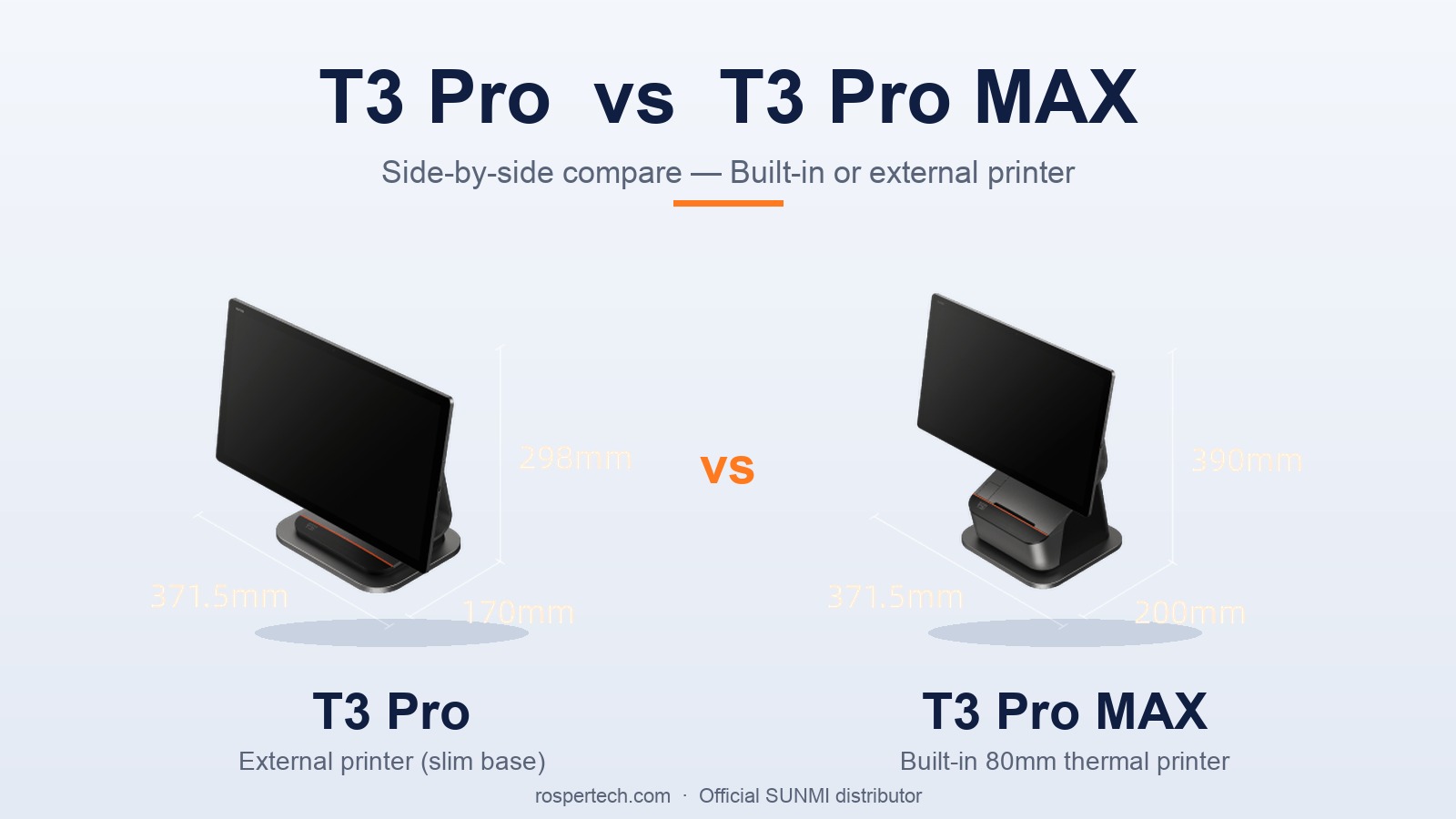
The 2026 SUNMI T3 Pro vs T3 Pro MAX comparison comes down to one hardware decision: built-in 80mm printer (T3 Pro MAX, which removes the separate receipt printer and its cabling) versus external printer flexibility (T3 Pro), with both running the same SUNMI Android 13 OS that Rosper supports across all 6 SKUs.
If you are scoping desktop POS hardware for a restaurant, grocery, or quick-service brand, the T3 Pro vs T3 Pro MAX question lands on the spec sheet almost immediately. The T3 Pro is the lighter 36W terminal that pairs with an external printer. The T3 Pro MAX is the 60W flagship with a built-in 80mm Seiko thermal printer that runs at 250mm/s with auto cutter. Choosing between them is really a choice between lower upfront cost plus printer flexibility, or a higher upfront investment that consolidates two devices and recovers cost through reduced cabling, fewer SKUs to support, and faster checkout throughput.
This guide walks through every t3 pro vs t3 pro max difference at the SKU level, the 80mm Seiko printer details that matter on a busy line, and the customer-facing display options. Rosper is the SUNMI distributor for North America and stocks every T3 Pro configuration in 8 warehouses across the US and Canada.
T3 Pro vs T3 Pro MAX at a Glance
The T3 Pro and T3 Pro MAX share the same Qualcomm QCM6490 platform, the same 15.6-inch FHD flip display, the same Wi-Fi 6E and Bluetooth 5.2 connectivity, and the same port layout. The split between them is built-in printer, chassis size, power adapter, and weight.
| Spec | T3 Pro | T3 Pro MAX |
|---|---|---|
| Built-in printer | None | 80mm Seiko thermal, 250mm/s, auto cutter, 150 km service life |
| Power adapter | 36W, DC 24V 1.5A | 60W, DC 24V 2.5A |
| Chassis dimensions | 298 x 371.5 x 170 mm | 390 x 371.5 x 200 mm |
| Weight (with packaging) | 5.4 kg | 8.9 kg |
| Processor | Qualcomm QCM6490 octa-core, up to 2.7 GHz | Same |
| Main display | 15.6-inch FHD IPS, 1920 x 1080, 400 nits, 125 degree flip | Same |
| Wi-Fi | Wi-Fi 6E (2.4 / 5 / 6 GHz) | Same |
| Bluetooth | BT 5.2 with Long Range | Same |
| Ports | 4x USB Type-A, 1x RJ45, 1x RJ11, 1x RJ12, 1x USB-C 3.0, 8-pin POGO | Same |
| External storage | MicroSD up to 2 TB | Same |
The T3 Pro MAX is roughly 65 percent heavier and takes about 30 percent more counter depth. In return you eliminate a separate receipt printer SKU, the printer power brick, and the USB or serial cable that connects them.
T3 Pro vs T3 Pro MAX: All 6 SKUs Side by Side
The T3 Pro family covers 6 SKUs in total. Three are T3 Pro (no built-in printer), three are T3 Pro MAX (built-in 80mm printer). Each lineup includes a non-GMS standard version, a GMS-EDLA version for North America, and a Super dual-OS version that ships with both Android 13 and a Windows License.
| SKU | Model | Built-in Printer | RAM / Storage | GMS | Operating System |
|---|---|---|---|---|---|
| P01240004 | T3 Pro Smart Desktop Terminal | No | 6 GB + 128 GB | No | Android 13, single OS |
| P01240007 | T3 Pro Smart Desktop Terminal GMS | No | 6 GB + 128 GB | GMS-EDLA | Android 13, single OS |
| P01290013 | T3 Pro Super Smart Desktop Terminal | No | 8 GB + 256 GB | No | Dual OS, Android 13 + Windows License |
| P01250005 | T3 Pro MAX Smart Desktop Terminal | Yes, 80mm Seiko | 6 GB + 128 GB | No | Android 13, single OS |
| P01250008 | T3 Pro MAX Smart Desktop Terminal GMS | Yes, 80mm Seiko | 6 GB + 128 GB | GMS-EDLA | Android 13, single OS |
| P03190011 | T3 Pro MAX Super Smart Desktop Terminal | Yes, 80mm Seiko | 8 GB + 256 GB | No | Dual OS, Android 13 + Windows License |
If your software stack is Android only and you do not need Google Mobile Services, the non-GMS SKUs (P01240004 or P01250005) are the simplest fit. If you depend on Google Play Services for your POS software or mobile device management, choose the GMS-EDLA SKU (P01240007 or P01250008). If you still run a Windows-based ERP, KDS, or back office app, the Super SKU (P01290013 or P03190011) lets you run both Android 13 and Windows on the same hardware without rebooting.
The Built-In 80mm Seiko Printer: What It Does for a Busy Counter
The T3 Pro MAX integrates a Seiko 80mm thermal print head with the following published specs.
| Print Spec | Value |
|---|---|
| Paper width | 80mm |
| Print speed | 250 mm/s |
| Cutter | Auto cutter |
| Cutter service life | 150 km (rated) |
| Paper roll outer diameter | 80 mm |
| Head supplier | Seiko |
For full-service restaurants, 250 mm/s with an auto cutter is fast enough that the printer finishes the receipt before the cashier has handed back the card. For grocery, deli, and convenience stores running long itemized receipts, the 80mm width avoids the cramped layout you get on 58mm thermal rolls and the larger paper roll diameter means fewer roll changes per shift.
If you are evaluating t3 pro vs t3 pro max purely on printer economics, the MAX consolidates two power outlets into one, eliminates one USB or serial port from the terminal, and removes one device from your spare-parts inventory. Multi-location operators usually find this consolidation pays back faster than the higher hardware cost over a 3-year deployment.
When the External Printer Path Wins
The non-printing T3 Pro is the better choice for several common cases.
- Quick-service kiosks and self-order stations where the customer never sees a receipt. No printer means a smaller, lighter terminal that fits on a kiosk counter.
- Locations with an existing kitchen printer network. If your kitchen printer already prints both KDS and customer receipts on demand, you do not need a printer at the front terminal.
- High humidity or wash-down environments. A standalone printer can be mounted away from the wettest part of the counter and replaced independently.
- Mixed-mode counters where some stations need printing and others do not. Buy fewer T3 Pro MAX units for the printing stations and standard T3 Pro for the rest.
For external printer pairing, most North American customers use the SUNMI 80mm Cloud Printer or a third-party Ethernet receipt printer that connects via the T3 Pro RJ11 port, USB-A, or LAN.
T3 Pro Customer-Facing Display Options
Both T3 Pro and T3 Pro MAX support an optional customer-facing display through USB. There are two display SKUs and they are physically interchangeable across the family.
| SKU | Display | Resolution | NFC | Connection |
|---|---|---|---|---|
| C02020003 | 10.1-inch HD | 1280 x 800 | Yes | USB direct |
| C02020004 | 15.6-inch FHD | 1920 x 1080 | Yes | USB direct |
Both displays include NFC so you can use the second screen for tap-to-pay confirmations, loyalty signup, or guest signature. The 10.1-inch C02020003 also works on D3 Pro, which is convenient if you mix T3 Pro and D3 Pro across your locations.
The 15.6-inch C02020004 turns the customer side into a full secondary display, useful for digital menu boards on the front counter or for showing upsell prompts during checkout.
ROI Worksheet: T3 Pro vs T3 Pro MAX Over 3 Years
The simplest way to compare t3 pro vs t3 pro max economics is to model the 3-year cost of ownership including hardware, accessories, power, and printer paper. The variables most US deployments care about are listed below.
| Cost Driver | T3 Pro Path | T3 Pro MAX Path |
|---|---|---|
| Terminal hardware | One T3 Pro SKU | One T3 Pro MAX SKU (higher unit price) |
| External printer hardware | One 80mm receipt printer | None (built in) |
| Cabling and power | Terminal cable + printer cable + printer adapter | Terminal cable only |
| Counter footprint | Terminal + printer footprint | Terminal footprint only |
| Spare-parts SKUs | Terminal + printer + adapter + ribbon (if any) | Terminal + adapter |
| Warranty coordination | Two warranty workflows (terminal + printer) | One warranty workflow |
For multi-location operators with 10 or more counters, the consolidated SKU and unified warranty workflow often outweighs the higher per-unit hardware cost of T3 Pro MAX. For single-location operators with 1 or 2 counters, the T3 Pro plus external printer path can be cheaper to start, especially if you already have a working receipt printer.
Rosper can provide a volume quote on either path. Request a quote with your unit count and we will share pricing, lead time from the nearest of 8 warehouses, and recommended accessories for your industry.
How to Choose Between T3 Pro and T3 Pro MAX
| Your Situation | Recommended SKU |
|---|---|
| Restaurant front counter, needs built-in printer and guest display | P01250008 (T3 Pro MAX GMS) plus C02020004 (15.6-inch display) |
| Multi-counter restaurant, mixed printing needs | P01250008 at printing stations, P01240007 at non-printing stations |
| Quick-service kiosk or self-order counter | P01240007 (T3 Pro GMS) with the 10.1-inch C02020003 facing the guest |
| Retail apparel, electronics, or specialty store | P01240007 (T3 Pro GMS) plus C02020003 (10.1-inch display) and external printer |
| Grocery or deli, long receipts, heavy daily print volume | P01250008 (T3 Pro MAX GMS) for the 80mm Seiko throughput |
| Retail or hospitality that needs Windows-based ERP alongside Android POS | P03190011 (T3 Pro MAX Super) or P01290013 (T3 Pro Super) |
| Deploying outside the GMS-EDLA scope | P01240004 (T3 Pro) or P01250005 (T3 Pro MAX) |
If you are unsure which variant fits your floor plan and software stack, the Rosper team will help you map your workflow to a SKU before you commit volume.
Where to Buy T3 Pro and T3 Pro MAX in the US and Canada
Rosper is the SUNMI distributor for North America and stocks every T3 Pro and T3 Pro MAX SKU in 8 warehouses across the US and Canada. Most orders arrive in 2-7 business days from your nearest warehouse. Every Gen 3 SUNMI hardware unit sold through Rosper carries a 3-year warranty, and Rosper assists with warranty claims, helping you connect with SUNMI faster than buying direct from overseas.
Browse the full T3 Pro family page on rospertech.com or request a quote with your SKU shortlist. Contact Rosper for availability and pricing.
T3 Pro vs T3 Pro MAX FAQ
What is the difference between T3 Pro and T3 Pro MAX?
The T3 Pro MAX adds a built-in 80mm Seiko thermal printer that runs at 250mm/s with auto cutter and a 150 km service life. The chassis is larger (390 x 371.5 x 200 mm vs 298 x 371.5 x 170 mm), heavier (8.9 kg vs 5.4 kg with packaging), and uses a 60W adapter instead of 36W. Processor, display, Wi-Fi 6E, Bluetooth 5.2, ports, and external storage are identical.
Does T3 Pro MAX have a built-in printer?
Yes. T3 Pro MAX includes a Seiko 80mm thermal print head rated at 250mm/s with an auto cutter and 150 km service life. The standard T3 Pro does not include a built-in printer and pairs with an external receipt printer.
Is T3 Pro MAX worth the extra cost over T3 Pro?
For most full-service restaurants, grocery stores, and any counter that prints 200+ receipts per day, T3 Pro MAX usually wins on 3-year total cost because it removes the external printer, its cable, its power brick, and a second warranty workflow. For quick-service kiosks, self-order counters, or locations where customers do not need a receipt, T3 Pro is the leaner option. Contact Rosper for a volume quote on either path.
Can T3 Pro use an external printer?
Yes. T3 Pro pairs with a SUNMI 80mm Cloud Printer or a third-party USB, serial (RJ11), or Ethernet receipt printer. The T3 Pro chassis includes 4x USB Type-A, 1x RJ11, 1x RJ12, 1x RJ45, and 1x USB Type-C 3.0, which covers every common receipt printer interface.
Where can I buy T3 Pro and T3 Pro MAX in the US?
Rosper is the SUNMI distributor for North America and stocks every T3 Pro and T3 Pro MAX SKU in 8 warehouses across the US and Canada. Most orders arrive in 2-7 business days. Contact Rosper for availability and pricing.
Further reading: SUNMI T3 Pro product page.