
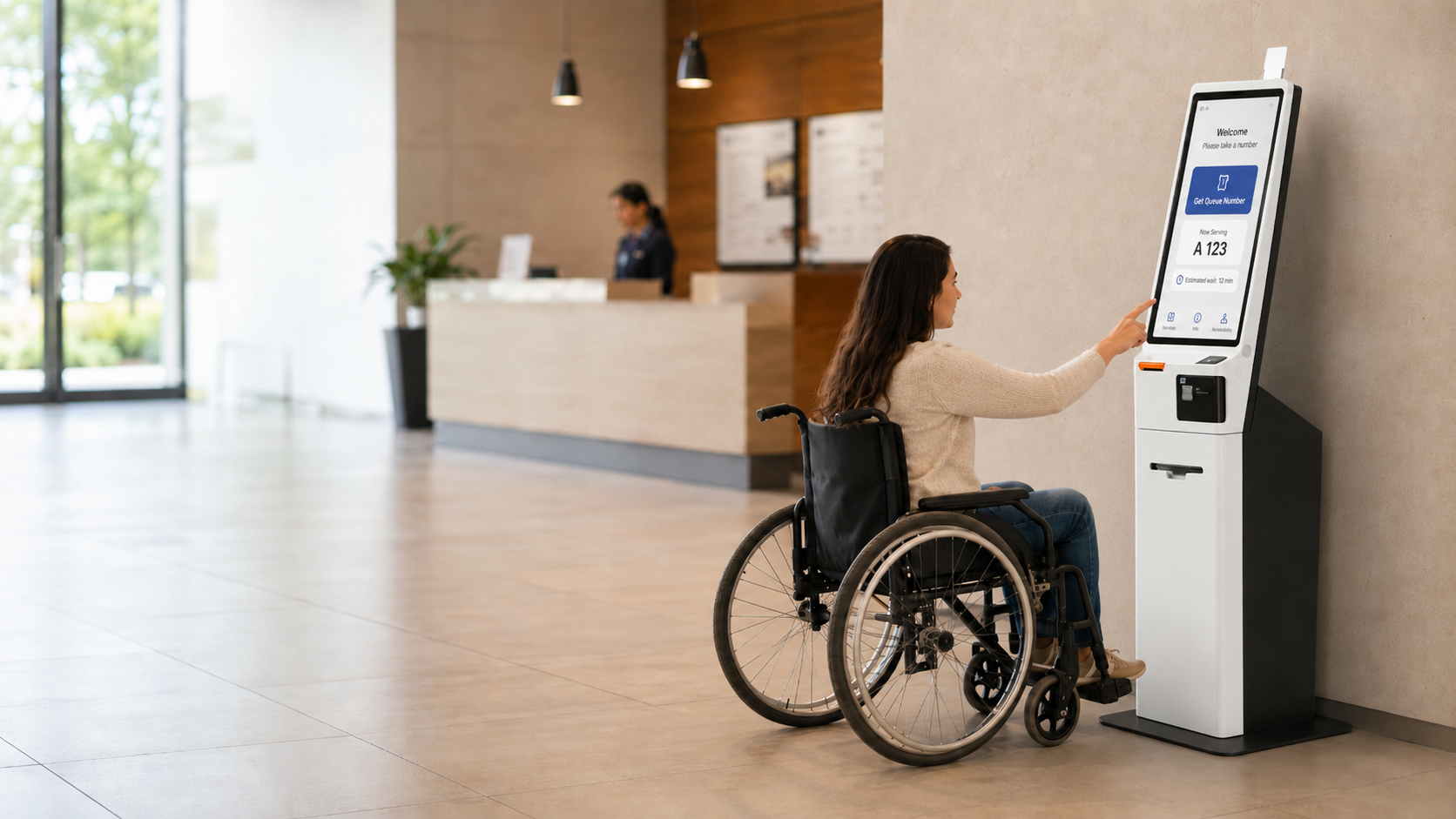
Choosing self-service kiosk hardware that is ADA compliant means buying a device a customer using a wheelchair, or a customer who cannot see the screen, can operate without help. That single requirement shapes the hardware you buy, where you mount it, and how you configure the software on top. This 2026 guide walks US and Canadian businesses through the accessibility rules and the specific self-service kiosk hardware traits that keep a deployment on the right side of the law.
The short answer for buyers in a hurry: choose ADA-compliant self-service kiosk hardware with an open Android platform, a headphone jack for private audio, tactile navigation, and a mounting format that puts every control within a seated reach range. Get those four things right and most of the compliance work is done.
What ADA compliance means for a self-service kiosk in the US
In the United States, public-facing kiosks fall under Title III of the Americans with Disabilities Act. A kiosk in a store, restaurant, or clinic lobby is treated as part of a place of public accommodation, so it has to be usable by people with disabilities.
The 2010 ADA Standards for Accessible Design set the measurable rules. Operable parts, meaning the touchscreen and any buttons, must sit inside an accessible reach range. For an unobstructed forward or side approach, that range is 15 to 48 inches above the floor.
The kiosk also needs clear floor space of at least 30 by 48 inches so a wheelchair user can pull up to it. If a counter or base blocks the approach, the reach range tightens, which is why the mount matters as much as the device.
Vision access is the part buyers miss most often. A screen-only kiosk is unusable for someone who is blind or has low vision, so the hardware has to support speech output through a standard 3.5 millimeter headphone jack, along with tactile or on-screen navigation the software can drive.
Canada: the Accessible Canada Act and provincial standards
Canada regulates accessibility at both the federal and provincial level, so a compliant kiosk in Toronto answers to a different rulebook than one in Vancouver, even when the device is identical.
At the federal level, the Accessible Canada Act of 2019 sets a national goal of a barrier-free Canada and applies to federally regulated sectors such as banking, telecommunications, and interprovincial transport. Its standards development body, Accessibility Standards Canada, publishes technical guidance that touches self-service technology.
Most retail and hospitality operators are governed provincially. Ontario runs the Accessibility for Ontarians with Disabilities Act, whose Integrated Accessibility Standards require accessible self-service kiosks to be considered at the design and procurement stage. Manitoba, Nova Scotia, and British Columbia have their own accessibility statutes moving in the same direction.
| Jurisdiction | Key accessibility rule | Applies to |
|---|---|---|
| United States | ADA Title III + 2010 Standards | Public accommodations |
| Canada (federal) | Accessible Canada Act 2019 | Federally regulated sectors |
| Ontario | AODA Integrated Accessibility Standards | Ontario businesses |
| British Columbia | Accessible British Columbia Act | BC public bodies and beyond |
For the physical dimensions, Canadian designers often reference the CSA B651 standard on accessible design for the built environment. Its reach ranges line up closely with the US figures, so a kiosk configured for ADA reach usually satisfies Canadian requirements too. Confirm the current rule with your provincial authority before you finalize a rollout.
The self-service kiosk hardware checklist
Accessibility is not one feature. It is a set of self-service kiosk hardware traits that let the software deliver an equal experience to every customer. Here is what to verify before you buy.
| Hardware trait | Why it matters for compliance |
|---|---|
| Headphone jack (3.5 mm) | Delivers private speech output for blind and low-vision users |
| Adjustable mounting height | Keeps the screen and controls inside a 15 to 48 inch reach range |
| Tactile or physical input option | Supports users who cannot rely on a flat touchscreen alone |
| Open Android platform | Lets accessibility software, speech output, and high contrast run natively |
| Volume control and clear audio | Serves customers who are hard of hearing |
| Clear approach and knee clearance | Allows a seated user to pull up to the unit |
Why open Android matters for self-service kiosk hardware
The open Android platform point deserves emphasis. Accessibility features such as screen readers, text-to-speech, high-contrast themes, and adjustable font sizes are built into modern Android. A locked-down device that blocks those services forces you to rebuild accessibility from scratch, which is slow and risky.
The headphone jack is the single most overlooked item. Without it, there is no compliant way to serve a customer who cannot read the screen, and a jack is far harder to add after the fact than to specify up front.
Match the mounting format to the space
The same kiosk board can ship as a countertop unit, a wall mount, or a floor-standing pedestal. The format you pick decides whether your reach range holds up in the real space, so choose it around the room and the customer, not just the footprint.
Countertop kiosks work for a fixed service counter where staff can assist, but the counter itself can push controls out of a seated reach range. Wall-mounted units save floor space and let you set an exact mounting height for accessibility. Floor-standing pedestals give the most flexibility for clear approach and knee clearance in an open lobby.
For a busy quick-service restaurant, a floor-standing self-order kiosk with a generous approach zone is usually the safest accessibility choice. For a healthcare lobby check-in, a wall or pedestal mount set to a verified height keeps patients of every mobility level served consistently.
Choosing self-service kiosk hardware by industry
Accessibility is the floor, not the ceiling. The right self-service kiosk also has to survive the environment and the transaction volume of your specific setting.
Retail self-checkout
Retail kiosks need a fast scanner, a durable screen for constant public touch, and a clean layout for retail self-service deployments. Payment acceptance and receipt printing should sit within the same reach range as the screen so the whole transaction stays accessible.
Quick-service restaurants
Self-order kiosks in food service take heavy daily use and need a large, bright display that reads well in high-contrast mode. Speech output through the headphone jack lets a low-vision guest place an order independently, which is exactly the outcome the ADA is built around.
Healthcare and appointment check-in
Patient check-in kiosks handle sensitive data, so private audio and a clear, high-contrast interface are not optional. For clinics planning healthcare check-in deployments, a verified mounting height keeps every patient served without staff intervention.
SUNMI kiosk options and how Rosper helps
Rosper is an official SUNMI distributor for North America, and the SUNMI self-service kiosk family is built on open Android with the accessibility hooks this guide calls for. The K2 kiosk line ships in formats that suit countertop, wall, and floor-standing installs, so you can hold your reach range across very different rooms.
Because the platform is open Android, standard accessibility services run natively, and a 3.5 millimeter audio path supports private speech output. Rosper has helped North American retailers and hospitality operators spec kiosk configurations that clear accessibility review, and the team can advise on mounting height and format before you commit to an order.
You can compare the current kiosk and terminal lineup on the Rosper products page. For SUNMI product background and imagery, the SUNMI official site is the authoritative source.
How to choose a SUNMI kiosk distributor in the US and Canada
Picking accessible self-service kiosk hardware only helps if you buy it through a distributor that can support the deployment. For SUNMI kiosks in North America, the distributor you choose decides your lead time, your warranty path, and whether units arrive configured or as bare boxes.
Start with authorization. An official SUNMI distributor sells genuine hardware with a valid manufacturer warranty, current firmware, and a direct line to SUNMI for support. Gray-market units bought overseas often arrive without a usable North American warranty and can carry the wrong power or radio certification.
| What to check | Why it matters for a US or Canada kiosk rollout |
|---|---|
| Official SUNMI authorization | Genuine warranty, firmware updates, and escalation to SUNMI |
| Local US and Canada stock | Avoids import, customs, and duty delay, most orders arrive in 2 to 7 business days |
| Warranty coordination | A local partner files and tracks SUNMI claims on your behalf |
| Pre-ship configuration and staging | Kiosks arrive imaged and ready instead of as bare boxes |
| Fleet and MDM support | Central device management for a multi-location rollout |
| Accessibility knowledge | Guidance on ADA and AODA reach range and mounting before you order |
| Spare pool and advance replacement | A cold spare keeps a lane open while a unit is serviced |
Canadian buyers should confirm the distributor holds stock inside Canada, not only in the US. Shipping kiosks across the border adds customs time and duty cost, so a Canadian warehouse such as Brampton, Ontario matters for an Ontario or nationwide rollout.
Rosper is an official SUNMI distributor stocking kiosk hardware in eight warehouses across the US and Canada, coordinates SUNMI warranty claims, and can stage units before they ship. You can start a kiosk spec on the request a quote page.
Getting compliant kiosks deployed
Choosing the hardware is half the job. The other half is getting the right units, correctly configured, to each location on time. This is where a distributor with local stock changes the timeline.
Rosper stocks SUNMI hardware in warehouses across the US and Canada, including a Canadian facility in Brampton, Ontario, with most orders arriving in 2 to 7 business days. Devices are backed by SUNMI’s manufacturer warranty, up to three years on current-generation hardware, and Rosper assists with any warranty claims. If you are planning a single lobby kiosk or a multi-location rollout, you can share your store count and mounting plans on the request a quote page to get a configuration that clears accessibility review.
Frequently asked questions
What makes a self-service kiosk ADA compliant?
An ADA-compliant self-service kiosk keeps every control within a 15 to 48 inch reach range, provides clear floor space of at least 30 by 48 inches, and offers speech output through a 3.5 millimeter headphone jack for blind and low-vision users. Open Android hardware with tactile navigation and high-contrast display support meets these requirements.
Do Canadian businesses follow the ADA for kiosks?
No. Canadian businesses follow Canadian rules, mainly provincial statutes such as Ontario’s AODA and the federal Accessible Canada Act, with physical dimensions often drawn from the CSA B651 standard. Its reach ranges match the US figures closely, so a kiosk configured for ADA reach usually satisfies Canadian requirements as well.
What mounting height should a kiosk screen use?
Operable controls and the interactive parts of the screen should sit no higher than 48 inches and no lower than 15 inches above the floor for an unobstructed approach. A wall or pedestal mount lets you set and verify that exact height, which is why adjustable mounting is a core accessibility feature.
Which kiosk is best for a quick-service restaurant that needs to be accessible?
A floor-standing self-order kiosk with a generous clear approach zone, a large high-contrast display, and a headphone jack for private audio is the safest accessibility choice for a busy quick-service restaurant. The SUNMI K2 kiosk family runs open Android and ships in floor-standing formats suited to this use.
Is a headphone jack really required on an accessible kiosk?
For a kiosk serving customers who cannot read the screen, private speech output through a 3.5 millimeter headphone jack is the standard accessible path, so it is effectively required. It is much harder to add later, so specify a device with an audio jack before you buy.
How fast can Rosper deliver kiosk hardware in North America?
Rosper stocks SUNMI kiosk hardware in warehouses across the US and Canada, including a facility in Brampton, Ontario, and most orders arrive in 2 to 7 business days. Devices carry SUNMI’s manufacturer warranty, up to three years on current-generation models, with Rosper assisting on warranty claims.
How do I choose a SUNMI kiosk distributor in the US or Canada?
Choose an official SUNMI distributor that holds local stock in both the US and Canada, coordinates SUNMI warranty claims, and can stage kiosks before shipment. Local stock avoids customs delay, most orders arrive in 2 to 7 business days, and Canadian buyers should confirm the distributor warehouses units inside Canada.