
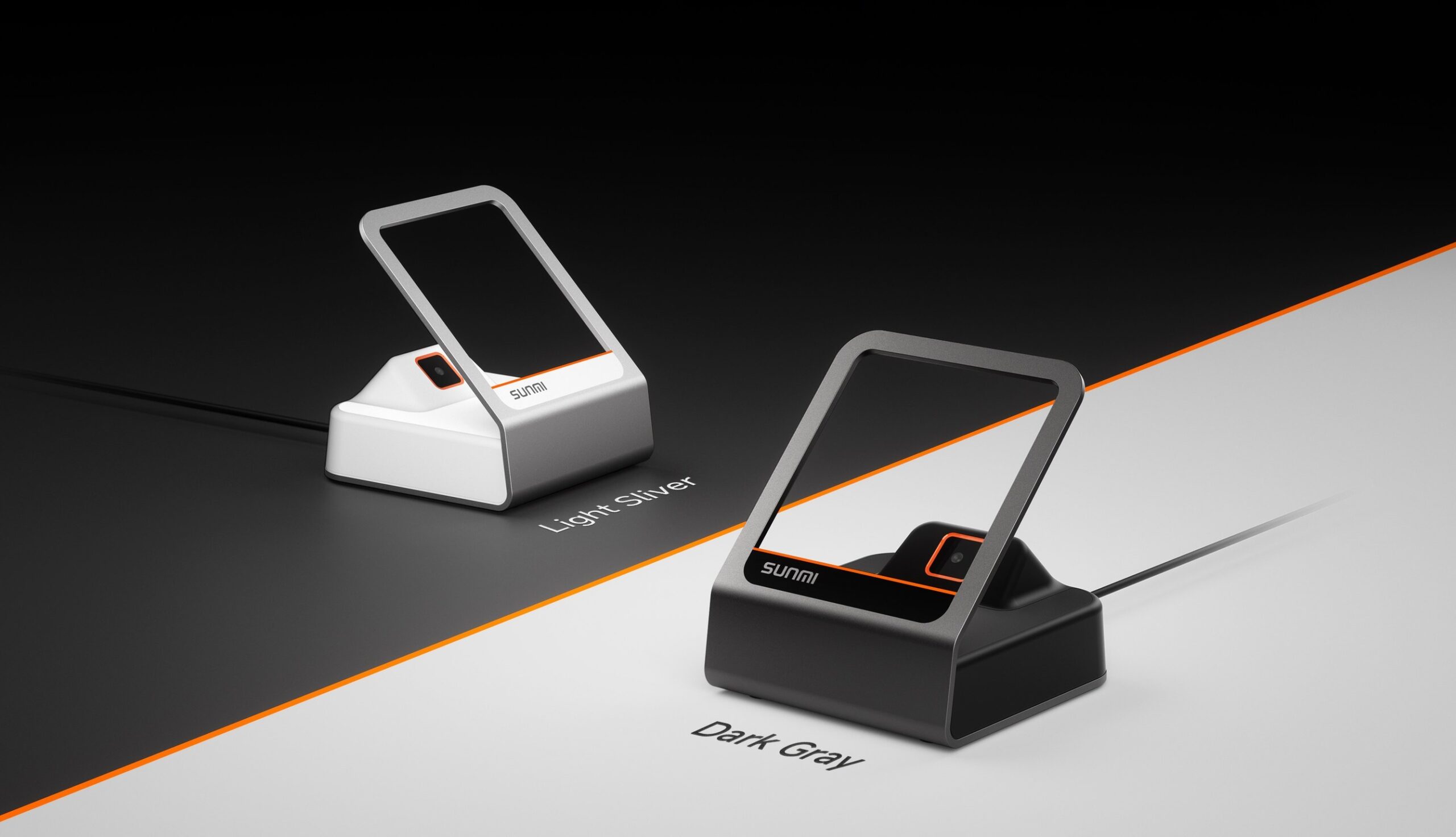
Yes, the SUNMI Blink Scanbox is built for retail self-checkout. A Blink Scanbox self-checkout lane reads printed barcodes and phone-screen codes in roughly a fifth of a second, which is exactly the speed a self-service station needs to keep shoppers moving. This guide covers what the Blink Scanbox does, how it fits a self-checkout station, its specifications, and how to deploy it with an Android checkout build in 2026.
It is written for retailers, grocery and convenience operators, and the software teams that build self-checkout stations for them. The focus is the practical work of turning a counter into a reliable, low-touch scanning point.
Blink Scanbox self-checkout: key takeaways
The Blink Scanbox is a countertop scanning device, not a full checkout station on its own. It supplies the fast, accurate scanning that a self-checkout lane is built around.
Three points matter most. It reads 1D, 2D, and phone-screen codes at one wide window. It connects over USB to an Android, Windows, or Linux host. And it is designed for continuous, hands-free scanning at a fixed angle.
What the Blink Scanbox is and how self-checkout scanning works
The Blink Scanbox is a compact presentation scanner with a large scan window angled at about 45 degrees. The angle lets a shopper bring a product up to the window naturally, without aiming a handheld reader.
At a self-checkout lane the flow is simple. A shopper presents each item, the wide window captures the code, and the scanned data passes to the checkout software running on the connected device. There is no trigger to pull and no line of sight to fuss over.
Because the Blink Scanbox reads codes on paper packaging and on a phone screen, the same window handles product barcodes, digital loyalty cards, coupons, and mobile payment codes. That keeps the shopper at one spot for the whole transaction.
How the Blink Scanbox fits a retail self-checkout lane
A self-checkout lane usually has three parts. A screen and checkout software, a payment device, and a scanner. The Blink Scanbox is the scanner, and it is the part shoppers touch on nearly every item.
Placed at the front of the counter, the scan window faces the shopper. The connected Android checkout hardware runs the interface and totals the basket, while the Blink Scanbox feeds every code into it.
This split keeps the lane flexible. The same scanner supports an attended lane, a semi-attended lane where one associate watches several stations, or a fully unattended station, without changing the hardware.
Blink Scanbox self-checkout specifications
The table below summarizes the Blink Scanbox self-checkout specs that matter when you design a lane. Confirm exact figures for your unit with Rosper before ordering.
| Specification | Blink Scanbox |
|---|---|
| Scanner type | Fixed hands-free presentation scanner |
| Codes read | 1D such as UPC and EAN, 2D such as QR and Data Matrix, plus phone-screen codes |
| Scan window | Wide window at about a 45 degree ergonomic angle |
| Read speed | About 0.2 seconds per code |
| Interface | USB, plug and play |
| Host compatibility | Android, Windows, and Linux |
| Data output | Keyboard input mode or software SDK |
| Color options | Light Silver and Dark Gray |
| Typical use | Self-checkout, counter checkout, click and collect |
Choosing a mount and orientation for the lane
The Blink Scanbox sits on the counter and needs only a USB connection to the host, so mounting is light work. Aim the window toward the shopper at a comfortable presentation height.
For a compact lane, place the scanner within easy reach of a bagging area so the motion of scan, then set down, stays short. Short motions reduce mis-scans and keep throughput high.
Pick a color that matches the station. The Dark Gray unit blends into darker counters and kiosk frames, while the Light Silver unit suits bright, open retail floors.
Blink Scanbox versus a handheld scanner for self-checkout
Both a fixed presentation scanner and a handheld reader can capture codes, but they suit different lanes. The table below compares them for a self-checkout context.
| Factor | Blink Scanbox (fixed) | Handheld scanner |
|---|---|---|
| Shopper action | Present item to window | Pick up, aim, and pull trigger |
| Speed for many items | Faster, no aiming | Slower, one aim per item |
| Phone-screen codes | Reads at the window | Reads, but needs steady aim |
| Wear points | No moving trigger | Trigger and cable flex |
| Best fit | Fixed self-checkout lanes | Large or heavy items, backup scanning |
Many stores run both. The Blink Scanbox handles the bulk of packaged items at the fixed window, and a handheld unit covers oversized goods that are hard to lift to a counter scanner.
Where retailers use the Blink Scanbox for self-checkout
The Blink Scanbox suits any floor where shoppers scan their own items. In grocery and convenience stores it speeds a basket of 10 to 20 packaged goods, since most reads land on the first present.
Pharmacies and specialty shops use it for mixed baskets that include coupons and loyalty codes shown on a phone. The one window reads paper and screen codes, so the shopper never switches devices mid-order.
Click and collect counters use the same scanner to confirm an order code and mark a pickup complete. One fixed window covers scan-to-buy and scan-to-collect on the same station, which keeps the hardware count low.
Integrating the Blink Scanbox with an Android checkout build
Integration is deliberately simple. In keyboard input mode the scanner types each decoded value into the active field, so a checkout app that accepts typed barcodes works with no driver.
For finer control, developers pair the scanner with a software SDK to manage scan events, formats, and error handling inside the app. That path suits teams building a branded self-checkout experience on retail checkout hardware.
Because the Blink Scanbox is a USB device, it pairs with a countertop Android checkout terminal or a self-order kiosk build. If you are weighing a full kiosk lane, the self-service kiosk guide covers the wider station design.
Deployment considerations for a busy floor
Throughput is the first thing to test on a Blink Scanbox self-checkout station. Time a real basket of 20 to 30 items and watch for any code that needs a second present. Adjust window height and lighting until first-pass reads stay consistent.
Hygiene matters at unattended lanes. A fixed scanner with no trigger has fewer touch points, and its smooth housing wipes down quickly between shifts.
Plan for a backup. Keep one handheld reader per bank of stations for oversized items and for the rare code the fixed window cannot capture, so a single awkward product never stalls the lane.
Watch damaged and low-contrast labels. Crumpled packaging and faded thermal labels are the usual cause of a re-present, so brief staff to smooth a label or offer a manual lookup rather than let a shopper scan an item several times.
Warranty, shipping, and support
SUNMI provides the manufacturer hardware warranty on the Blink Scanbox, and Rosper coordinates warranty service and replacement for buyers in the US and Canada. That means one point of contact when a unit needs attention.
Most Rosper orders arrive in 2 to 7 business days, shipped from one of 8 regional warehouses. Canadian retailers ship from the Brampton, Ontario warehouse, which keeps duties and transit time low for cross-border stores.
Build your self-checkout lane with the Blink Scanbox
The Blink Scanbox gives a self-checkout lane the fast, hands-free scanning it depends on, and it drops into an Android checkout build over a single USB cable. Pair it with the right countertop hardware and you have a low-touch lane shoppers can run themselves.
To spec a lane, compare units, and confirm current pricing and lead times, request a quote from Rosper. The team can match the Blink Scanbox to your checkout hardware and volume.
Frequently asked questions
Can a Blink Scanbox self-checkout setup replace a staffed lane?
Yes, for many baskets. A Blink Scanbox self-checkout lane is a fixed, hands-free presentation scanner built for counters and unattended stations. Shoppers hold a barcode or a phone screen in front of the wide scan window and the code reads in about a fifth of a second, so one associate can watch several stations at once.
What barcodes does the Blink Scanbox read at a self-checkout station?
The Blink Scanbox reads standard 1D retail barcodes such as UPC and EAN, 2D codes such as QR and Data Matrix, and codes shown on a phone screen. That covers packaged goods, loyalty codes, coupons, and mobile wallet payment codes at one window.
How does the Blink Scanbox connect to an Android POS terminal or kiosk?
It connects over USB and works as a plug-and-play device. It can present scanned data as keyboard input for fast setup, or pair with a software SDK for deeper control. It is compatible with Android, Windows, and Linux hosts, so it drops into most self-checkout builds without custom drivers.
Is the Blink Scanbox covered by warranty in the US and Canada?
Yes. SUNMI provides the manufacturer hardware warranty, and Rosper helps coordinate warranty and replacement for US and Canadian buyers. Most Rosper orders arrive in 2 to 7 business days from one of 8 regional warehouses, including a Brampton, Ontario location for Canada.